7
Cross-Site Scripting (XSS)
Cross Site Scripting (XSS) is a widespread vulnerability that affects many web applications. XSS attacks consist of injecting malicious client-side scripts into a website and using the website as a propagation method.
The risks behind XSS is that it allows an attacker to inject content into a website and modify how it is displayed, forcing a victim’s browser to execute the code provided by the attacker while loading the page.
XSS is present in about two-thirds of all applications.
Generally, XSS vulnerabilities require some type of interaction by the user to be triggered, either via social engineering or via a visit to a specific page. If an XSS vulnerability is not patched, it can be very dangerous to any website.
Examples of XSS Vulnerabilities
Imagine you are on your WordPress wp-admin panel adding a new post. If you are using a plugin with a stored XSS vulnerability that is exploited by a hacker, it can force your browser to create a new admin user while you’re in the wp-admin panel or it can edit a post and perform other similar actions.
An XSS vulnerability gives the attacker almost full control of the most important software of computers nowadays: the browsers.
Back in 2017, our research team disclosed a stored XSS vulnerability in the core of WordPress websites. Remote attackers could use this vulnerability to deface a random post on a WordPress site and store malicious JavaScript code in it.
Types of XSS
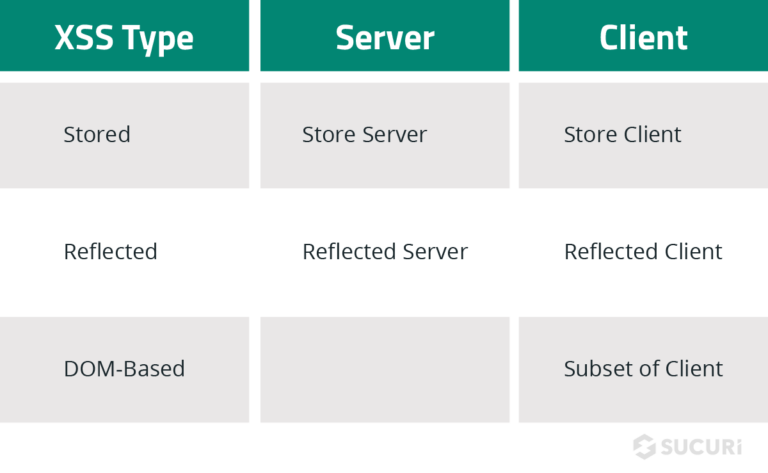
According to the OWASP Top 10, there are three types of cross-site scripting:
- Reflected XSS: The application or API includes unvalidated and unescaped user input as part of HTML output. A successful attack can allow the attacker to execute arbitrary HTML and JavaScript in the victim’s browser. Typically the user will need to interact with some malicious link that points to an attacker-controlled page, such as malicious watering hole websites, advertisements, or similar.
- Stored XSS: The application or API stores unsanitized user input that is viewed at a later time by another user or an administrator. Stored XSS is often considered high or critical risk.
- DOM XSS: JavaScript frameworks, single-page applications, and APIs that dynamically include attacker-controllable data to a page are vulnerable to DOM XSS. Ideally, the application would not send attacker-controllable data to unsafe JavaScript APIs. Typical XSS attacks include session stealing, account takeover, MFA bypass, DOM-node replacement or defacement (such as Trojan login panels), attacks against the user’s browser such as malicious software downloads, keylogging, and other client-side attacks.
Reducing the Risks of XSS
There are technologies like the Sucuri Firewall designed to help mitigate XSS attacks. If you are a developer, here is some insight on how to identify and account for these weaknesses.
How to Prevent XSS Vulnerabilities
Preventive measures to reduce the chances of XSS attacks should take into account the separation of untrusted data from active browser content. OWASP guidelines gives some practical tips on how to achieve it:
- Using frameworks that automatically escape XSS by design, such as the latest Ruby on Rails, React JS. Learn the limitations of each framework’s XSS protection and appropriately handle the use cases which are not covered.
- Escaping untrusted HTTP request data based on the context in the HTML output (body, attribute, JavaScript, CSS, or URL) will resolve Reflected and Stored XSS vulnerabilities. The OWASP Cheat Sheet for XSS Prevention has details on the required data escaping techniques.
- Applying context-sensitive encoding when modifying the browser document on the client side acts against DOM XSS. When this cannot be avoided, similar context-sensitive escaping techniques can be applied to browser APIs as described in the OWASP Cheat Sheet for DOM based XSS Prevention.
- Enabling a content security policy (CSP) is a defense-in-depth mitigating control against XSS. It is effective if no other vulnerabilities exist that would allow placing malicious code via local file includes (e.g. path traversal overwrites or vulnerable libraries from permitted content delivery networks).
8
Insecure Deserialization
Every web developer needs to make peace with the fact that attackers/security researchers are going to try to play with everything that interacts with their application–from the URLs to serialized objects.
In computer science, an object is a data structure; in other words, a way to structure data. To make it easier to understand some key concepts:
- The process of serialization is converting objects to byte strings.
- The process of deserialization is converting byte strings to objects.
Examples of Insecure Deserialization Attack Scenarios
According to OWASP guidelines, here are some examples of attack scenarios:
- Scenario #1: A React application calls a set of Spring Boot microservices. Being functional programmers, they tried to ensure that their code is immutable. The solution they came up with is serializing user state and passing it back and forth with each request. An attacker notices the “R00” Java object signature, and uses the Java Serial Killer tool to gain remote code execution on the application server.
- Scenario #2: A PHP forum uses PHP object serialization to save a “super” cookie, containing the user’s user ID, role, password hash, and other state:
An attacker changes the serialized object to give themselves admin privileges:
One of the attack vectors presented by OWASP regarding this security risk was a super cookie containing serialized information about the logged-in user. The role of the user was specified in this cookie.
If an attacker is able to deserialize an object successfully, then modify the object to give himself an admin role, serialize it again. This set of actions could compromise the whole web application.
How to Prevent Insecure Deserializations
The best way to protect your web application from this type of risk is not to accept serialized objects from untrusted sources.
If you can’t do this, OWASP security provides more technical recommendations that you (or your developers) can try to implement:
- Implementing integrity checks such as digital signatures on any serialized objects to prevent hostile object creation or data tampering.
- Enforcing strict type constraints during deserialization before object creation as the code typically expects a definable set of classes. Bypasses to this technique have been demonstrated, so reliance solely on this is not advisable.
- Isolating and running code that deserializes in low privilege environments when possible.
- Logging deserialization exceptions and failures, such as where the incoming type is not the expected type, or the deserialization throws exceptions.
- Restricting or monitoring incoming and outgoing network connectivity from containers or servers that deserialize.
- Monitoring deserialization, alerting if a user deserializes constantly.
9
Using Components with Known Vulnerabilities
These days, even simple websites such as personal blogs have a lot of dependencies.
We can all agree that failing to update every piece of software on the backend and frontend of a website will, without a doubt, introduce heavy security risks sooner rather than later.
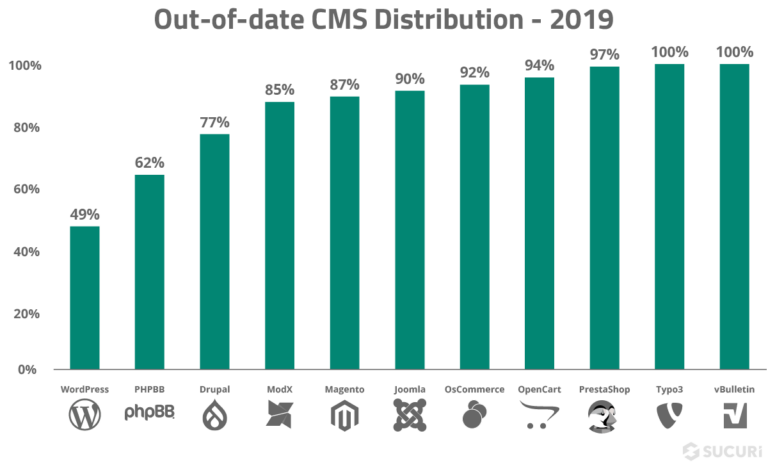
For example, in 2019, 56% of all CMS applications were out of date at the point of infection.
The question is, why aren’t we updating our software on time? Why is this still such a huge problem today?
There are some possibilities, such as:
- Webmasters/developers cannot keep up with the pace of the updates; after all, updating properly takes time.
- Legacy code won’t work on newer versions of its dependencies.
- Webmasters are scared that something will break on their website.
- Webmasters don’t have the expertise to properly apply the update.
This might be a little too dramatic, but every time you disregard an update warning, you might be allowing a now known vulnerability to survive in your system. Trust us, cybercriminals are quick to investigate software and changelogs.
Whatever the reason for running out-of-date software on your web application, you can’t leave it unprotected. Both Sucuri and OWASP recommend virtual patching for the cases where patching is not possible.
Virtual patching affords websites that are outdated (or with known vulnerabilities) to be protected from attacks by preventing the exploitation of these vulnerabilities on the fly. This is usually done by a firewall and an intrusion detection system.
Vulnerable Applications
Vulnerable applications are usually outdated, according to OWASP guidelines, if:
- You do not know the versions of all components you use (both client-side and server-side). This includes components you directly use as well as nested dependencies.
- The software is vulnerable, unsupported, or out of date. This includes the OS, web/application server, database management system (DBMS), applications, APIs and all components, runtime environments, and libraries.
- You do not know the versions of all components you use (both client-side and server-side). This includes components you directly use as well as nested dependencies.
- You do not fix or upgrade the underlying platform, frameworks, and dependencies in a risk-based, timely fashion. This commonly happens in environments when patching is a monthly or quarterly task under change control, which leaves organizations open to many days or months of unnecessary exposure to fixed vulnerabilities.
- The software developers do not test the compatibility of updated, upgraded, or patched libraries.
- You do not secure the components’ configurations.
You can subscribe to our website security blog feed to be on top of security issues caused by vulnerable applications.
How to Avoid Using Components with Known Vulnerabilities
Some of the ways to prevent the use of vulnerable components are:
- Remove all unnecessary dependencies.
- Have an inventory of all your components on the client-side and server-side.
- Monitor sources like Common Vulnerabilities and Disclosures (CVE) and National Vulnerability Database (NVD) for vulnerabilities in the components.
- Obtain components only from official sources.
- Get rid of components not actively maintained.
- Use virtual patching with the help of a Website Application Firewall.
10
Insufficient Logging & Monitoring
The importance of securing a website cannot be understated. While 100% security is not a realistic goal, there are ways to keep your website monitored on a regular basis so you can take immediate action when something happens.
Not having an efficient logging and monitoring process in place can increase the damage of a website compromise.
Here at Sucuri, we highly recommend that every website is properly monitored. If you need to monitor your server, OSSEC is freely available to help you. OSSEC actively monitors all aspects of system activity with file integrity monitoring, log monitoring, root check, and process monitoring.
Example of Logging and Monitoring Attack Scenarios
According to OWASP, these are some examples of attack scenarios due to insufficient logging and monitoring:
- Scenario #1: An open-source project forum software run by a small team was hacked using a flaw in its software. The attackers managed to wipe out the internal source code repository containing the next version and all of the forum contents. Although source could be recovered, the lack of monitoring, logging, or alerting led to a far worse breach. The forum software project is no longer active as a result of this issue.
- Scenario #2: An attacker scans for users with a common password. They can take over all accounts with this password. For all other users, this scan leaves only one false login behind. After some days, this may be repeated with a different password.
- Scenario #3: A major U.S. retailer reportedly had an internal malware analysis sandbox analyzing attachments. The sandbox software had detected potentially unwanted software, but no one responded to this detection. The sandbox had been producing warnings for some time before detecting the breach due to fraudulent card transactions by an external bank.
How to Have Efficient Website Monitoring
Keeping audit logs are vital to staying on top of any suspicious change to your website. An audit log is a document that records the events in a website so you can spot anomalies and confirm with the person in charge that the account hasn’t been compromised.
Whatever the reason for running out-of-date software on your web application, you can’t leave it unprotected. Both Sucuri and OWASP recommend virtual patching for the cases where patching is not possible.
We know that it may be hard for some users to perform audit logs manually. If you have a WordPress website, you can use our free WordPress Security Plugin to help you with your audit logs. The plugin can be downloaded from the official WordPress repository.
Vulnerable Applications
The Sucuri Website Security Platform has a comprehensive website monitoring solution that includes:
- Remote monitoring
- Website blocklist monitoring
- Server-side monitoring
- DNS monitoring
- Uptime monitoring
Protect Your Website from Security Vulnerabilities
The Sucuri Website Security Platform can protect your site from the top 10 website threats and security risks. Sign up to have peace of mind.