A working checkout page is often the moment a business starts to feel real. The products are live, the cart is functional, payments are flowing, and orders are landing in your inbox. That is also when security shifts from a background concern to a real-world risk.
Once your website starts accepting credit card payments, it becomes part of a payment environment attackers actively look for.
That does not mean every small ecommerce store needs an enterprise security team. It does mean your site is now something attackers can turn into profit. Attackers are practical. They do not care if you sell handmade candles or digital courses. They care if there is a weakness they can automate, exploit, and use to steal payment data.
This is where PCI compliance comes in. PCI DSS is a practical security framework for reducing risk around cardholder data, payment pages, user access, malware, logging, and the systems that keep ecommerce running. Handled well, PCI compliance is a disciplined way to keep attackers away from your checkout and protect the business you have built.
What PCI compliance really means for ecommerce websites
PCI DSS, short for Payment Card Industry Data Security Standard, applies to organizations that accept, process, store, or transmit payment card data. For ecommerce sites, that can include the store itself, the payment page, scripts loaded during checkout, administrative access, hosting environments, plugins, integrations, and third-party services involved in the payment flow.
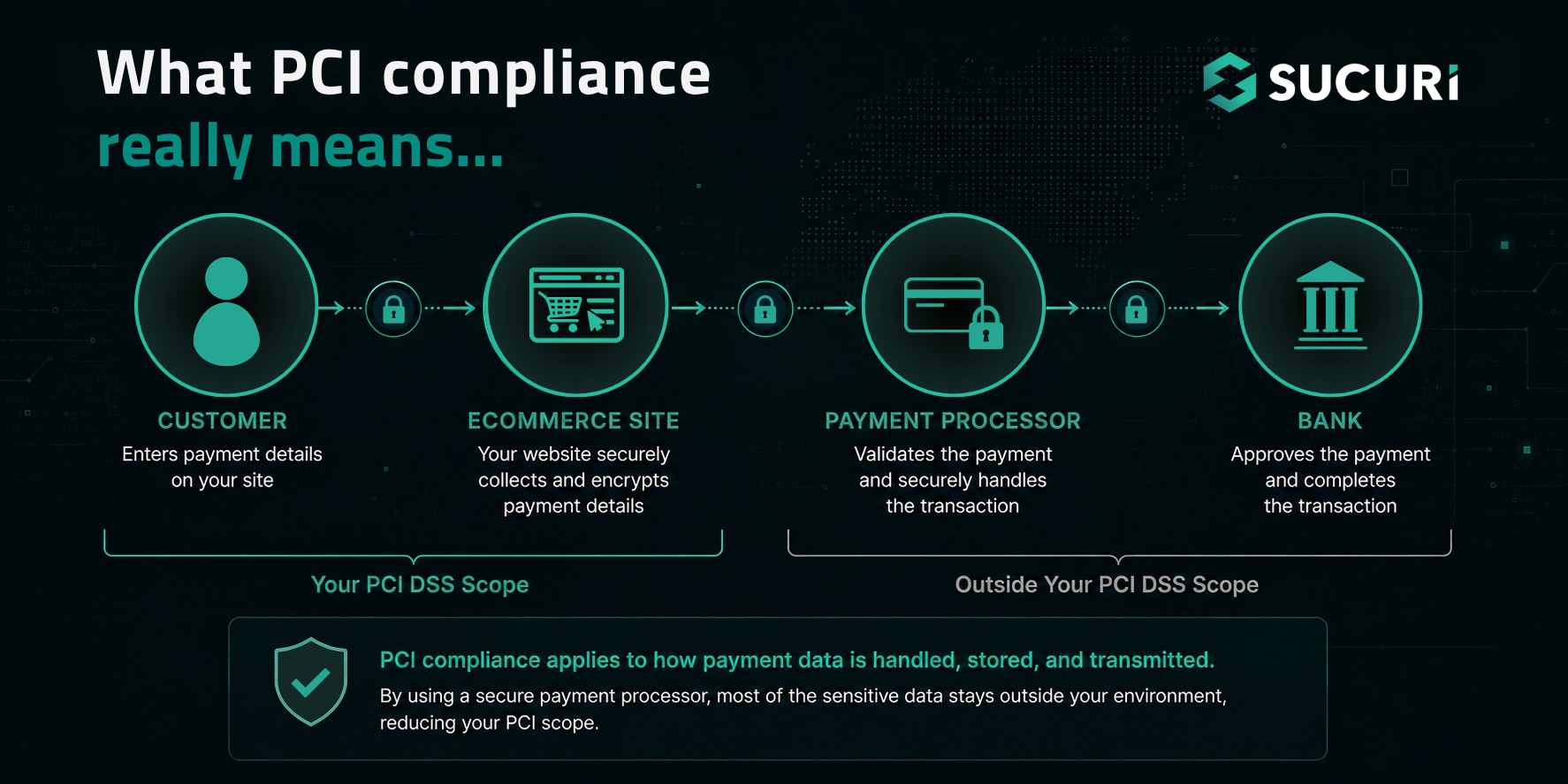
If you thought using Stripe, PayPal, Authorize.net, Recurly, or another reputable payment processor would remove all PCI obligations, think again. It helps, often significantly, since outsourcing payment processing can reduce the amount of cardholder data your website actually touches, and typically a smart move. But it does not automatically make the rest of the website irrelevant.
If attackers get into your store before customers reach the payment processor, they can embed malicious JavaScript, redirect users to fake payment pages, steal logins, or tamper with checkout content. This is why ecommerce security has to cover the website itself, not just the payment provider.
PCI compliance asks a practical question: Are reasonable controls in place to protect cardholder data and the systems around it?
The answer should not depend on luck.
The checkout page is not the only thing attackers target
It is tempting to think of payment security as just protecting the form where customers enter card numbers. In reality, modern ecommerce attacks rarely stick to that script.
Intruders often target outdated plugins, weak admin passwords, exposed panels, vulnerable themes, insecure file permissions, or forgotten staging sites. They may inject scripts that only show up for certain users or checkout conditions, or hide malware in places most store owners never check.
This is why small merchants get targeted. Not because they are high-profile, but because their sites are easy to find, easy to scan, and often run on familiar software. Attack bots do not need a reason. They just need a known vulnerability.
Once a site is compromised, the fallout can be fast and wide. Customers may be sent to fake checkout pages. Search engines and browsers may flag the site. SEO spam can pollute your search results. Malware can spread through injected content. Your server can be used for spam, phishing, or DDoS attacks.
And, of course, payment data can be exposed.
PCI DSS is designed to reduce that risk by pushing businesses toward stronger controls: secure configurations, encryption, vulnerability management, access control, monitoring, testing, and documented security policies.
That may sound dry on paper. In practice, it is the difference between hoping nothing goes wrong and having real defenses in place when something does.
PCI compliance starts with knowing what is in scope
Before a business can secure its payment environment, it has to understand what belongs to that environment.
For ecommerce sites, that means identifying the systems, pages, scripts, users, services, and data flows involved in payment activity. This is often called defining the cardholder data environment (CDE). For a modest online store, the CDE might be fairly limited. For a larger operation with custom checkout logic, third-party scripts, subscriptions, customer portals, CRMs, analytics tags, and multiple admin users, the picture gets more complicated.
Scope matters because every extra system that touches payment data or can affect payment security adds risk and responsibility. A clean, simple setup is easier to defend and easier to review.
A few useful questions:
- Does the website store cardholder data, or does the processor handle it?
- Which scripts load on checkout and payment pages?
- Who has administrator access to the CMS, hosting account, payment settings, and DNS?
- Are plugins, themes, extensions, and custom code maintained?
- Are logs available if suspicious activity occurs?
- Is there a firewall or WAF filtering malicious traffic before it reaches the server?
The goal is to understand how an attacker could move through your environment and where defenses need to be.
The security controls that matter most for ecommerce and PCI compliance
PCI DSS includes a broad set of requirements, but several themes show up again and again.
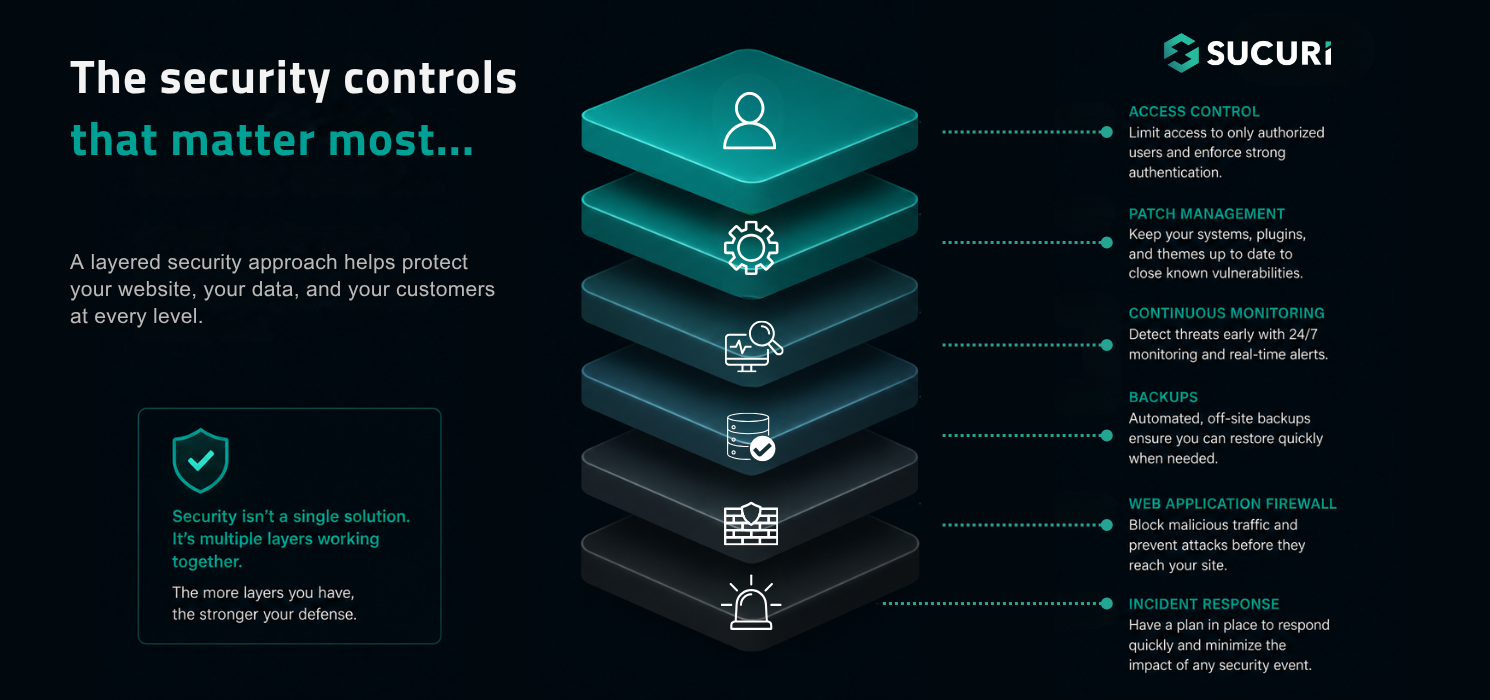
1. Ecommerce sites need hardened configurations
Default passwords, unused services, exposed admin tools, and loose permissions are easy wins for attackers. The basics matter because attackers automate the basics.
2. Access should be tightly controlled
Every admin account should belong to a real person, use strong authentication, and have only the permissions needed for their work. Shared logins are convenient until something breaks and no one knows who changed what.
3. Software needs to stay patched
CMS platforms, plugins, themes, libraries, and server components all age. Some age quietly. Others become public entry points as soon as a vulnerability is announced. When you cannot patch right away, compensating controls like virtual patching through a web application firewall can help reduce exposure.
4. The website needs monitoring
File changes, malware signs, suspicious redirects, blocklist warnings, uptime issues, DNS changes, SSL problems, and odd checkout behavior should not depend on someone stumbling across them. Logs and alerts matter most when they are in place before an incident.
5. Payment pages deserve special attention
PCI DSS v4.x places more emphasis on ecommerce script management and tamper detection. That makes sense. Today’s checkout pages regularly rely on multiple scripts from multiple providers. Each one can affect what the customer sees, what the browser executes, and what data may be exposed.
A secure checkout is controlled, monitored, and shielded from unauthorized changes.
A WAF is not the whole PCI compliance program, but it is a very useful layer
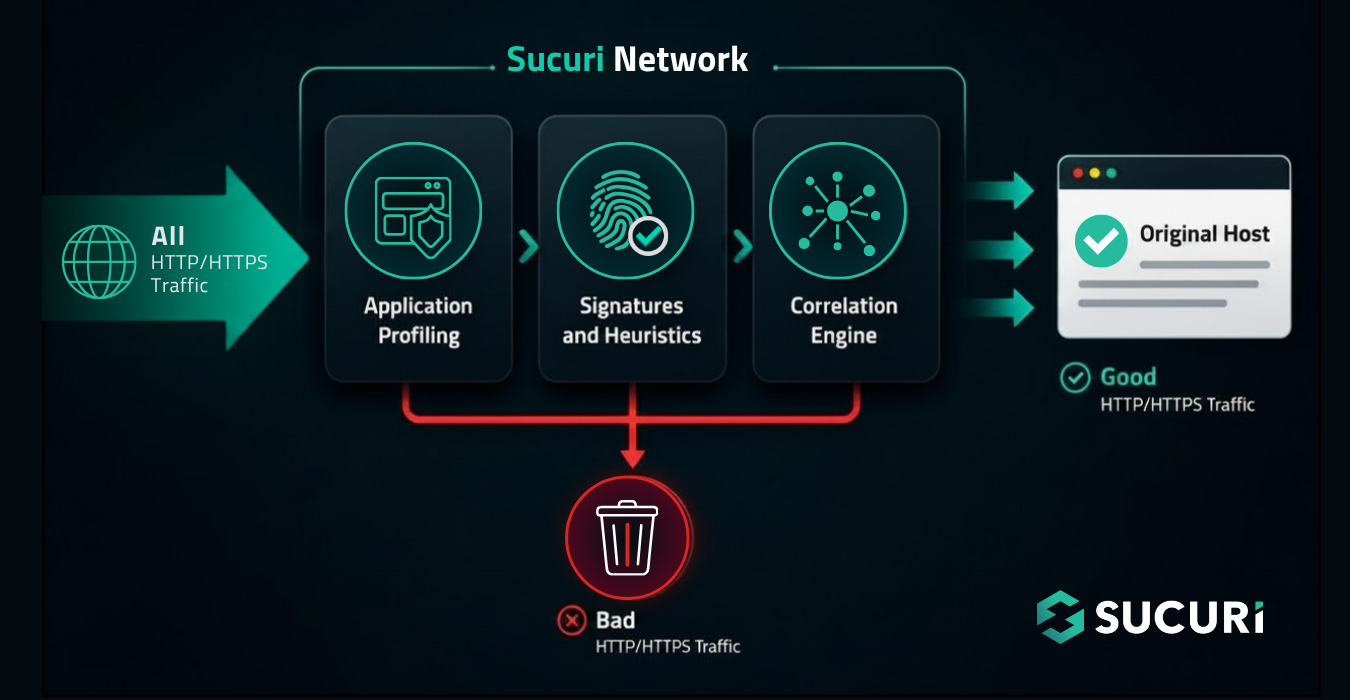
A Web Application Firewall (WAF) sits between website traffic and the origin server, inspecting requests and filtering malicious behavior before it reaches the application. For ecommerce sites, that can be especially valuable because so many attacks begin with automated probing: vulnerability scans, exploit attempts, bad bots, malicious payloads, brute force attempts, and suspicious request patterns.
A WAF does not replace secure development, patch management, strong passwords, access control, or good operational discipline. No serious security tool does.
But a properly configured WAF can help reduce risk in several PCI-relevant areas. It can help enforce firewall protections, support hardening efforts, mitigate exploitation attempts against known vulnerabilities, provide visibility into malicious traffic, and help keep attack noise away from the application. For stores running common ecommerce platforms or CMS software, virtual patching can be particularly useful when a plugin, extension, or theme vulnerability is known but a clean update path is not immediately available.
That last point matters more than many teams admit. Updates are not always instant. A plugin update can break checkout. A theme change can affect sales. A custom module may need developer review. While the business sorts out those dependencies, attackers do not wait.
A WAF buys you time. Sometimes that time is the difference between a blocked exploit and a compromised store.
The “small store” problem with PCI compliance
Smaller merchants may assume PCI compliance and advanced security controls are only for bigger companies. That assumption is risky.
Attackers do not need to pick a small store by hand. Automated tools scan thousands of sites for the same vulnerable plugin, weak login, exposed file, or misconfiguration. For attackers, compromising many small sites is often easier than breaking into one well-defended enterprise.
But the aftermath won’t feel small to the site owner.
A payment security incident can lead to forensic investigations, processor scrutiny, customer notifications, fraud liability, cleanup costs, lost sales, damaged rankings, and reputational harm. Even when the direct financial cost is survivable, the operational disruption can be brutal.
This is why ecommerce security should be routine maintenance. The most effective programs are not dramatic. They are consistent. Patch what can be patched. Remove what is unused. Restrict access. Monitor changes. Filter malicious traffic. Back up the site. Review logs. Test regularly. Repeat.
Practical steps to strengthen PCI readiness
For most ecommerce sites, the path forward begins with reducing unnecessary risk. The fewer systems that touch payment or influence checkout, the easier the environment is to secure and validate.
Reduce your payment data exposure
Avoid storing payment card data unless there is a clear business need and the right controls are in place. Use a reputable payment processor whenever possible, and keep cardholder data off your site where you can.
That still means the site itself needs attention. Inventory anything that affects checkout, including payment forms, plugins, themes, third-party scripts, redirects, hosting settings, SSL, and old staging environments. Remove anything you do not need.
Lock down access and software
Once your payment footprint is trimmed down, tighten the two areas attackers usually test first: Who can access the site, and what vulnerable software they can exploit?
- Require unique accounts for every user.
- Enforce strong passwords and multi-factor authentication, especially for admins, developers, hosting accounts, and payment systems.
- Review permissions regularly. Former employees, old contractors, and forgotten test accounts should not have access to production.
Next, focus on the application layer.
- Keep CMS core files, ecommerce software, plugins, themes, extensions, and server components updated.
- Where patching is delayed, use protective controls to reduce exposure.
- A web application firewall is useful here because it can block many exploit attempts before they reach vulnerable code.
Monitor, log and document the basics
Monitoring should come next. Ecommerce teams should have visibility into:
- Malware
- File changes
- Suspicious redirects
- Blocklist warnings
- Uptime issues
- SSL problems
- DNS changes
- Login activity
- Unusual checkout behavior
Security logs also matter. When something goes wrong, logs help determine what happened, when it happened, and how far the compromise may have reached.
Finally, don’t forget to document the process. PCI compliance depends on being able to show the controls exist, are maintained, and are understood by the people responsible.
Where Sucuri fits into the picture
No single product can make a website PCI compliant by itself. Compliance depends on the full environment: people, policies, hosting, software, access, payment flows, monitoring, and response procedures.
That said, the right security layer can make the work much more manageable.
The Sucuri PCI DSS Compliant WAF helps ecommerce sites filter malicious traffic, reduce exposure to common website attacks, support virtual patching, and protect payment environments with cloud-based firewall controls. For teams working through PCI requirements, it can provide a practical layer of protection while also helping address important security expectations around firewall implementation, hardening, vulnerability protection, and logging.
For store owners, developers, and agencies managing ecommerce sites, the value is clear: fewer malicious requests reach the site, more visibility into attack activity, and stronger protection around the checkout experience your customers rely on.
FAQ
Does PCI compliance apply to small ecommerce websites?
Yes. PCI DSS applies to businesses that accept payment cards, regardless of transaction volume. Smaller stores may have different validation requirements than large enterprises, but they are not exempt from protecting payment data and the systems involved in payment security.
Does using a third-party payment processor remove PCI responsibility?
No. A third-party payment processor can reduce scope, especially if cardholder data is handled away from your website. However, the website can still affect payment security through checkout pages, scripts, redirects, admin access, plugins, and server-side vulnerabilities.
Is a WAF required for PCI compliance?
PCI DSS includes requirements around network security controls, vulnerability management, monitoring, and secure systems. A WAF can help support those requirements by filtering malicious traffic, blocking exploit attempts, and reducing exposure at the application layer. It should be used alongside other controls, not as a replacement for them.
How does a WAF help protect ecommerce checkout pages?
A WAF helps inspect and block suspicious requests before they reach the website. It can reduce automated attacks, exploit attempts, bad bot activity, and certain application-layer threats. For ecommerce sites, that protection is especially useful around login areas, checkout workflows, and software components that may become vulnerable between updates.
PCI compliance may start as an obligation. Done right, it becomes a disciplined way to keep revenue, reputation, and client confidence out of attackers’ hands. And that is worth far more than a checked box.


 Sucuri
 Denis Sinegubko

 Ben Martin
 Rianna MacLeod
 Luke Leal
 Ashley Sand
 Krasimir Konov
 Tony Perez