
Brute force attacks are one of the oldest and most common types of attacks that we still see on the Internet today. If you have a server online, it’s most likely being hit right now. It could be via protocols like SSH or FTP, and if it’s a web server, via web-based brute force attempts against whatever CMS you are using.
It is often not very complex to stop brute force attacks, but they still happen and are successful; mostly, because people are very bad at choosing good passwords, or employing good access control habits. There is a catch however, while simple, these brute force attacks are noisy.
Traditionally, to try 500 different passwords, the attackers would need to attempt 500 different login attempts that would be captured in a 1 to 1 relationship with each request to the server. By design, this simplifies the mitigation approach, as every single attempt is logged and can be blocked once a certain limit is reached.
Brute Force Amplification
What if, the attacker could reduce the noise? What if the attacker could make it so that it’s a 1 to many relationship between each request? Imagine a request that was able to try 500 passwords in one shot.
Imagine a world where an attacker could amplify their Brute Force attacks in such a way that traditional mitigation strategies fall short. Instead of 500 different login attempts, the attackers could reduce their login attempts to say 20, or 50 and still try 500 or even thousands of passwords to each request. As you might imagine, this begins to make your mitigation strategy a bit harder to employ.
This would be kinda similar to the DDoS amplification attacks we hear about in the news, where a single command and control server can leverage things like a DNS or NTP protocol response amplification methods to increase their attack power by 50 or 100 times more.
Any type of amplification method can make the job of an attacker, much easier.
Brute Force Amplification Attacks via WordPress XML-RPC
One of the hidden features of XML-RPC is that you can use the system.multicall method to execute multiple methods inside a single request. That’s very useful as it allow application to pass multiple commands within one HTTP request.
XML-RPC is a simple, portable way to make remote procedure calls over HTTP. It can be used with Perl, Java, Python, C, C++, PHP and many other programming languages. WordPress, Drupal and most content management systems support XML-RPC.
Remember though, any feature that is used for the good, will likely be used for bad at some point.
That’s exactly what is happening here.
Brute Force Tracking
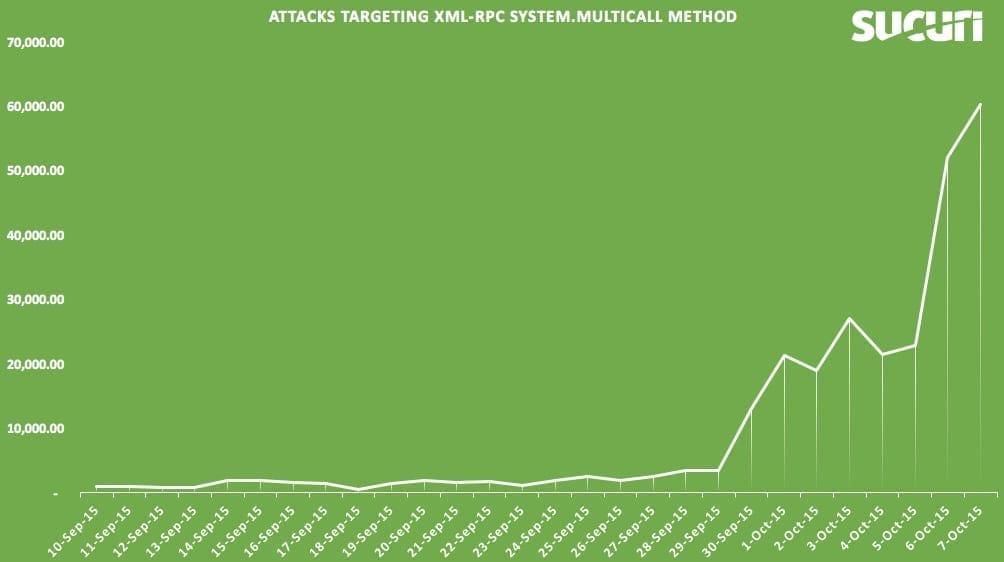
We’ve actually been tracking this for a few weeks (first attack spotted on 2015/Sep/10), and it keeps getting more traction and becoming more popular. Instead of going against wp-login.php (which can be easily blocked or protected via .htaccess) or doing a single attempt against xmlrpc, attackers are leveraging the system.multicall method to attempt to guess hundreds of passwords within just one HTTP request.
Yes, hundreds of login attempts within a single HTTP request. Imagine seeing it on your log file (yes, just this one entry):
194.150.168.95 - - [07/Oct/2015:23:54:12 -0400] "POST /xmlrpc.php HTTP/1.1" 200 14204 "-"
"Mozilla/5.0 (Windows; U; WinNT4.0; de-DE; rv:1.7.5) Gecko/20041108 Firefox/1
Would you guess that this log entry came from a system.multicall method call with hundreds of passwords attempted? With only 3 or 4 HTTP requests, the attackers could try thousands of passwords, bypassing security tools that are designed to look and block brute force attempts.
Most attacks we are seeing in the wild are using the wp.getCategories method, which requires a user/pass. This is how the request looks like:
<methodCall><methodName>system.multicall</methodName>
 <member><name>methodName</name><value><string>wp.getCategories</string></value></member>
 <member><name>params</name><value><array><data>
 <value><string></string></value><value><string>admin</string></value><value><string>demo123</string></value>
 ..
 <member><name>methodName</name><value><string>wp.getCategories</string></value></member>
 <member><name>params</name><value><array><data>
 <value><string>admin</string></value>
 <value><string>site.com</string></value>
 ...
WordPress (xmlrpc) responds if any of the user/pass combinations used were successful (in this example, he tried the admin/demo123 and admin/site.com password combos):
[{'faultCode': 403, 'faultString': 'Incorrect username or password.'}, {'faultCode': 403, 'faultString': 'Incorrect username or password.'}, {'faultCode': 403, 'faultString': 'Incorrect username or password.'}, {'faultCode': 403, 'faultString': 'Incorrect username or password.'}, {'faultCode': 403, 'faultString': ...
 [[{'url': 'http://site.com/wordpress/', 'isAdmin': True, 'blogid': '1', 'xmlrpc': 'http://site.com/wordpress/xmlrpc.php', 'blogName': 'wpxxx'}]]]
While we are seeing the wp.getCategories method being used, any other method that requires authentication can be used as well, so blocking just wp.getCategories won’t do much to stop these attacks. This is a list of methods that require authentication:
wp.getUsersBlogs, wp.newPost, wp.editPost, wp.deletePost, wp.getPost, wp.getPosts,
wp.newTerm, wp.editTerm, wp.deleteTerm, wp.getTerm, wp.getTerms, wp.getTaxonomy,
wp.getTaxonomies, wp.getUser, wp.getUsers, wp.getProfile, wp.editProfile, wp.getPage,
wp.getPages, wp.newPage, wp.deletePage, wp.editPage, wp.getPageList, wp.getAuthors,
wp.getTags, wp.newCategory, wp.deleteCategory, wp.suggestCategories, wp.getComment,
wp.getComments, wp.deleteComment, wp.editComment, wp.newComment, wp.getCommentStatusList,
wp.getCommentCount, wp.getPostStatusList, wp.getPageStatusList, wp.getPageTemplates,
wp.getOptions, wp.setOptions, wp.getMediaItem, wp.getMediaLibrary, wp.getPostFormats,
wp.getPostType, wp.getPostTypes, wp.getRevisions, wp.restoreRevision, blogger.getUsersBlogs,
blogger.getUserInfo, blogger.getPost, blogger.getRecentPosts, blogger.newPost,
blogger.editPost, blogger.deletePost, mw.newPost, mw.editPost, mw.getPost,
mw.getRecentPosts, mw.getCategories, mw.newMediaObject, mt.getRecentPostTitles,
mt.getPostCategories, mt.setPostCategories
Below is an illustration of the attacks we’ve been seeing targeting the XML-RPC system.multicall method specifically, and are attributed to these Brute Force attempts. Remember, each request can signify an attack of 100’s, if not 1,000’s of username/password Brute Force attempts. Some simple math, and you’ll appreciate the scale of the attacks and it’s potential implications.
Protecting Yourself
I used to recommend people block all access to xmlrpc.php, but it was breaking some plugin’s functionality (mostly JetPack). With that in mind, if you are not using JetPack or any of the other plugin that require it XML-RPC, it might be a good idea to block direct access to it altogether.
If you can’t block XML-RPC, and you are using a WAF (web application firewall), I highly recommend blocking system.multicall requests. It is barely used in the wild and will protect you against these amplification methods.
Note that users of our WAF are already protected against this attack, so if you are on our firewall, you are safe.


 Gerson Ruiz
 Ben Martin
 Denis Sinegubko
 Puja Srivastava

 Maninder Toor
 Juliana Lewis

 Krasimir Konov
102 comments
I have been recommending disabling XMLRPC to all our clients for the past 2 years since we got a major attack which was causing php spikes every 10 minutes 24/7, and other stuff not good. Most attacks came from Ukraine, so blocking that helped, too (still good to check logs to see WHO is actually attacking you!). 🙂
I have been doing the same actually. I don’t like when one entry point (xmlrpc) has so much power that you can’t really restrict what you can do from there.
If customers don’t need xmlrpc at all disabling it is the best thing you can do. However if they need some xmlrpc methods removing the unwanted methods is the way to go.
How does a non-tech person who has ads on her website know what methods are wanted and unwanted?
But you can’t remove system.multicall using xmlrpc_methods filter as explained in my previous comment above.
How do you disable XMLRPC?
My question as well…because that isn’t explained. Plus how to block system.multicall requests?
To disable the xmlrpc interface paste the following code into the functions.php file of your child theme:
add_filter(‘xmlrpc_enabled’,’__return_false’);
To disable only some methods e.g. the system methods paste the following code into the functions.php file of child theme:
add_filter( ‘xmlrpc_methods’, ‘mmx_remove_xmlrpc_methods’);
function mmx_remove_xmlrpc_methods( $methods ) {
unset( $methods[‘system.multicall’] );
unset( $methods[‘system.listMethods’] );
unset( $methods[‘system.getCapabilities’] );
return $methods;
}
Disabling XMLRPC methods is a good thing, but what it doesn’t do is stopping the POST-requests from coming in. I haven’t looked at the byte-size of the POST-requests in question, but hosting multiple WordPress sites on one (shared) web server might severely degrade performance.
Does anyone know any common plugins/apps that are using system.multicall? If it were to be disabled server-wide, what’s the likely collateral?
I used your second method but, how do you test if the code is doing it’s job?
Thank you
The xmlrpc_methods filter cannot be used to remove system.multicall or the two others.
These are not part of the XML-RPC methods added by WordPress in wp-includes/class-wp-xmlrpc-server.php, are part of the IXR – The Incutio XML-RPC Library (wp-includes/class-IXR.php) and at the time of writing this there’s not any filter to remove them.
Hi Samuel,
I was looking at your plugin today and was thinking the same 🙂
Do you see any change to shut down the multi call function at this time?
You can block access to xmlrpc via .htaccess:
order deny,allow
deny from all
Or follow Michael’s recommendations to disable specific methods.
Is there a way to set that server-wide so I don’t have to go into each website’s individual htaccess file to set?
You have a multi site wordpress network? you can install the plugin i mentioned above.
No just many individual sites of my own and those that I operate/maintain for others.
I have this code:
Order Allow,Deny
Deny from all
in the htaccess in the folder above my root (in the folder above public_html)
It blocks xmlrpc access for all my sites server wide.
The rule posted above by Mark Canada doesn’t work for me. I don’t know why.
If you have root access in cPanel/WHM:
In WHM: Home »Service Configuration »Apache Configuration »Include Editor … Pre VirtualHost Include (pre_virtualhost_global.conf)
#Help protect WordPress against hacking
Order deny,allow
Deny from all
Allow from 127.0.0.1 localhost
ErrorDocument 403 “Access Denied. Please contact webhost for details.”
Thank you fellow Canadian.
Make it via nginx config instead. Don’t allow attackers overload your servers.
Disable XML-RPC Plugin by Philip Erb
Is there a tool that can test a WAF’s effectiveness against this? Maybe a metasploit plugin or something?
I am not aware of any public exploit available for this. It seems to be only on the “underground” so far.
However, testing it is not that hard by sending a POST request to xmlrpc.php with multiple methods inside.
thanks,
Any opinions on the Disable XML-RPC plugin? That’s a lot easier for the non-techie client.
I never used personally, but heard good things about it. Should work well. The Ithemes Security plugin has an option ti disable xmlrpc, which you can use too.
Which one? The one by Samuel Aguilera or the one by Philip Erb
It was originally called better-wp-security, google wordpress itheme security and it will be the 1st one that comes up.
I disabled XML-RPC using Philip Erb’s plugin. I tested it and it has indeed been disabled. Read Philip Erb’s text file to visit a site so you can test if XML-RPC has indeed been disabled.
Thanks for that, I didn’t know about the test.
Wordfence developers say it should NOT be disabled and that WordFence doesn’t disable it, but makes it more secure. Your thoughts?
My thoughts are that that is confusing. I hate it when the smart people aren’t in agreement. Do you have a link to their explanation?
Many plugins blocks PART of XML-RPC because otherwise users other plugins won’t work. So they will block XML-RPC’s ability to “ping,” but not the part that messes up JetPack or remote updating. If you are a newbie it might be best to block all of XML-RPC functionality (use “Disable XML-RPC” by Phil Erb). But, if you HAVE to use JetPack or another plugin that needs to use part of XML-RPC then try (i.e. you install the above plugin and things don’t work on your site anymore) then try one that restricts only part of XML-RPC, like the pingbacks, etc. function. Which is that?? WordFence?
Phil Erb
Might be interesting: I dug through my own logfiles, and it occurred to me that most POST requests are sent to my non-SSL URL, which is 301 redirected to HTTPS (and thus losing it’s POST payload). I have some 876 kB of “POST /xmlrpc.php” log lines this month alone
Daniel, All of my websites (same host) got an error today of something like that: “the plugin has been deactivated due to an error” and I got my entire SEO plugin deleted, when I checked the websites I saw that someone tried to access this exact file: xmlrpc
How it’s possible that two different sites got this hack?
iThemes Security has the ability to turn off XML-RPC.
It does? Is that a box in the settings? (I’ve missed it obviously)
Yes, settings > WordPress Tweaks Section > XML-RPC. It’s a dropdown with multiple options and one of them is to completely disable XML-RPC.
Thanks, found it. Had just scrolled right by it before. With so much activity on this currently, I’m thinking I can live with Jetpack not playing nice with it.
I stopped using Jetpack long time ago. Many of the features can be found as plugins or can be hard coded.
It really doesn’t give much functionality, IMO. I have a couple of clients who have gotten accustomed to its tracking reports, but it well might be time to wean them off and onto something else.
Google Analytics is what I use for traffic reports.
I missed that as well. If you are not using any plugin that leverages XMLRPC, thats probably the easiest way to disable it. Thanks for sharing.
I’m glad to begin seeing ways to deal with this. I’ve been having sites where either Wordfence or Ithemes security (the free version) have had up to 100 lockouts per day. (Times over 30 sites that’s a lot of IP address ranges to block.) I think that even if blocking access to xmlrpc.php bugs up Jetpack? I can probably live with that. Even with strong passwords and fairly paranoid attitudes to security, this much activity gets worrisome. Thanks for the update.
Wordfence already do protect against brute force via XML-RPC and they have for some time now.
I do have Wordfence installed, and even though they claim it is already protected in Wordfense, when I checked using a website to see if XML-RPC is activate, the test showed that XML-RPC was still indeed active!!! So how Wordfense can claim it’s not is confusing.
So I installed disable XML-RPC plugin by Philip Erb’s, and ran the test again, and this time the test PASSED showing that XML-RPC was indeed disabled!
SO I recommend installing Disabled XML-RPC by Philip Erb’s, even if Wordfense claims their plugin stops these attacks because their test FAILED!
How did you test wordfence? Did you activate the correct configuration in wordfence? Wordfence doesn’t protect from xmlrpc Brute Force Amplification attacks with it’s default configuration. The “Enable Login Security” checkbox must be checked and you should chose. You can configure the number of failed logins on the Wordfence options page under “Login Security Options”. One should be good. When something tries to connect to your xmlrpc then it should have the right password. If it doesn’t have the right password, then it is probably malicious. Two attempts should not be necessary. One attempt is no problem. It’s when they use the multicall method that it becomes a problem.
I have Wordfence installed and it blocked those attacks. I sometimes get 100s of emails about a blocked IPs due to failed logins. 100s of attacks during a few minutes.
Is this a problem when I have two factor verification?
Yes, 2FA on wp-login won’t do much to help you here.
thanks!
Not even a setting that blocks an ip after a number of failed attempts?
So what do we do, Daniel? Add the code to .htacess? Or make the change to the functions.php file that mensmaximus recommended? I’m confused. I’d also like to hear your opinion on the plugin Disable XML-RPC that someone mentioned.
Both works, really up to you. Alberto just mentioned that ithemes security can do it for you as well:
“Yes, settings > WordPress Tweaks Section > XML-RPC. It’s a dropdown with multiple options and one of them is to completely disable XML-RPC.”
Might be the easiest way.
thanks!
I don’t have ithemes security – I use you guys! But I don’t have the firewall. Do you have any knowledge re the plugin I mentioned?
Unfortunately, when I put in the code, my font changed and, more importantly, some of the ads I have that are run by an ad management company no longer appeared. Darn!
I use both iThemes and Sucuri plugins since they both have their pros n cons. I have had no issues running both.
It’s the code I’m having problems with, unfortunately. But I checked into iThemes and there’s a warning that it can break your blog/theme that makes me nervous!
It doesn’t hurt to activate iThemes and see if it does break you blog/theme. If it does and you can’t login to admin, delete the plugin through FTP.
Try Wordfence. (Wordfence doesn’t disable some XML-RPC functionality by default, you have to go to “Login Security Options” and check the checkbox for “Enable Login Security.” Do your ads work??
As well ithemes, the WordPress Simple Firewall plugin has the ability to block XMLRPC authentication. You must turn off the XMLRPC exception in the login protection and user sessions modules.
Oh nice, thanks for sharing.
Thanks for that!
No problem.. Happy to help!
Hi I have two wp sites under attack. I have added
order deny,allow
deny from all
on the htaccess file and turned off the XML-RPC on iThemes security but the brute forse attack is not mitigated. What can I do more to solve, thanks
have a nice day!
Try this Fede
Order Allow,Deny
Deny from all
I tried that rule you have and it didn’t work for me either.
I don’t understand why they post that rule when it doesn’t work.
Use this to keep jetpack working
Order Deny,Allow
Deny from all
Allow from 192.0.64.0/18
Satisfy All
ErrorDocument 403 http://127.0.0.1/
Sorry for a probably stupid question, but do Limit Login plugins have any effect on this vector?
I’m acutally looking into that Jason. I don’t think limit login attempts will stop that attack, but if I find out differently I will post here. Nevertheless, that plugin is outdated and has not been updated for too long. A better choice would be “wp limit login attempts.”
Simple solution one invalid password reject the rest of the request.
This is honestly a brilliant solution. Has it been posed to the WP devs?
Yeah! WP do it since 4.4
Still doesn’t stop the brute force attacks though. The issue then (on servers with limited resources as least) is the whole machine gets tied up at application level. So makes everything else grind to a halt, usually in the end with 500 errors as the MySQL server crashes or is totally unresponsive.
Try to do as much as possible at the Apache server level, or even earlier than that if possible.
For anyone using the iThemes Security (Pro) plugin, by default the Brute Force Protection feature will lockout the attackers IP address for 15 minutes after 5 invalid login attempts within 5 minutes. The rest of the xmlrpc payload login attempts are irrelevant since the IP is locked out … So you can keep xmlrpc active … no worries.
This new xmlrpc attack has one weakness. The xmlrpc request system.multicall individual entries cannot be made distributed …
In other words, every login attempt is done using the same IP address …
Well, the attack can be distributed. A site can be attacked from thousands of different IP addresses and “after 5 invalid login attempts” won’t help much. Unless I’m missing something obvious here the only solution is to use Nginx instead of Apache and return 444 to each xmlrpc.php request.
@wiktor_sadowski:disqus
Yes, MULTIPLE xmlrpc requests can be made distributed …
However I was referring to a SINGLE xmlrpc system.multicall request like described in this Sucuri article …
The iThemes Security (Pro) plugin is very well capable of dealing with distributed attacks as well …
simply by locking out users (instead of ip addresses).
Just make sure to whitelist your ip address otherwise you might get locked out yourself …
With all the respect – none of WordPress plugins is able to deal well enough with distributed hack attempts, in my opinion.
Catching them at php level is simply too late from server’s performance and health point of view.
So it’s not about security only.
Letting floods of “bad” request going through WordPress-php machine can bring server’s down to its knees very quickly.
That’s a whole different discussion.
If you don’t mind let’s just stick to the info I wanted to share with everyone in my initial post.
When properly configured the brute force protection feature of the iThemes Security plugin is perfectly capable of dealing with this new amplification attack through xmlrpc.
Impact on server load can be also be minimized.
Try it and you will see,
The info I’m sharing is based on actual test results …
What to do with JetPack then? I would hate to look for alternatives for all that it offers…if this is even possible. Has Automattic responded to this? What about social media plugins like Facebook Comments?
Block non US IPs – use a GeoIP module.
Allow Automattic ip addresses only – get them from ARIN, update from time to time and cache.
Use Nginx/Openresty if you can – test each ip with lua script calling “host” command and block if needed.
All above is for xmlrpc.php requests, of course.
We moved one of our customers from shared hosting to VPS and JetPack works nicely so far, but yes, we will be trying to replace it with other plugins/code.
FYI We managed to get CloudFlare to add a special WAF rule for this to their WP rule list, you have to manually enable though. So that’s a quick fix for many people, if they can’t block XML-RPC entirely (CloudFlare also lets you do this).
From our own WAF rule tests, it appears that the official WordPress mobile apps use the system.multicall method. Which makes it that much harder to restrict 🙁
Daniel, this seems like a very easy to block attack based on its very unusual usage of xml-rpc. I am actually trying to write a plugin to detect and block it, but can’t find a tool that will generate such a XML-RPC request. Do you know such a tool, or do you guys just use curl for this kind of testing?
My Apologies I just now (today) received an email notification of this post, since the subject matter is something that I find not only intriguing but a matter of survival, I have to say that even if you block xmlrpc.php you still will have many more problems to overcome… I believe the greatest problem is that most people do not understand what the problem actually is here, (you can delete the file, you can disable the file, you can block pings, you can do many things) but this is not your problem, …
So contrary to popular opinion this is not a fix this is not even a solution, …
The problem here is that so many people do not realize that the “xmlrpc.php” problem is actually a symptom of a larger problem that continues to be a serious issue, (its not about what this page does its about apache) Its about L.A.M.P understanding this problem is something that most people do not even realize is the actual problem causing the symptom…
You are right. Replace LAMP with LOMP – O stands for Openresty.
Not really, people are doing mass POST requests to WordPress installations. This isn’t a symptom of something else, it’s what they are doing. There are many other things you can do to secure a LAMP installation, this is just one thing to protect your WordPress.
quick fix, add to .htaccess:
Quick fix for .htaccess
Order Deny,Allow Deny from all
I tried this and got internal server errors.
Its probably because your Apache config has “AllowOverride” set to “None”.
Hello i think this can fix it and let jetpack connects to it by htaccess
Order Deny,Allow
allow from ( hosting ip or vps ip )
deny from all
Funny how there are lots of free solutions to this (free security plugins or .htaccess rules), but sucuri itself can’t handle this, and it’s one of the most expensive security plugins out there. Always trying to push the WAF.
Interesting article Daniel, thank you.
But, what I don’t get is, why there seem to be no concerns at all except when system.multicall is used?
I mean, isn’t it already a big problem itself that XML-RPC poses no barriers to consecutive wrong login attempts?
You can have system.multicall disabled yes, but how does this make you less concerned about “old style”, one-at-a-time brute-force login attempts that still can happen when there is no protection on failed attempts?
Why has not something like that been implemented yet for XML-RPC? Maybe I am missing some big piece of “theory” here… Please can anyone explain it? I’d appreciate that greatly! Thanks a lot!
The code below is for anyone
that wants to keep using Jetpack on their own sites on their clients sites
without blocking xmlrpc.php. We have this in place on our servers to prevent
our clients sites from getting brute force via xmlrpc.php except for WordPress
current IPs. 192.0.64.0/18
None
technical: This will stop anyone from connecting to your site via xmlrpc.php
except for WordPress
Technical:
What is does is redirects the attacker or third to localhost 127.0.0.1 so it
will create a loop on their end and not waste server or site resources.
Please
note: The IP range below is WordPress current range. I have not seen it change
in over 6 months but if Jetpack stops working you’ll have to update the range. This
is the best method to keep Jetpack working on clients sites and protect them
from attackers.
Reason I
have it server wide is I have over 400+ hosted domains and not all of my
clients uses Jetpack. Jetpack does have protection within it for xmlrpc.php
brute force but doesn’t help with clients that don’t use it. Most of my clients
are resellers like most of you which manage their own client’s sites and I just
provide hosting services for them.
You can
place this code within your client’s htaccess files or if you manage your own
server you can place this within your Apache config.
If you’re
using CPanel you can place it in the following area.
Apache
Configuration – Include Editor – Pre VirtualHost Include – Select All Versions
from the drop down – paste the code – hit update and restart Apache.
Let me
know if you have questions.
Order
Deny,Allow
Deny from
all
Allow
from 192.0.64.0/18
Satisfy
All
ErrorDocument
403 http://127.0.0.1/
Good stuff. Implemented on my sites today. We will see what happens.Thanks for the share.
Awesome tip here, but I am left with the following…If I disable it server wide except for Jetpack as you noted, is there any way to determine that it is not blocking access to xmlrpc.php for another legitimate plugin? Like, how you even know that a plugin isn’t working because of a previous block of xmlrpc.php?
I would think that you would see it in the logs. For example, I would guess that the IP address for Yoast would resolve to their website. So if Yoast stopped working, I would think that you could check out the IP address for Yoast’s website (when I looked it up, it was 192.124.249.201). I would then do a search in the logs for 192.124.249.xx.
It isn’t foolproof but the 403 error logs would have all of the IP address that were denied. There are plugins that have this functionality built in and that might make your life a little easier (I have used WordFence before and it worked pretty well) but I don’t know if they increase the server load significantly.
I think that if XMLRPC is open, you’re have basically decided to travel a slightly harder road.
nice to heard about brute force amplification day by day increases its regular production.
keep sharing more updates.
To block it on a later version of Apache use:
Require all denied
ErrorDocument 403 http://127.0.0.1/
in your Virtualhost configurations. The “Order by” method is a way old version and won’t work on modern Apache 2.4.x installations.
Note: This disqus editor adds =”” to the end of the files directive, that should not be there.
Why don’t you just updated WordPress
4.4 and 4.5 are handling this brute force amplification in such elegant way : if the first login/password failed all the next one will fail too even if the password is the correct one
I was hacked with this xmlrcp.php exploit yesterday and it was a one month old site and running 4.5. I always select auto-update for WordPress and Themes and Plugins. So… WordPress 4.5 and up-to-date themes/plugins/WordPress will NOT keep one safe.
I solve the problem with a free wordpress plugin ( Authentication and xmlrpc log writer ) and enforcing on my server fail2ban. No more problems. It also preserves the server performace killing multiple authentications attemps on single xmlrpc call.
Comments are closed.