
Originally published: November 11, 2023 by Rianna MacLeod
Attackers don’t care what platform you use. WordPress, Magento, Joomla, Drupal – every site is a potential target if it’s left exposed. Once a vulnerability is publicly disclosed and patched, attackers often begin hunting for sites that haven’t updated yet, which turns every day of delay into an exposure window. If your site goes unprotected, you risk downtime, lost trust, and cleanup headaches that can cost far more than prevention.
This guide breaks down twelve practical steps to harden your website. Each is a layer, and no single fix is enough on its own, but together they make your site a far less attractive target for attackers.
What is website security?
Website security is all about adding layers of protection to reduce the risk of an attack. This is a process referred to as “defense in depth.” It’s essentially a catch-all term used to describe the techniques, settings, and configurations that help enhance the security of your website.
Why should I secure my website?
If you care about your website and visitors, you’ll want to take steps to secure your website against attacks. Website hardening techniques can help reduce risk from automated attacks, known vulnerabilities, and strengthen any weak access points.
How to secure a website
Harden your website by patching everything, exposing as little as possible, limiting who can log in and what they can do, encrypting traffic with HTTPS, monitoring your logs, filtering user input, and putting a web application firewall in front of it all.
Use the checklist below as your table of contents. Each item links to the full explanation, with an example and the reason attackers go after it:
- Keep website software patched and updated
- Reduce the attack surface
- Remove unnecessary plugins and themes
- Practice the principle of least privilege
- Restrict access to the admin panel
- Use multi-factor authentication
- Use strong, unique passwords
- Access over HTTPS
- Reduce exposure of information
- Monitor the website and keep up with its log activity
- Check for input sanitization techniques
- Use a web application firewall
1 – Keep website software patched and updated
Every single piece of software running on your website needs to be kept up to date with the latest patches and security updates. Website vulnerabilities come in all shapes and sizes, so it is important to update your CMS along with any third party components like plugins, themes, and extensions.
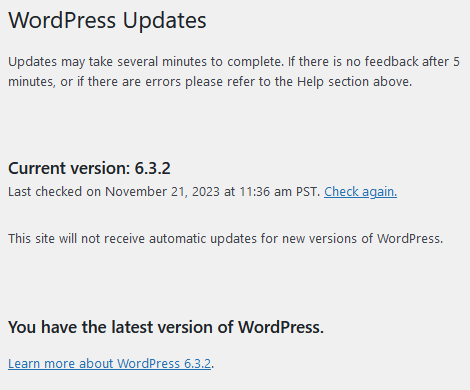
And don’t neglect your server, Apache, or PHP updates either. These important components need to be patched to the latest version to mitigate risk, too.
By keeping everything up-to-date with the latest security releases, you’ll reduce the possibility of attackers targeting your site due to known vulnerabilities.
2 – Reduce the attack surface
There are a few ways you can reduce the attack surface of your website.
- Only allow public access to public areas of your application.
- Deny everything else by default.
- Search for and harden all of your website access points.
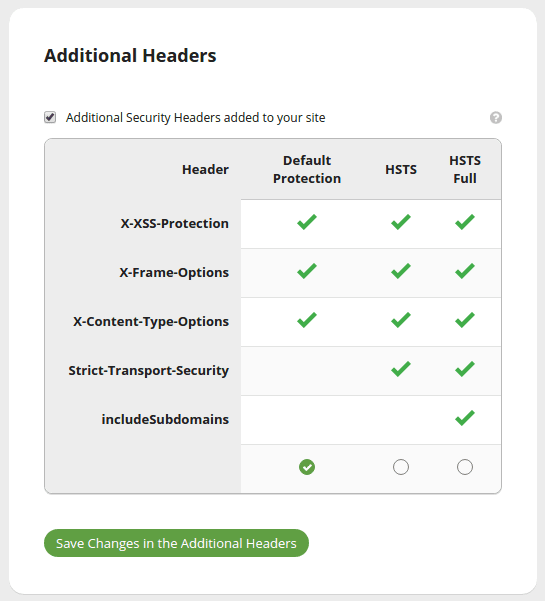
These can be accomplished with server configuration rules, setting file and folder permissions, and by using features found in modern web application firewalls.
3 – Remove unnecessary plugins and themes
We all love features and functionality that improve engagement and website experience. But the more software (or third-party components) you have, the greater the risk of an attack. Each additional piece of code on your website is a potential gateway for attack.
So if you’re not using a plugin, theme, or third-party component, uninstall it. Especially if you’re not keeping up with updates on your site. Keep only what you’re actively using on your website. And remember: disabling a plugin or theme is not the same as removing it.
That last point is more important than it might seem. When you deactivate a plugin, its files often remain on the server, and in many cases, those files can still be accessed directly. This means a flaw in a plugin you stopped using years ago could still be exploited. Attackers take advantage of this because it is easy for them. Scanning for the file paths of a few popular but poorly maintained components is much simpler than trying to find a new bug in your custom code.
4 – Practice the principle of least privilege
Restrict what each member of your team can do and make sure they don’t have more privileges than necessary. This can be accomplished by practicing the principle of least privilege.
Granting every user administrative access is a security hazard. You can mitigate risk by using appropriate permissions. So, make use of CMS roles and define access control for your site.
For example: If you have an author or editor contributing to your website, they shouldn’t need administrator privileges.
Grant someone the exact amount of access needed to do their job. And be sure to remove users and revoke access when they no longer need it.
5 – Restrict access to the admin panel
Administrator panel compromises are among some of the most common attacks WordPress users face.
By default, WordPress admin panel login screens are accessible to the public. This renders them vulnerable to brute force attacks. But regardless of the CMS you use, restricting access to your admin or login panel can significantly enhance the security of your website.

Here are some ways that you can enhance the security of your admin panel:
- Restrict access to specific IP addresses
- Require CAPTCHA
- Limit login attempts
- Use a non-standard URL
Applying these techniques to your admin pages can deter brute force and password guessing attempts, as well as limit access for bad actors.
6 – Use multi-factor authentication
Multi-factor authentication requests multiple methods of authentication from different categories of credentials to verify the identity of a user. It essentially combines two or more independent forms of authentication.
For example:
- What the user knows (a password)
- What the user has (a security token)
- What the user is (biometrics)
Combining two or more of these forms of authentication creates a layered defense that makes it significantly harder for an unauthorized attacker to breach.
WordPress users can leverage a variety of plugins to help accomplish this on your site. Choose one that has solid reviews — and make sure it’s regularly maintained and patched by the development team.
Sucuri Firewall users can employ two factor authentication on their website with Google authenticator.
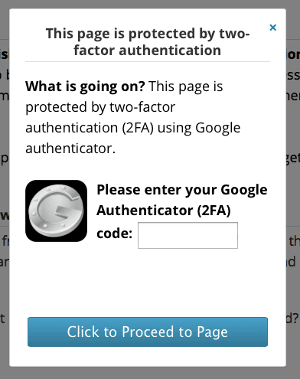
Most often, the second factor is a time-based code from an authenticator app or a hardware security key. SMS codes are better than nothing, but they’re the weakest option since attackers can hijack phone numbers through SIM swapping.
Multi-factor authentication is your best defense against stolen passwords. Credentials leak all the time through reuse, malware, or brute force. So if your login is relying only on a password, a leak is all it takes. With a second factor, a password alone won’t get an attacker in.
7 – Use strong, unique passwords
Passwords are the standard for logging in to accounts. That includes your server, database, FTP, and admin panels.
By using strong and unique passwords for all of your accounts, you are hardening your website as well. So enforce the use of strong passwords for your website.
Take a quick look at this quick demo of how brute force attacks work:
As you can see, automated attacks make it much easier for hackers to gain unauthorized access to your website. So be sure to use secure passwords for all of your accounts.
If creating and maintaining strong, unique passwords is a challenging task for you, use a password manager to store, encrypt and manage them for your site.
8 – Access over HTTPS
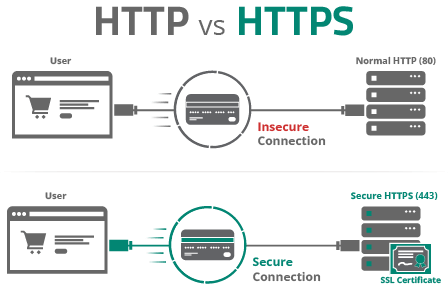
All websites should be accessed over HTTPS — this ensures all data is securely encrypted during transit from point A to point B.
HTTPS and SSL certificates are the status quo when it comes to securing data in transit on your website. They’re especially important for sites collecting any form of data — including credit card information, login credentials, names, addresses, or any other form of Personally Identifiable Information (PII).
You’ll also want to prevent direct access from public hotspots by allowing access to restricted areas only when using a secure channel such as a VPN or proxy. And make sure all administrators are accessing from safe devices!
9 – Reduce exposure of information
Instead of “Your password is incorrect”, change failed password attempt messages to something like “Login credentials invalid.”
Why? In the first example, you’re explicitly telling the attacker that the username is correct, but the password isn’t. But in the second example, the attacker won’t know for sure if they have the wrong username, password — or both.
This kind of reduced verbosity can diminish the chance of a successful brute force attack.
Furthermore, make sure sensitive website data isn’t written to any website or server logs — and that logs cannot be publicly accessible. Using an internal error code can reduce the amount of information displayed while still allowing for easy debugging.
10 – Monitor the website and keep up with its log activity
Logs are exceptionally valuable for website monitoring. They’re also very helpful when you need to troubleshoot technical issues or ensure user accountability.
Furthermore, if you have an ecommerce website, logs are mandatory for PCI DSS compliance. And storing logs for future analysis is also a critical piece for GDPR, CIPA, and other regulations.
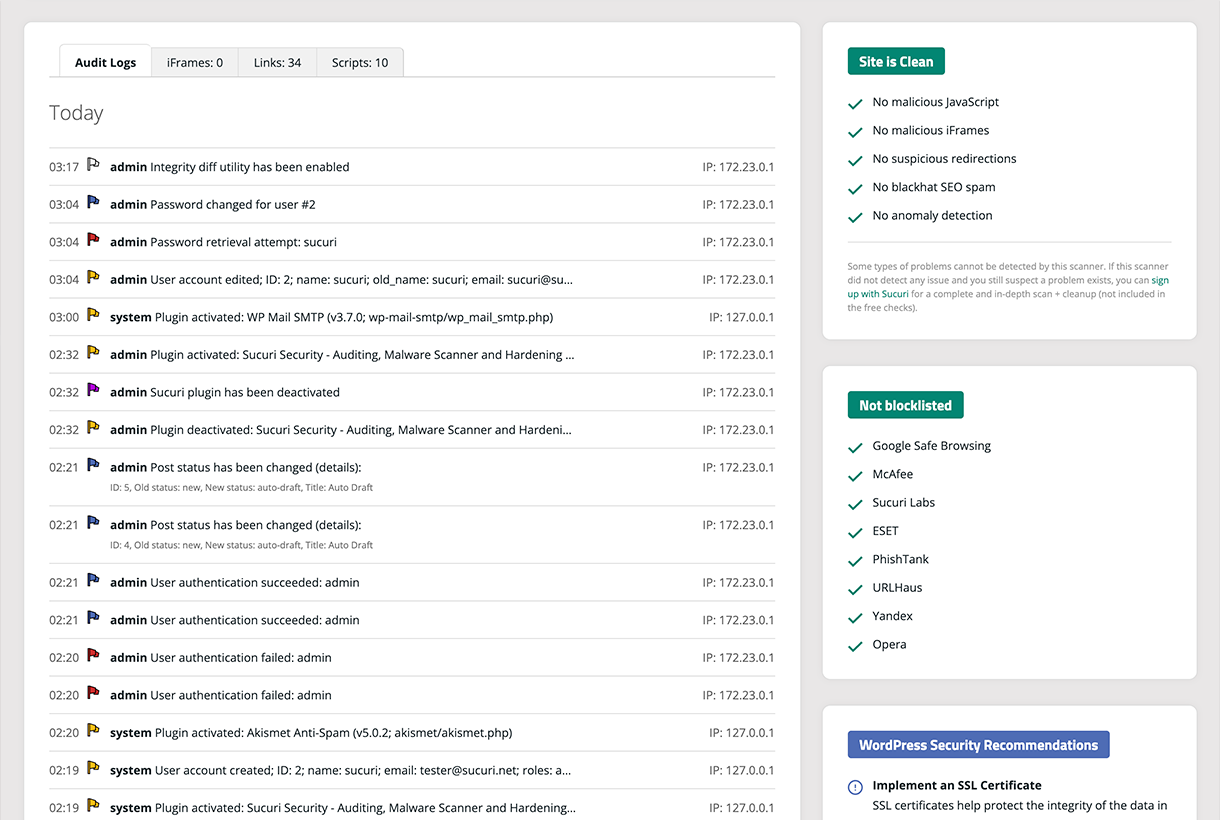
So be sure to check for anomalies in your website logs to detect important information concerning misconfigurations, malfunctions, attack attempts, and other important status information.
11 – Check for input sanitization techniques
Input sanitization is used to check data that’s entered on your website. It then “sanitizes” or removes anything that might be potentially dangerous.
A classic example is sanitizing form inputs to block SQL injection. The same goes for cross-site scripting (XSS): if you don’t filter input, attackers can inject code that runs in your visitors’ browsers, often to steal data or redirect traffic.
When employing input sanitization techniques, you’ll need to specify exactly what kind of data you expect from the user:
- Should you accept special characters?
- What is the maximum length or size?
- Should you allow only numbers, or letters as well?
Any visitor to your website could be an attacker. So it’s important to exercise caution — and never trust information inputted into website fields.
So, be sure to accurately filter what is sent to your website or application. This will help enhance your security, prevent SQL injections, and harden your website. And remember: accidental damage can be just as harmful as intentional damage.
12 – Use a web application firewall
Sucuri offers a web application firewall that can help harden your website against attacks. Virtual patching allows the Sucuri team to harden your website against known vulnerabilities until you have time to patch.
Activating the firewall will help enhance the security of your website and server, defend against brute force and bad bots, and protect against DDoS attacks. However, you’ll still need to practice good security habits like passwords and privileges.
Interested in giving the firewall a try? Sign up for our free 30 day firewall trial and get an enterprise-grade WAF for your website!
Bringing it all together
Hardening is an ongoing process, not a one-time fix. Each step is a layer. The more layers you stack, the harder you make it for attackers to succeed.
If you do nothing else today, focus on your update process. Outdated software is exactly what automated scanners are looking for. Once that’s handled, move to the next weakest link and keep working through the list.
Frequently asked questions
What’s the most common website security mistake?
The most common mistake is letting software go out of date. Delayed patching, whether it’s core, plugins, themes, or the server stack, is what automated scanners are designed to exploit. We see outdated components behind many of the compromises we clean up. Enable auto-updates where possible, and use virtual patching if you can’t update immediately.
How often should I audit my website for vulnerabilities?
Scan your site continuously if possible, and do a manual review at least once a month plus after any change to plugins, themes, or the server. Check that every component is still supported, user accounts and privileges are up to date, and nothing new is exposed to the public. Automated monitoring helps catch issues between manual checks.
How often should I check my website logs?
For ecommerce sites or anything handling logins or payments, check logs daily. For smaller blogs or brochure sites, weekly is usually enough. Set up alerts – activity logs and integrity monitoring can flag new admin users, file changes, or spikes in failed logins that need your attention.
Can I secure a website without a web application firewall?
You can secure a site without a firewall, but only up to a point. Patching, least privilege, multi-factor authentication, and strong passwords all help, but a web application firewall blocks malicious traffic before it hits your site and can buy you time on unpatched vulnerabilities. Without one, you leave a gap attackers can exploit.



 Douglas Santos
 Ben Martin
 Sucuri Malware Research Team
 Luke Leal
 Cesar Anjos
 Krasimir Konov

 Antony Garand