

Originally published: March 7, 2023 by Rianna MacLeod
Defacement is a form of digital vandalism where attackers change what your visitors see, often replacing your homepage or key pages with their own message or imagery. The goal is not to stay hidden, but to make sure every visitor knows your site has been compromised.
The Short Answer: If you log in one morning and find your homepage replaced with a message you did not write, you are looking at a website defacement. Attackers gain access to your site and swap out your content for their own message, image, or signature. Defacements are meant to be seen, and the damage is immediate: lost trust, lost revenue, and a visible hit to your reputation and search rankings.
Most defacements are about visibility, not profit. Attackers may want to make a statement, embarrass the owner, or simply show off. But the outcome is the same as any other hack: lost trust, lost sales, and, if the content is inappropriate, search engines may warn visitors away from your site until you clean it up.
It’s also easily one of the most obvious signs of a hacked website. In these attacks, bad actors gain unauthorized access to an environment and leave their mark through digital vandalism, altering its visual appearance or content in the process.
In many cases, website defacements display social or political messages that are completely unrelated to the site’s original content, with the ultimate goal of blackmailing or embarrassing the website owner, enacting revenge, or promoting alternative viewpoints.
Unlike many other attacks, defacers seek attention and publicity; they often disclose contact information or a name so they can be associated with the defacement.
So, if you’re a website owner and you access your homepage one day only to find that all of hard work and content replaced with something like this, you may have fallen victim to website defacement:
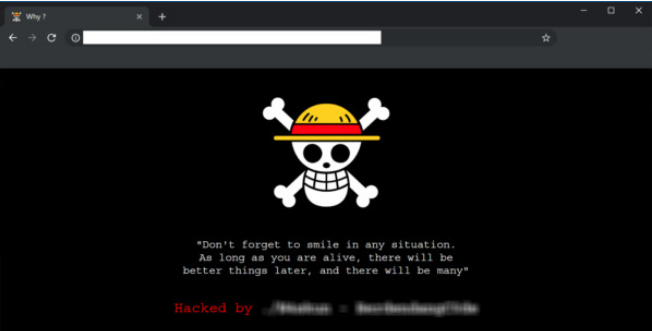
Table of Contents
- How do hackers deface websites?
- Why do hackers deface websites?
- What do website defacements look like? (Examples)
- What are the consequences of a website defacement?
- How do you recover from a defaced website?
- Website defacement FAQ
How do hackers deface websites?
Hackers deface websites by gaining unauthorized access to an environment. The methods can vary, but popular methods of entry include exploiting vulnerabilities in third-party plugins, brute forcing admin pages, or leveraging stolen login credentials.
Step by step: how a defacement typically unfolds
- Reconnaissance – the attacker (or an automated scanner) fingerprints your CMS, themes, and plugins looking for outdated software or exposed login pages.
- Initial access – a vulnerability is exploited. A classic chain is SQL injection: unsanitized input in an outdated plugin lets the attacker run their own database queries.
- Database or account compromise – those queries expose administrator records, or are used to insert a brand new administrator account the attacker controls.
- Persistence – with edit access, the attacker uploads a backdoor or web shell so they can return even after the visible damage is repaired.
- Content replacement – the defacement itself: php or a theme template is overwritten, or page and post content is rewritten directly in the database.
- Publicity – the attacker publicizes the URL so the defacement is credited to them, which is often how owners first hear about it.
Not every defacement follows all six steps. Credential stuffing against a login page, for example, skips straight to step three.
Once a foothold has been established, the hacker can gain edit access to the website and make whatever changes they see fit.
Just as the methods of defacement will vary, the depth of the attack can also differ. It may be as simple as the website’s index.php file being modified. This kind of hack can be fixed by simply replacing the hacked index.php file with a clean copy.
But hackers may also go a bit deeper in their defacement and alter important core files as well. In this case, you may be looking at a more difficult malware cleanup scenario.
Why do hackers deface websites?
While many hacks are designed to generate some form of value for the attacker, website defacements are typically a different kind of attack. Mostly, the defacer is just trying to share a message. In some cases, they’re just looking to flaunt their skills and leave a “calling card” to gain a bit of street cred, while others might deface a website for the sheer fun or challenge. But defacements can also be motivated by political, religious or ideological goals; for example, protesting a specific movement in an act of civil disobedience.
Regardless of the intent, finding your site with a “hacked by” message is something you’ll want to get resolved as soon as possible.
Examples of website defacements
Website defacements tend to look like… well, what you might expect when you think of a stereotypical hack. Scary imagery like a skull and crossbones, biohazard symbols, or other imagery designed to draw attention to the hack.
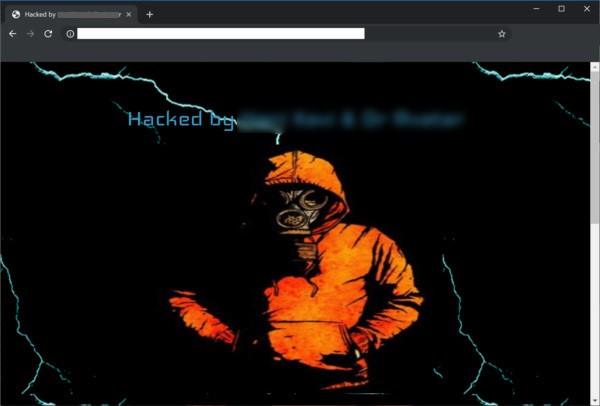
Hackers will also take credit for the attack by leaving their mark or “signatures.” Most common hacker signatures are usually pretty generic with wording such as “hacked by”, “pwnd by,” “defaced by,” “Been Hacked By,” “YOU GOT HACKED,” and other such jargon.
Some hackers will even just go with plain text defacements:
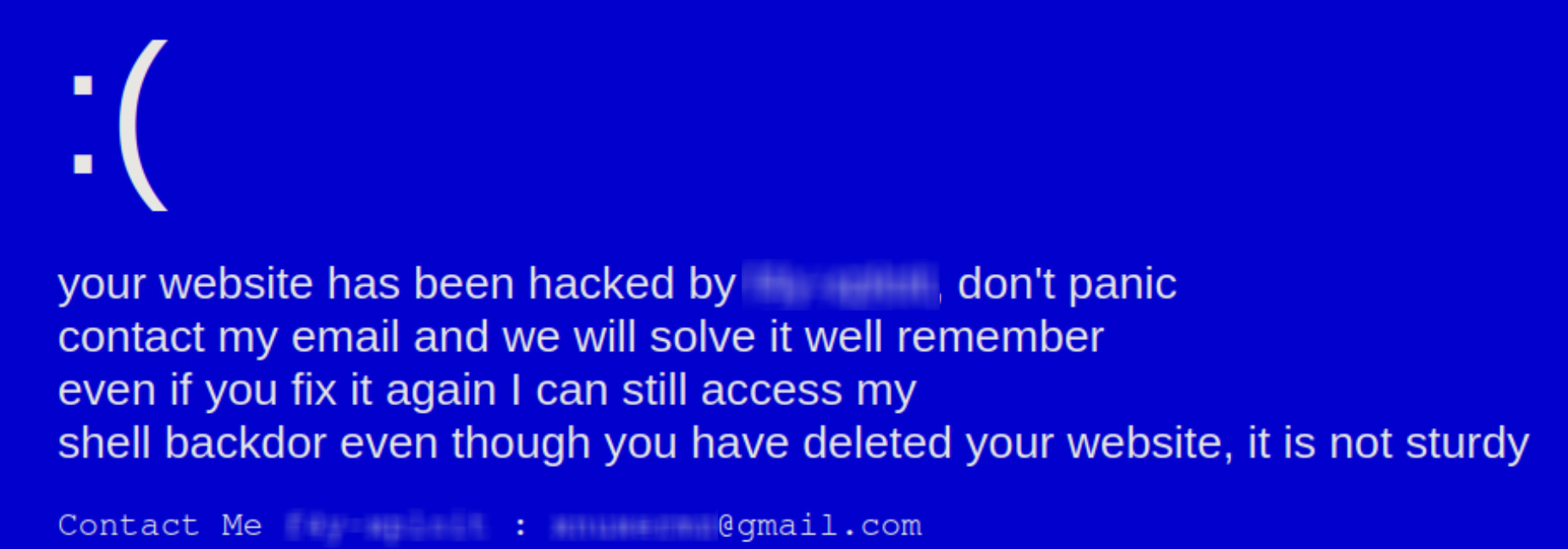
Because the nature of these attacks is publicity, we’ve decided not to provide any of the most recent groups’ names.
Common types of defacement
- Full-page defacement – the homepage or entire template is replaced with the attacker’s page.
- Partial or inline defacement – a banner, image, or block of text is injected into otherwise normal pages, which makes it much easier to miss.
- Redirect-based defacement – visitors are quietly forwarded to an attacker-controlled page, sometimes only on mobile devices or only when arriving from search results.
- Deep or database-level defacement – post content, titles, or core files are rewritten, so replacing a single php file will not fix it.
- Mass defacement – every site on a shared account or server is defaced at once through a single compromised environment.
What are the consequences of a website defacement?
The consequences of a defaced website are much the same as any other hack, but it’s more obvious that your website’s security has been breached and the environment has been tampered with right off the bat.
Trust will be immediately diminished when users visit a page that is clearly displaying signs of being hacked, which can have an immediate impact on your reputation, website sales, churn, and bounce rates.
The costs add up fast: lost revenue and traffic while the defacement is live, time spent on cleanup and investigation, and long-term damage to your reputation. Ad networks, payment providers, or your host may also suspend your account if inappropriate content is visible.
And the longer you allow your website to display the defacement, the worse things will get. An outward-facing website compromise containing inappropriate content can result in a blacklist from Google and other search engines. This means your site may stop ranking in search results and organic traffic may plummet. Getting off of a blacklist can be difficult, which is why you’ll want to clean up any website defacements as soon as possible.
How to recover from a defaced website
If you’ve been keeping regular backups, recovering a defaced website is easy. Simply restore your site back to its original form from the last uncompromised backup. But if you do not have a backup, recovery may require a bit more work.
In a case where a backup restoration is not possible, you will want to:
- Log into your server via SFTP or SSH.
- Make a backup of your site in its current state.
- Identify any recently changed files on the server and confirm any changes with users who might have made them.
- Scan for backdoors and remove any malicious code from the environment.
- Restore suspicious CMS system files with fresh copies from a stock installation.
- For any custom or premium files, open the file with a text editor to remove any suspicious code.
- Test to verify the site is still operational after changes.
You can follow our hacked website guide for complete, step-by-step instructions. Once the site is back to its original state, you’ll want to take a few more precautions to ensure that hackers can’t regain access to your website.
- Change all passwords: If any account was compromised, updating credentials is essential. Use strong, unique passwords for every account.
- Update all plugins and themes: Vulnerabilities in outdated software are a common entry point, so keeping everything patched is critical.
- Limit user permissions: Only give users the access they need to do their work. This reduces the risk of future defacements.
- Use a website firewall: A firewall can block bad bots, protect admin pages, and help patch known vulnerabilities.
- Monitor for unexpected changes: File integrity and uptime monitoring alert you to problems quickly, so you do not have to rely on customers or search engines to spot an issue.
But if you are feeling at all uncomfortable about cleaning up a defaced website on your own, don’t worry. Help is available. Sucuri offers website security solutions that can clean your site and protect you from any future website defacements.
Frequently asked questions
What are defacements in website security?
Defacements are attacks in which someone with unauthorized access changes what a website displays, like swapping a homepage, injecting imagery, or replacing page content with a message or “hacked by” signature. The site usually still loads normally, but simply no longer shows what the owner published, which is why defacement is called digital vandalism.
What is the difference between a defacement and a data breach?
Defacement changes what visitors see: pages, images, or text replaced by the attacker. A data breach means information was accessed, copied, or stolen, often silently. The two overlap because whoever could edit your pages may also have reached your database, so treat any defacement as a possible breach and investigate accordingly.
Can a website be defaced without a hack?
In a sense, yes. A stolen admin password, a careless or malicious insider, a compromised third-party script or ad, or a takeover of your DNS or hosting account can all change what visitors see without any exploit against your own code. Least privilege and strong, unique passwords limit that risk.
How long does it take to detect a website defacement?
Because defacement is visible, owners often notice within hours, but only if someone actually looks at the affected page. Defacements placed on inner pages, language variants, or seldom-visited templates can go unnoticed far longer. Continuous monitoring and file integrity checks flag changed files instead of leaving detection to a customer or a search engine warning.
What is the cost of a defaced website?
Costs come from three places: lost sales and traffic while the defacement is live, cleanup and developer or incident-response time, and longer-term reputation damage. If search engines flag the injected content, a blocklist warning can suppress organic traffic until the site is cleaned and a review is requested.



 Luke Leal
 Denis Sinegubko
 Matt Morrow
 Kyle Knight
 Stephen Johnston

 Chase Watts

 Sucuri Malware Research Team
 Cesar Anjos