Originally published: January 9, 2024 by Rianna MacLeod
If you own a website and collaborate with other people, the Principle of Least Privilege (PoLP) is a crucial security concept with practical applications that strengthen your website’s security posture.
Understanding and implementing the Principle of Least Privilege (PoLP) is not just a fancy concept. It’s an excellent step to ensuring the security of your website and data.
The essence of this principle is simple: it lies in granting only the minimum necessary privileges users need to accomplish their tasks and revoking them when they’re done. By doing this, you’re paving the way for a more controlled, secure environment where data breaches and unauthorized use are less likely to occur.
Below, we’ll go over what PoLP means, how it applies to WordPress user roles, why it matters for server and file-level access, and how to put it into practice on your own site.
Let’s dive in!
Contents:
- Definition: The Principle of Least Privilege (PoLP)
- PoLP & Website Security
- Example of Principle of Least Privilege
- Default WordPress User Roles
- How PoLP Affects Websites & Servers
- Applying PoLP with File & Directory Permissions
- Frequently Asked Questions
Definition: The Principle of Least Privilege (PoLP)
By definition, the Principle of Least Privilege (PoLP) is a core cybersecurity principle that recommends granting the minimal set of privileges on a system or user just enough to perform an action, then revoking those once the action is completed.
PoLP is widely recognized as a foundational practice in identity and access management (IAM) and is a core building block of zero-trust security models, where no user, device, or process is trusted by default.
Think of this principle like borrowing an object from a friend; you only take what you need, use it for the intended time, then return it once you’re done.
PoLP’s role in website security
PoLP is a vital gatekeeper in website security; it provides only necessary access to your website’s data, resources, and applications. By limiting what users can access, the Principle of Least Privilege improves security, making breaches and data misuse less likely (or less harmful if they do occur).
Roles are key in PoLP, dictating what users can and can’t do on your website to enhance security. Considering this principle when assigning user roles will do more than just encourage strong password habits. It will boost your defenses, lower the risk of cyberattacks, and protect your website from potential threats.
When a privileged account is compromised, attackers inherit every permission tied to it. PoLP shrinks the blast radius of that compromise by ensuring most accounts simply don’t have the keys to do significant damage in the first place.
Example of Principle of Least Privilege
Let’s take a look at an example of this principle with an everyday analogy:
If you hire a gardener, you grant them access to your yard – not your bedroom, living room or your home office. Additionally, you grant them access for the time they’re working on your property (e.g., between 10 am and 2 pm). The idea is simple; give someone the access they require to do their job for the time they need it.
This should be the same way you approach access to your websites.
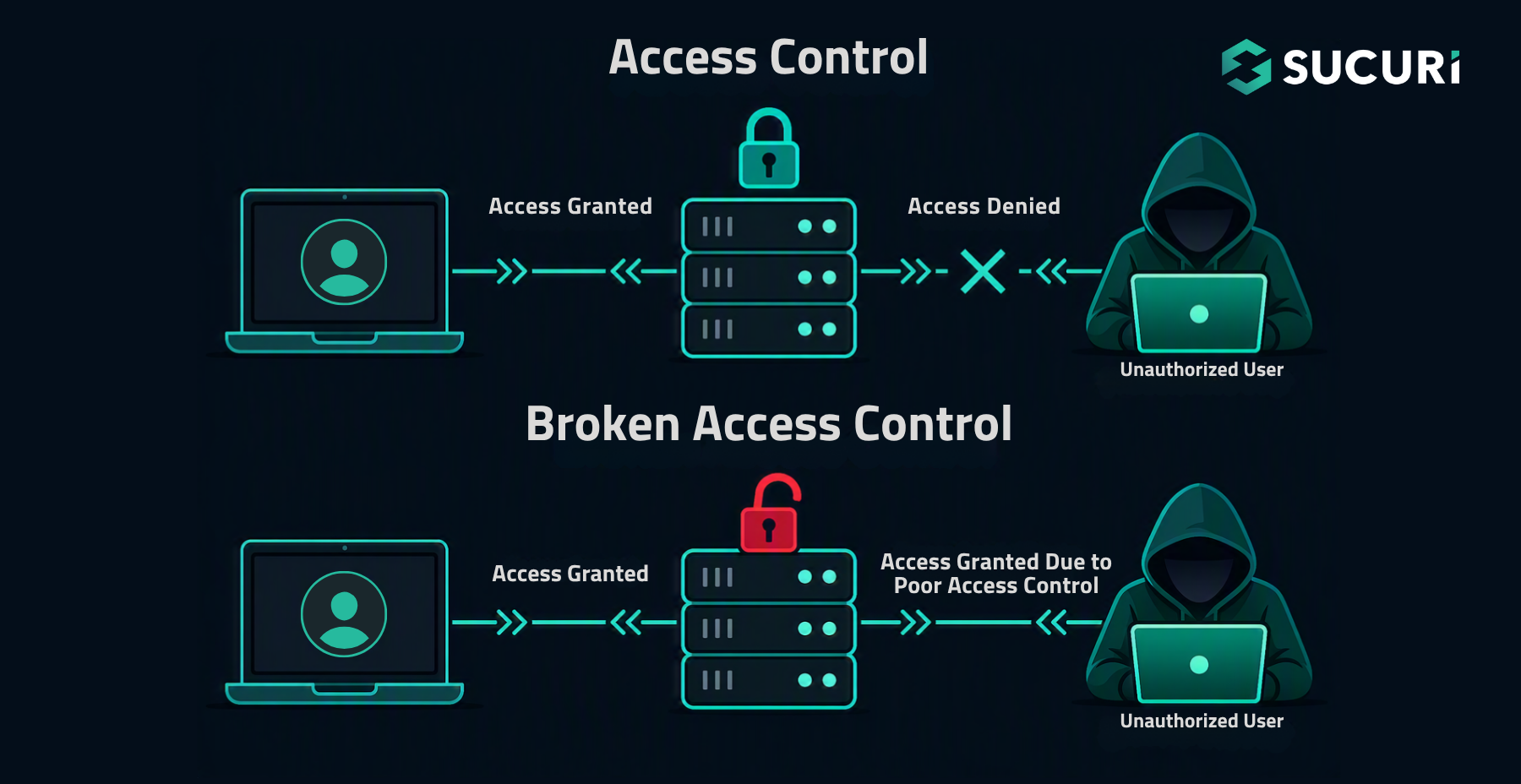
A well-thought out approach to user access on your website can help reduce the risk of broken access control and mitigate unwanted or malicious behavior.
The Principle of Least Privilege in WordPress
If you’re using a Content Management System (CMS) like WordPress for your website, you’ve likely encountered roles and their associated privileges. So, let’s take a look at how you can apply the PoLP in WordPress.
An administrator, for example, is privileged to install plugins, edit theme files, and add unfiltered HTML to posts. On the other hand, contributors may not be allowed to publish posts independently. Each user has a specific range of privileges designed to limit access to only what’s necessary based on trust.
Think of it like this: is it a vulnerability that an Administrator can install plugins? Not if they’re trusted and responsible. So, the effectiveness of the system hinges on assigning roles that align with each user’s competencies and responsibilities, thereby limiting potential security risks.
Default WordPress user roles
While no system is perfectly invincible, PoLP makes unauthorized actions more difficult to carry out by requiring higher privileges to exploit vulnerabilities. This practice effectively shrinks your attack surface, forming an essential part of your defense-in-depth approach to website security.
The following roles are available by default in WordPress:
| Role | Slug | Description |
| Super Admin | — | All capabilities, including access to the site network admin features (available on WordPress Multisite installations). |
| Administrator | administrator | Access to all admin features within a single site. |
| Editor | editor | Can publish and manage posts, including posts of other website users. |
| Author | author | Can publish and manage their own posts. |
| Contributor | contributor | Can write and manage their own posts but unable to publish them. |
| Subscriber | subscriber | Can only manage their own profile, including the ability to read content and leave comments where enabled. |
Upon installation, WordPress will automatically create an Administrator account. You can find additional information in the Official WordPress Roles and Capabilities Documentation.
If you run an ecommerce store on WooCommerce, a membership site, or a learning management system, you’ll also encounter additional roles such as Customer, Shop Manager, or Student/Instructor. The same PoLP thinking applies: assign each role only the capabilities required for its function, and audit them as your site evolves.
How PoLP affects websites and servers
Just as we lock our doors and allow certain people to enter, PoLP can be seen as the lock and key to your website; allowing specific access while denying others.
Without implementing PoLP, you run the risk of creating over-privileged users — which is akin to giving out too many keys to your front door, increasing the chances of a breach.
Moreover, certain systems can dynamically identify users, devices, applications, and functions a user or entity accesses. This dynamic identification reduces the necessity for network administrators to consider network constructs, allowing for more precise access control.
Assigning minimal user roles to protect your website
From a security standpoint, people tend to be the weakest link in the chain. Misalignment of roles can lead to serious consequences by increasing the odds of security breaches.
In many cases, compromises in website security come from exploitation of human vulnerabilities – this is where the inadequate or excessive allocation of privileges come in.
If you are the site owner and its only user, it’s still a good idea to create several users for different type of tasks. For example, to manage the site using an admin account and create/publish posts using an editor account.
This may seem like overkill but there are several reasons for this:
- Protect your admin username: If you publish posts using the admin account, it’s easy for anyone to discover its username. Then they only need to guess/brute force the password. If the attackers manage to compromise your admin account, they can take over the whole site. On the other hand, if they take over the editor account, the most they can do is modify/publish/delete posts. That’s why it’s a good idea to never expose your most powerful accounts in author archives, REST API responses, or post bylines.
- Mitigate risk from malware: Massive WordPress malware campaigns like Balada Injector are known to target logged in administrators. Malicious JavaScript in the admin’s browser has the same permissions as the admin itself, so attackers create scripts that install rogue plugins, upload files, and create malicious admin users in the background while an administrator browses their own site. If a user without admin permissions loads these malicious scripts, not much can go wrong as the malware will not have access to administrative functionality.
We recommend asking yourself two questions when thinking about what role to assign a user:
- What is the lowest set of privileges allowable for this user’s tasks?
- How long are the privileges required?
Don’t be shy about setting lower privileges to users that don’t need an administrative role. This includes your website customers, too!
Audit user roles regularly
Access needs change over time. Contractors finish projects, employees switch teams, and plugins sometimes add roles or capabilities you didn’t intend to grant. Set a recurring reminder to review every user account on your site and ask: does this person still need this level of access? Remove or downgrade any account that no longer fits its original purpose, and delete stale accounts entirely. This prevents a surprising number of incidents that begin with a forgotten, over-privileged login.
Applying PoLP with file and directory permissions
When granting access to specific files or directories on your WordPress website, PoLP can also be implemented. You should only provide access to the specific files and directories that a user or a software application needs. Any access beyond that can pose unnecessary risks.
Applying 440 or 000 may technically be the safest file permissions, but they’re also impractical for every day use. And on the flip side, 777 is extremely dangerous as it leaves directories and files open to modifications by any user on the server.
Here’s a quick guide to the recommended file permissions for WordPress (for most common server configurations):
| Directory or Subdirectory | File permission |
| Root directory (usually public_html) | 755 |
| wp-admin | 755 |
| wp-includes | 755 |
| wp-content | 755 |
| wp-content/themes | 755 |
| wp-content/plugins | 755 |
| wp-content/uploads | 755 |
| .htaccess | 644 |
| index.php | 644 |
| wp-config.php | 640 |
Directories and subdirectories:
Set them to 755. This setting allows the user read, write, and execute permissions, while the group and public only get read and execute permissions.
Files:
Have these set to 644, granting the user read and write permissions, but only read permissions for the group and public.
wp-config.php:
This is an important file and contains sensitive information. It should be set to 640 to give the user read and write permissions, while the group gets read access and the public gets none. Some hardened hosting environments support 600 for even tighter restriction, provided your web server user still has access to read the file.
Avoid 777 on any WordPress directory or file. It’s a common shortcut suggested in older tutorials when troubleshooting upload or plugin install errors, but it grants write access to everyone on the server and is one of the fastest ways to turn a small misconfiguration into a full site compromise.
Enhancing website security with user roles and privileges
The Principle of Least Privilege is an important part of your defense-in-depth approach to website security. It ensures that you effectively align each user of your site with an appropriate role and their associated privileges.
All common CMS applications have built-in roles and privileges that help website administrators better manage their users and associated permissions. However, regardless of the role, you’ll want to ensure that every user has strong and unique passwords for every one of their accounts, ideally paired with multi-factor authentication (MFA) on any account that can publish, install plugins, or change site settings.
If you currently employ a good defense-in-depth strategy and are looking for a solution to help complement your existing security controls, be sure to look into our website security platform.
Questions about how to better secure your website? Chat with us! Our highly skilled analysts are available 24/7 to answer your questions.
Frequently asked questions
What is the Principle of Least Privilege in simple terms?
The Principle of Least Privilege (PoLP) is the practice of giving every user, application, or process only the minimum access required to perform a specific task, and only for as long as that access is needed. Once the task is complete, the elevated privileges are removed.
Why is the Principle of Least Privilege important for website security?
PoLP limits how much damage can be done if an account is compromised. If a low-privilege account is breached, an attacker can’t install plugins, change site settings, or create new admin users. This containment is one of the most effective ways to reduce the impact of phishing, credential stuffing, and malware that targets logged-in users.
Which WordPress role should I assign to a new contributor or guest writer?
Start with the Contributor role. Contributors can draft and manage their own posts but can’t publish them, which gives an editor or administrator a chance to review the content first. Upgrade to Author only if the user has demonstrated trust and genuinely needs to publish without review.
Is it safe to use 777 file permissions on WordPress?
No. 777 permissions allow any user on the server to read, write, and execute the file or directory. This is a frequent entry point for attackers and should be avoided. Use 755 for directories, 644 for most files, and 640 (or stricter) for wp-config.php.
How often should I review WordPress user accounts and permissions?
Review accounts at least quarterly, and any time a team member, contractor, or agency relationship changes. Remove unused accounts, downgrade roles that exceed current responsibilities, and confirm that every remaining administrator still needs admin-level access.



 Krasimir Konov
 Ben Martin
 Joe Larson
 Denis Sinegubko
 Chase Watts
 Sucuri Malware Research Team

 Luke Leal
 Moe O
Moe O