

Last month, while working on a WordPress cleanup case, a customer reached out with a strange complaint: their website looked completely normal to them and their visitors, but Google search results were showing something very different.
Instead of normal titles and descriptions, Google was displaying casino and gambling-related content. We have been seeing rising cases of spam on WordPress websites. What made this even more confusing was where the spam was appearing. It was not showing on the homepage or blog posts, but on pages like About Us, Contact Us, Privacy Policy, and Terms & Conditions.
These are pages that usually stay untouched for years. Seeing spam there immediately raised concern.
The permalink for the “About Us” page was exactly what it should be, and the content was legitimate. However, as soon as we changed our browser’s User-Agent to mimic a search engine crawler, the spam appeared.

What are permalinks?
A WordPress permalink is the permanent web address (URL) of a post, page, or piece of content.
It’s what people type or click to visit that content.
- A hard-coded link is a fixed URL written manually, like
https://REDACTED/?p=103, which can break if the site structure changes. - A permalink is WordPress’s permanent, SEO-friendly URL, like
https://REDACTED/about-us/, and it updates automatically with WordPress settings.
Permalinks usually include words from the title to make them easy to read and SEO-friendly.
What did we find?
We started by checking the affected pages through the WordPress admin panel. The About Us page had a standard permalink and the content inside the editor looked completely clean. There was no visible spam, no suspicious links, and no injected scripts. To be sure, we also checked the database directly. The corresponding entry inside the wp_posts table matched exactly what was shown in the admin dashboard.
At this stage, there was no clear explanation for why Google was indexing spam content. The page source looked legitimate, the database was clean, and nothing stood out inside WordPress itself.
The breakthrough came when we loaded the same page again, but this time using a browser configured with a Googlebot User-Agent. As soon as we did that, the page content changed. Instead of the normal About Us text, the browser displayed a full page of casino-related spam.
That confirmed the site was behaving differently depending on the visitor.
What made this case different?
Upon inspecting the site’s file system via the file manager, we found something highly irregular. The attacker had not modified the WordPress database or the legitimate page content. Instead, they created physical directories on the server with names that exactly matched the WordPress permalinks.
The “new” element here was the use of directory shadowing. For example, since the “About Us” page had the permalink https://REDACTED/about-us/, the attacker created a folder named /about-us/ in the root directory. Because of how web servers like Apache and Nginx are configured, they prioritize serving a physical directory and its index.php file over the virtual permalinks handled by the WordPress index.php file. This allowed the attacker to fully hijack specific pages without modifying the actual WordPress configuration.
Inside each of these “shadow” folders, we found three specific files:
- index.php – The controller that decided what content to show.
- indexx.php – A static, clean copy of the original page’s source code.
- readme.txt – A file containing the full source code for the spam page.
This technique stood out because it completely bypassed WordPress’s page rendering process without altering the page content in the admin panel or the database.
We recently discussed a similar concept in our article about how Google sees spam while you see your site, but this directory-based approach adds a layer of persistence that is harder for standard security scanners to find.
Signs of infection
The strongest indicator in this case was the presence of directories named after WordPress page permalinks. Static pages should not exist as physical folders on disk. The consistent presence of index.php, indexx.php, and readme.txt inside those directories was another clear signal of malicious activity.
Search engine snippets showing casino or pharmaceutical content while the site looks fine to you. A noticeable difference between what search engines saw and what users saw was the final confirmation that the site was delivering different content based on the visitor.
What did the malware do?
The primary impact of this infection was search engine spam injection. By targeting trusted pages like About Us and Contact Us, the attacker leveraged the site’s existing reputation to promote spam content. This can lead to ranking penalties, loss of organic traffic, and long-term trust issues with search engines.
Because the site appeared normal to visitors and administrators, the infection could easily remain unnoticed for an extended period, allowing the spam to spread quietly.
Inside the malicious code
The malware logic was contained entirely within the index.php file located inside the fake directories. It acted as a gatekeeper, determining whether to serve the legitimate-looking content or the spam content.
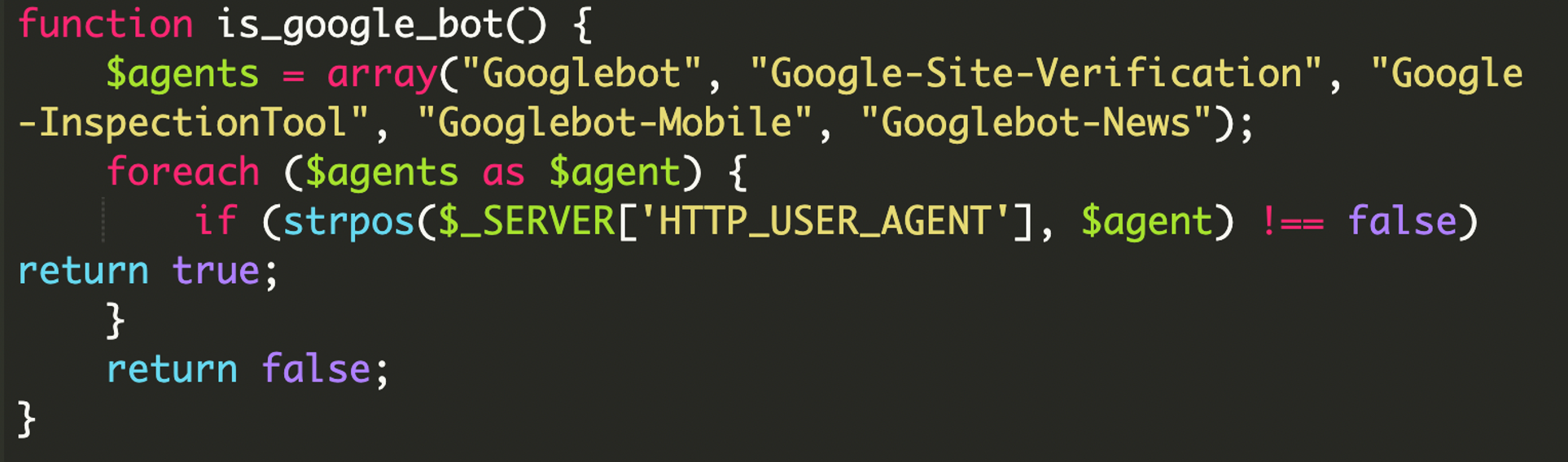
The bot identification logic
The attacker used a specific function to identify if the visitor was a search engine. They targeted a variety of Google-specific crawlers to ensure the spam was indexed effectively.
Serving the spam payload
When the request matched a Google-related User-Agent, the malware loaded the contents of the readme.txt file and printed it directly to the browser. This file contained a complete HTML document filled with spam content designed to be indexed by search engines.
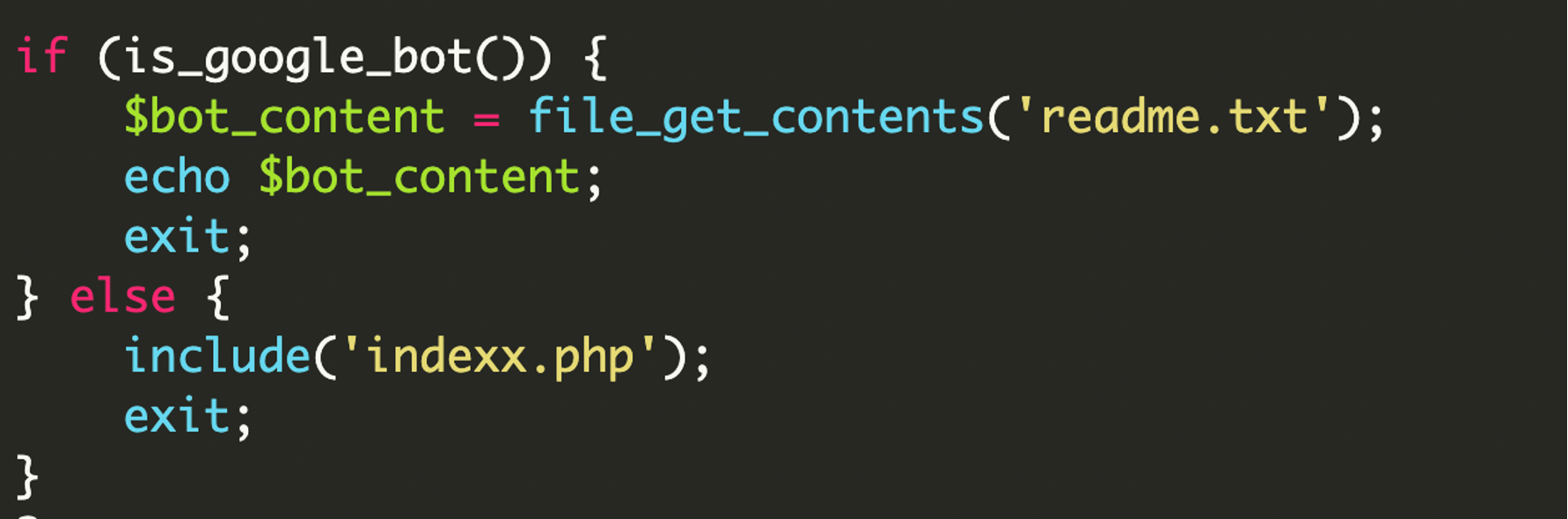
When a human visitor (or the site owner) visited the page, the script included indexx.php. Since indexx.php was just a captured HTML version of the real page, it appeared to be the genuine website.
The spam content (readme.txt)
The readme.txt file was far from a simple text file. It contained over 600 lines of complex HTML and JavaScript designed to mimic a high-authority e-commerce site. It used stolen CSS and metadata from Etsy to look legitimate to automated systems, but the content was strictly for “Slot Gacor” (Indonesian gambling).
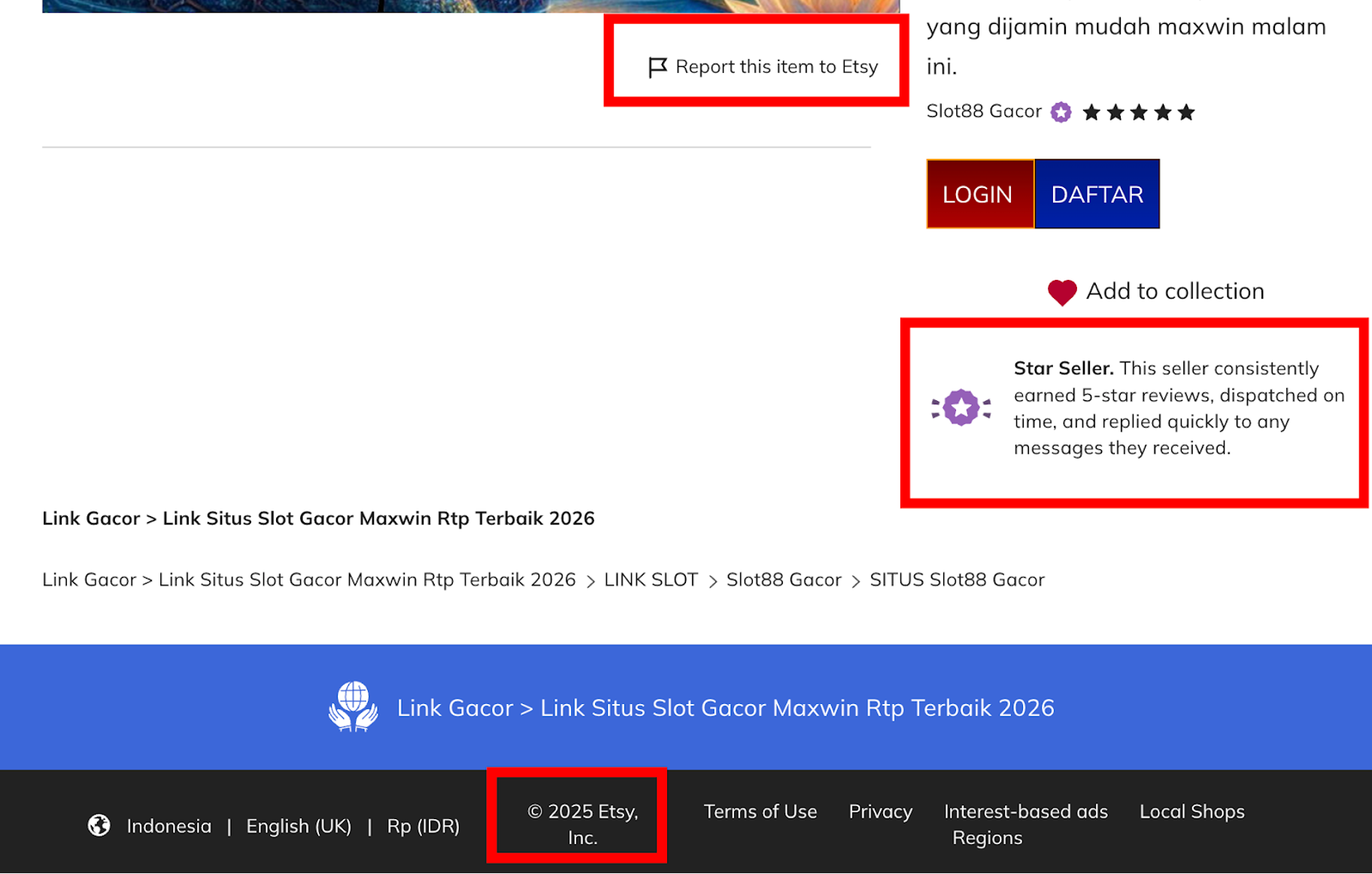
The attacker also heavily utilized Schema Markup (JSON-LD) to manipulate search results. By including product data, aggregate ratings, and “Offer” prices, they aimed to make the search engine snippet look like a highly-rated product rather than a simple blog page.
How we fixed it
To remediate the infection, we removed all malicious directories that mirrored WordPress page permalinks. The malicious files inside those directories were deleted, and the site was tested using multiple User-Agents to confirm consistent behavior.
We also reviewed file permissions, reset all access credentials, and advised the site owner to request a re-index from search engines after cleanup.
Remediation steps
- Remove malicious files: Delete any file or directory that you or your developer do not recognize.
- Audit users: Remove the help account and any other suspicious administrators.
- Delete Malicious Directories: Remove any folders that you or your developer do not recognize.
- Verify Core Integrity: Ensure your main index.php and .htaccess files have not been modified.
- Reset credentials: Change all admin, FTP, hosting, and database passwords.
- Scan Your Computer: Run a full antivirus and malware scan on your device.
- Update everything: Keep everything up to date.
- Monitor outgoing traffic: Look for connections to unknown or suspicious domains. This requires looking at server logs.
- Use a WAF: A Web Application Firewall can help block communication with known C2 servers and prevent the initial upload of malicious plugins.
Final thoughts
This case demonstrates that attackers are constantly finding ways to move outside of the standard WordPress structure. By using the server’s own logic against it, they can hide malicious content in plain sight. Regularly auditing your file system and monitoring how your site appears to search engines are essential steps in maintaining a clean and secure website.
As always, visibility, monitoring, and regular integrity checks are your best defense.



 Ben Martin
 Puja Srivastava
 Krasimir Konov

 Sucuri Malware Research Team
 Antony Garand

 Cesar Anjos
 Denis Sinegubko